28
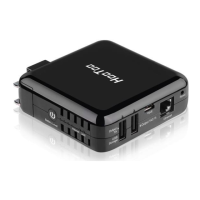
4.6.2 Port Range
Port range allows you to share resources on your PC with your friends
who are not in your LAN. By default, the router's firewall blocks inbound
traffic from the Internet to your computer except for the replies to the
outbound traffic. You can use the port forwarding feature to create
exceptions to this rule so that your friends can access these files from
external networks.
When accessing your PC from the Internet, type
"protocol://xxx.xxx.xxx.xxx:port number" into your browser’s address bar.
The protocol and port are the ones used by the service, whereas
"xxx.xxx.xxx.xxx" is the WAN IP address of your router. For example, a FTP
server uses the ftp protocol and 21 (standard port number).



 To Next Page