Determining
Bundled
System
Numbers
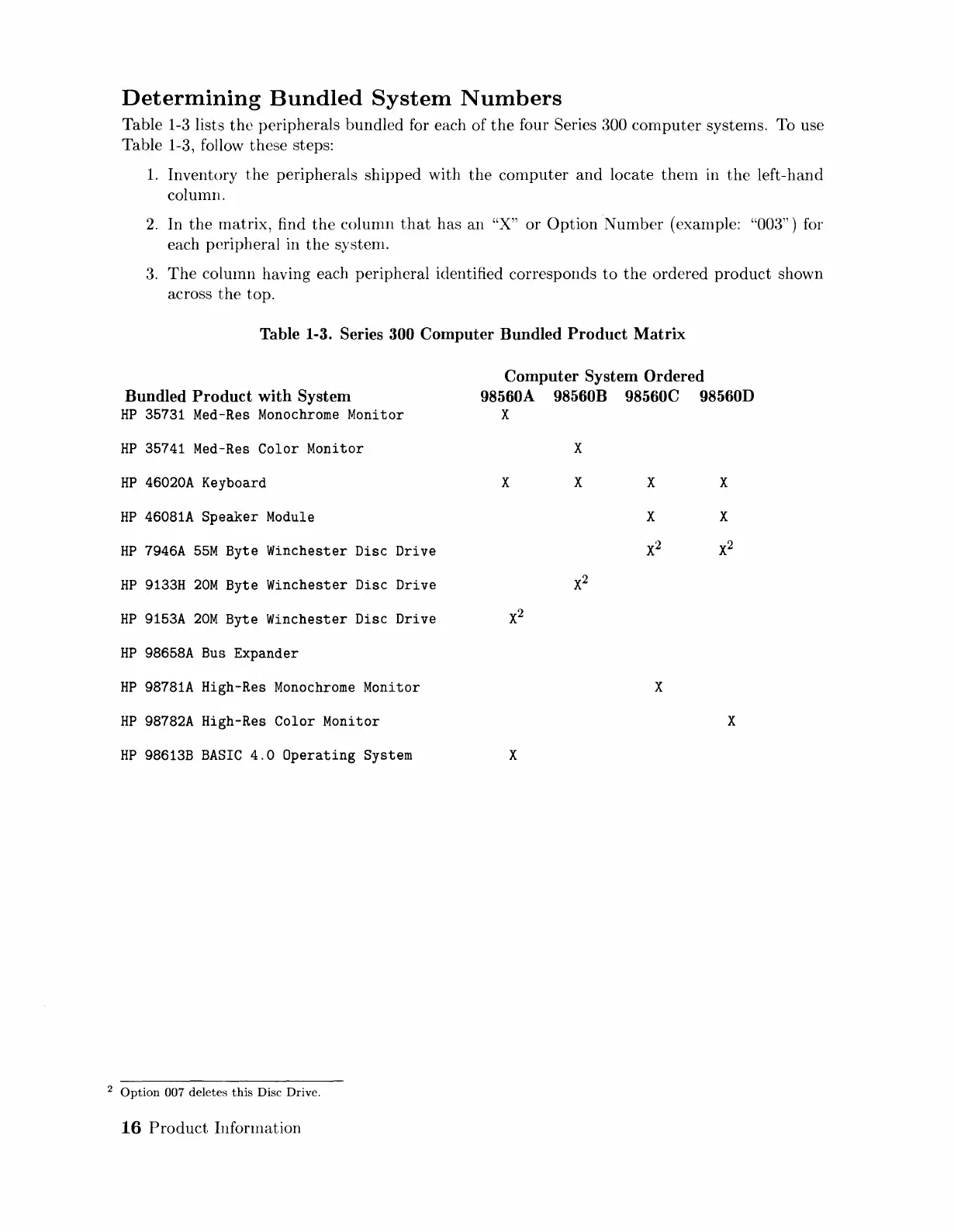
Table 1-3 lists
the
peripherals bundled for each
of
the
four Series 300 cornputer systerns. To use
Table 1-3, follow these steps:
1.
Inventory
the
peripherals
shipped
with
the
computer
and
locate
them
in
the
left-hand
column.
2.
In
the
matrix,
find
the
column
that
has
an
"X"
or
Option
Number
(example: "003") for
each peripheral in
the
systenl.
3.
The
column having each peripheral identified corresponds
to
the
ordered
product
shown
across
the
top.
Table 1-3. Series
300
Computer
Bundled
Product
Matrix
Bundled
Product
with
System
HP
35731 Med-Res
Monochrome
Monitor
HP
35741
Med-Res
Color
Monitor
HP
46020A
Keyboard
HP
46081A
Speaker
Module
HP
7946A
55M
Byte Winchester Disc Drive
HP
9133H
20M
Byte Winchester Disc Drive
HP
9153A
20M
Byte Winchester Disc Drive
HP
98658A
Bus
Expander
HP
98781A
High-Res
Monochrome
Monitor
HP
98782A
High-Res Color Monitor
HP
98613B
BASIC
4.0
Operating
System
2
Option
007 deletes
this
Disc Drive.
16
Product
Infonnation
Computer
System
Ordered
98560A 98560B 98560C 98560D
X
X
X X
X
X
X
2
X
X
X
X
X
Artisan Technology Group - Quality Instrumentation ... Guaranteed | (888) 88-SOURCE | www.artisantg.com


 To Next Page
 Loading...