Deg Reference
Model
8754A
250
MHz
260
MHz
240
MHz
190
MHz
200
MHz
210
MHz
220
MHz
230
MHz
M'_
dB
Reference
R±jX
=1.0 +jO.19
B.
Adjust
reference values
to
position
point
and
calculate
p
L0
-w"
e.
.""W
Frequency
MHz
CH1 Reference CH2 Reference
Start
A.
Interpolate
pL0
value
from
polar
graticule
Mm
.•
"m~
.11I.
Frequency
MHz
CH1 Reference CH2 Reference
Start
Channel 1
Smith Chart Overlay
Reference
(p
full scale)
Switch
2.0
+6
1.0
±OO
0.2
-14
0.1
-20
Simultaneous Measurements
24
For
simultaneous measurement
of
return loss and transmission insertion loss
or
gain, use
Channell
AIR:
and Channel 2 B/R.
To
measure transmission magnitude
and
phase
and
re~lection
coefficient using the same test setup,
calibrate Channel 2
B/R
for insertion loss
or
gain, Channel 2
PHASE
B/R
for insertion phase (but
do
not
change Channel 2
OFFSET
after
magnitude calibration), then calibrate
POLAR
AIR
reflection coefficient"
as described above (but
do
not
change Channel 2 OFFSET).
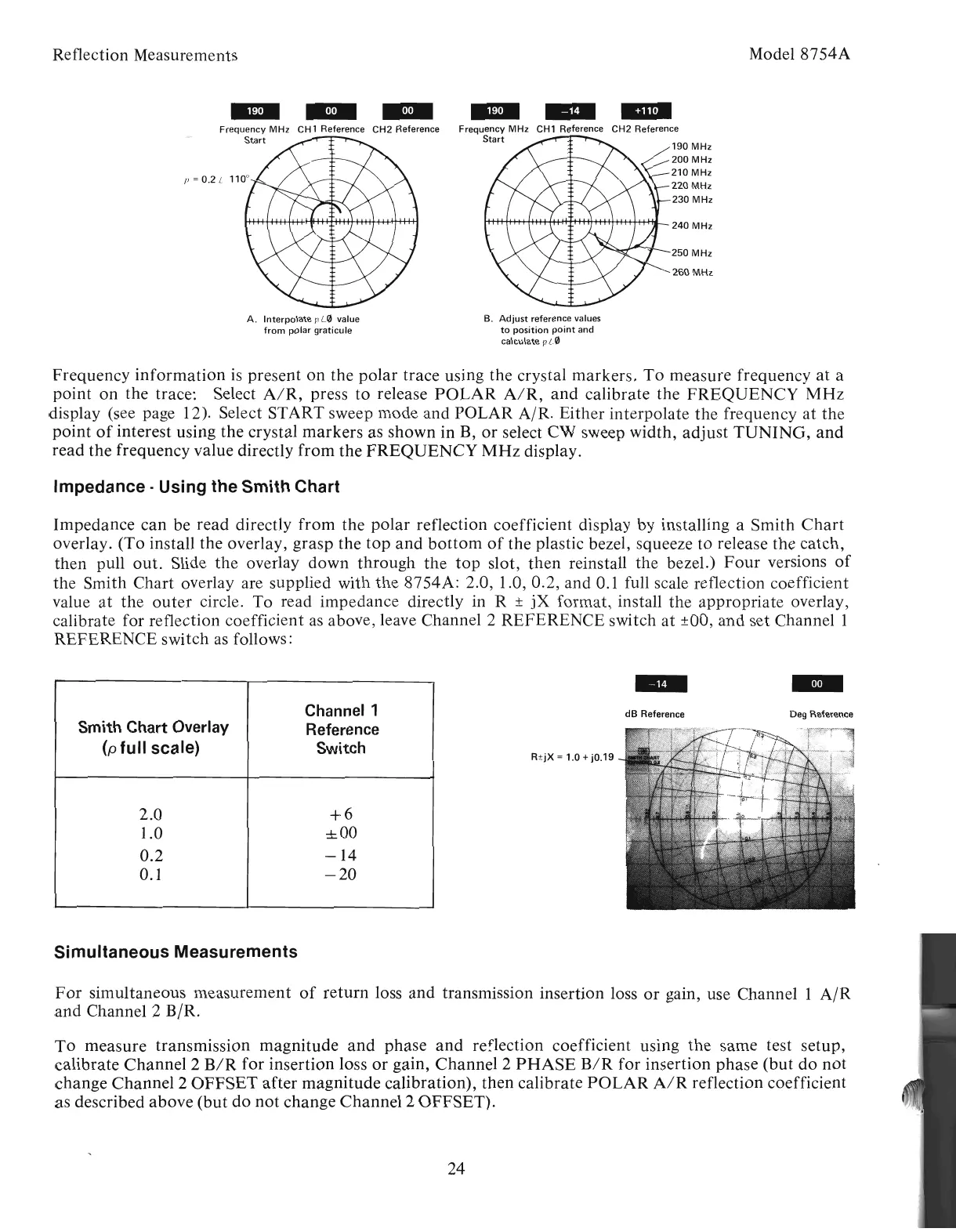
Impedance can be read directly
from
the polar reflection coefficient display by installing a Smith
Chart
overlay. (To install the overlay, grasp the
top
and
bottom
of
the plastic bezel, squeeze to release the catch,
then
pullout.
Slide
the
overlay down through the
top
slot,
then
reinstall the bezel.)
Four
versions
of
the Smith Chart overlay are supplied with the 8754A: 2.0, 1.0, 0.2, and 0.1 full scale reflection coefficient
value
at
the
outer
circle. To read impedance directly in R ±
jX
format, install the appropriate overlay,
calibrate for reflection coefficient
as
above, leave Channel 2 REFERENCE switch
at
±OO,
and set
Channell
REFERENCE switch
as
follows:
Impedance· Using the Smith Chart
Reflection Measurements
Frequency
information
is
present
on
the polar trace using the crystal markers.
To
measure frequency at a
point
on
the trace: Select
AIR,
press to release
POLAR
AIR,
and
calibrate the
FREQUENCY
MHz
display (see page 12). Select START sweep mode and POLAR
AIR.
Either interpolate the frequency
at
the
point
of
interest using the crystal markers as shown in B,
or
select
CW
sweep width,
adjust
TUNING,
and
read the frequency value directly
from
the
FREQUENCY
MHz
display.
Artisan Technology Group - Quality Instrumentation ... Guaranteed | (888) 88-SOURCE | www.artisantg.com



 To Next Page