Model
8754A
Using an External Source
To use this system:
Set 8620C
to
EXT SWEEP
mode
Set 8620C START and STOP frequencies
as
desired
Press
8754A
FREQUENCY
mode
START
pushbutton
Adjust
8754A
FREQUENCY
MHz
display
to
8620C START frequency
Set
8754A
SWEEP WIDTH
MHz
to
8620C sweep width
Adjust
8754A
SWEEP controls for desired sweep rate
Calibrate and make measurements
as
discussed previously
8662A
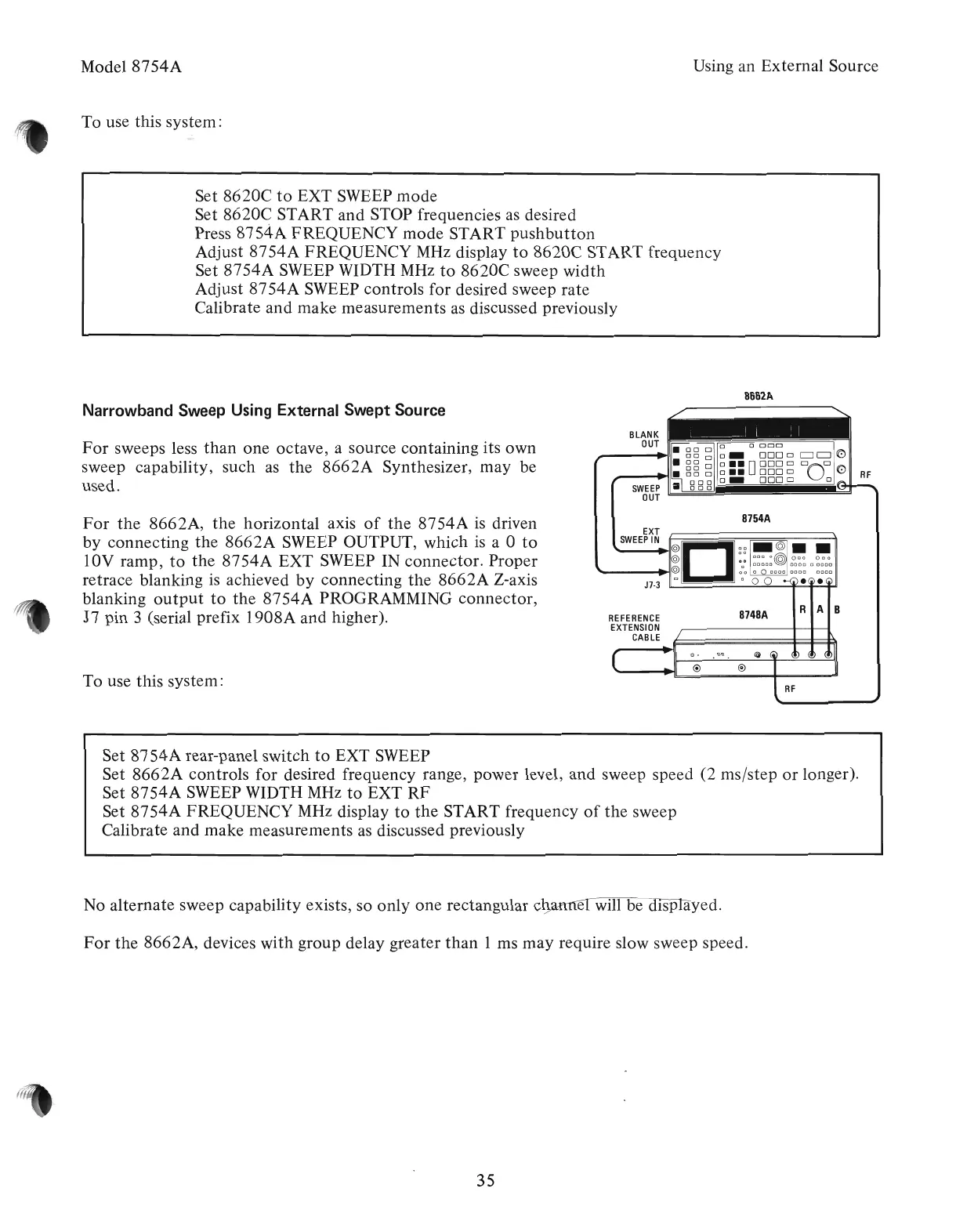
Narrowband Sweep Using External Swept Source
For
sweeps less
than
one octave, a source containing its own
sweep capability, such
as
the
8662A
Synthesizer, may be
used.
8754A
RF
8748A
REFERENCE
EXTENSION
CABLE
EXT
SWEEP
IN
6--===---==~~~
~II
II::I~;I~J~
""-----t~I@
0
0
0 ° 0
0000
DODO
DODO
J7-3
c:J
° 0 0
••
For
the
8662A,
the
horizontal axis
of
the
8754A
is
driven
by
connecting
the
8662A
SWEEP OUTPUT, which
is
a 0
to
lOV ramp,
to
the
8754A
EXT SWEEP IN connector. Proper
retrace blanking
is
achieved
by
connecting
the
8662A
Z-axis
blanking
output
to
the
8754A
PROGRAMMING connector,
J7
pin 3 (serial prefix 1908A and higher).
To use this system:
Set
8754A
rear-panel switch
to
EXT SWEEP
Set
8662A
controls for desired frequency range, power level, and sweep speed (2 ms/step
or
longer).
Set
8754A
SWEEP WIDTH
MHz
to
EXT
RF
Set
8754AFREQUENCY
MHz display
to
the
START frequency
of
the
sweep
Calibrate and make measurements
as
discussed previously
No alternate sweep capability exists, so only one rectangular c ed.
For
the
8662A, devices with group delay greater
than
1 ms may require slow sweep speed.
35
Artisan Technology Group - Quality Instrumentation ... Guaranteed | (888) 88-SOURCE | www.artisantg.com



 To Next Page