EasyManua.ls Logo

HP 8754A - Quick Reference Guide

HP 8754A
53 pages
Print Icon
To Next Page IconTo Next Page
To Previous Page IconTo Previous Page
Loading...
Mode18754A
44
Set Reference Positions
on
CRT:
11
12
10
12
PAGE
17,21
Test
Test
r
.........
)100---
~
Device -
Connect
TOgether~
tJ
To
Calibrate
8502
RF
Input:
~@~
II
II
:0:
I~;I
~~U~o
II
a
00
a
00000
0000 0000
o
DO<;)
-<i).C.O
J
RF
R
ALB
~-----.....".,
~---
......
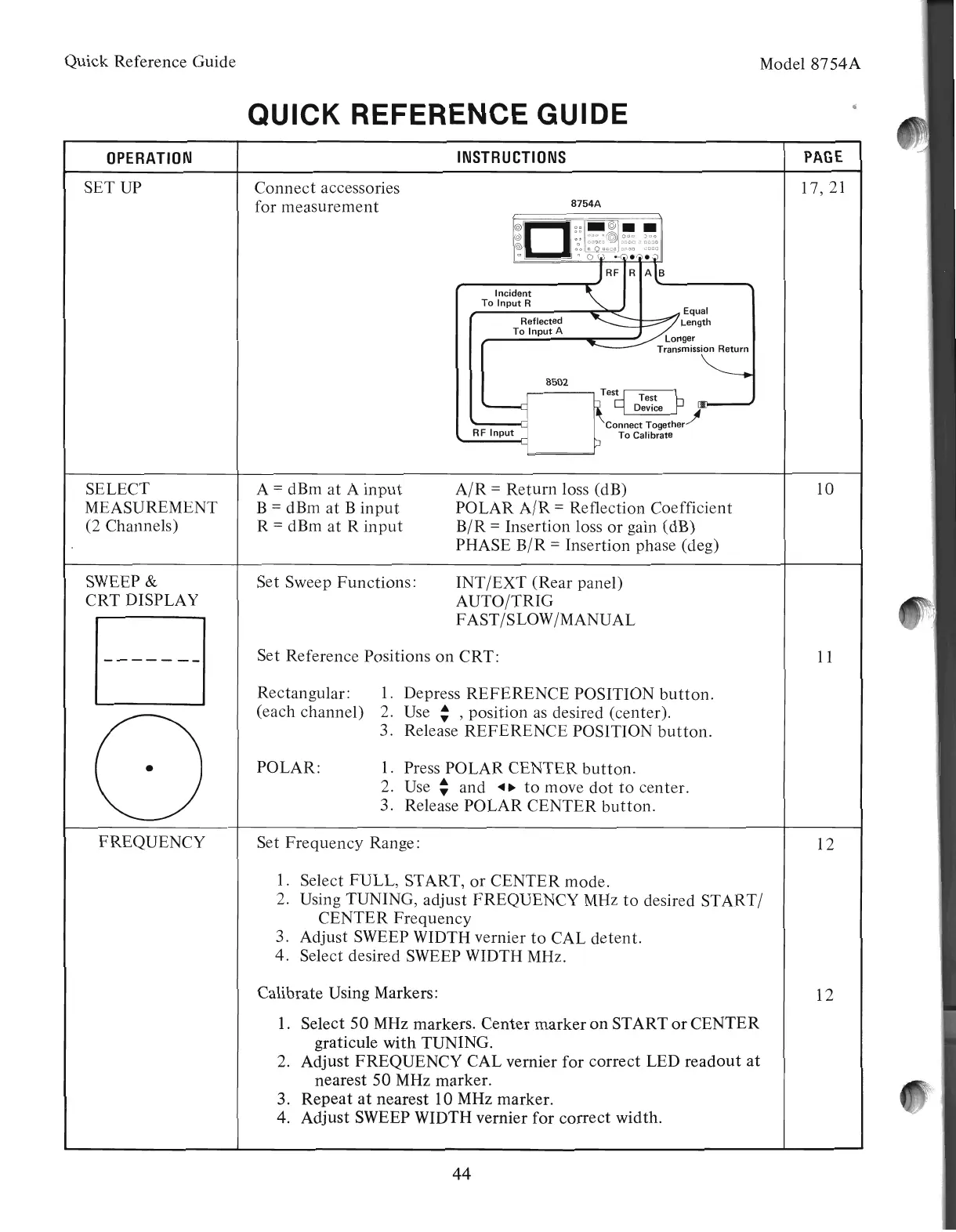
Incident
lit
To
Input
R
'"
Equal
Reflected
~
~
Length
To
Input
A Longer
TransmiSSC
INSTRUCTIONS
8754A
INT
/EXT
(Rear panel)
AUTO/TRIG
FAST/SLOW/MANUAL
A/R
=
Return
loss (dB)
POLAR
A/R
=Reflection Coefficient
B/R
=Insertion loss
or
gain (dB)
PHASE
B/R
= Insertion phase (deg)
1. Press POLAR
CENTER
button.
2.
Use:
and
.~.
to
move
dot
to
center.
3. Release
POLAR
CENTER
button.
1. Select FULL, START,
or
CENTER
mode.
2. Using TUNING, adjust
FREQUENCY
MHz
to
desired
START/
CENTER
Frequency
3. Adjust SWEEP WIDTH vernier
to
CAL
detent.
4. Select desired SWEEP WIDTH MHz.
Set
Frequency
Range:
Rectangular:
1.
Depress
REFERENCE
POSITION
button.
(each channel) 2. Use :
,position
as
desired (center).
3. Release
REFERENCE
POSITION
button.
POLAR:
Calibrate Using Markers:
1.
Select
50
MHz markers.
Center
marker
on
START
or
CENTER
graticule
with
TUNING.
2. Adjust
FREQUENCY
CAL vernier for
correct
LED
readout
at
nearest
50
MHz marker.
3.
Repeat
at
nearest 10 MHz marker.
4. Adjust SWEEP WIDTH vernier for
correct
width.
Set Sweep
Functions:
A =dBm
at
A
input
B =dBm
at
B
input
R =dBm
at
R
input
Connect
accessories
for
measurement
QUICK REFERENCE GUIDE
OPERATION
FREQUENCY
SELECT
MEASUREMENT
(2 Channels)
SWEEP
&
CRT
DISPLAY
SETUP
Quick Reference Guide
Artisan Technology Group - Quality Instrumentation ... Guaranteed | (888) 88-SOURCE | www.artisantg.com

Related product manuals