Modulate
or
Sum
the
Signals
2-13
A
B
C
How
to
Sum
fhe
Modulation
Signals
With the
HP
8904A, you can even sum the modulation signals first
and then use the resulting signal to modulate Channel
A
in
any
one
of
the
HP
8904As modulation modes. In the following steps,
you
will
sum Channels
B
and
C
and use the
resulting
signal
to amplitude
modulate Channel
A.
out
1
20k
3v
0.0
deg Sine
AM
1000
Hz
90%
0.0
deg Sine
Plse
1000
Hz
N/A
45.0
deg Sine
Note
If
you have just completed the preceding demonstration,
"How
to
Set Up Simultaneous Modulation," your
HP
8904A
is correctly
configured for beginning this demonstration; proceed to step
1
on
the next page.
If
your
HP 8904A
is not configured
US
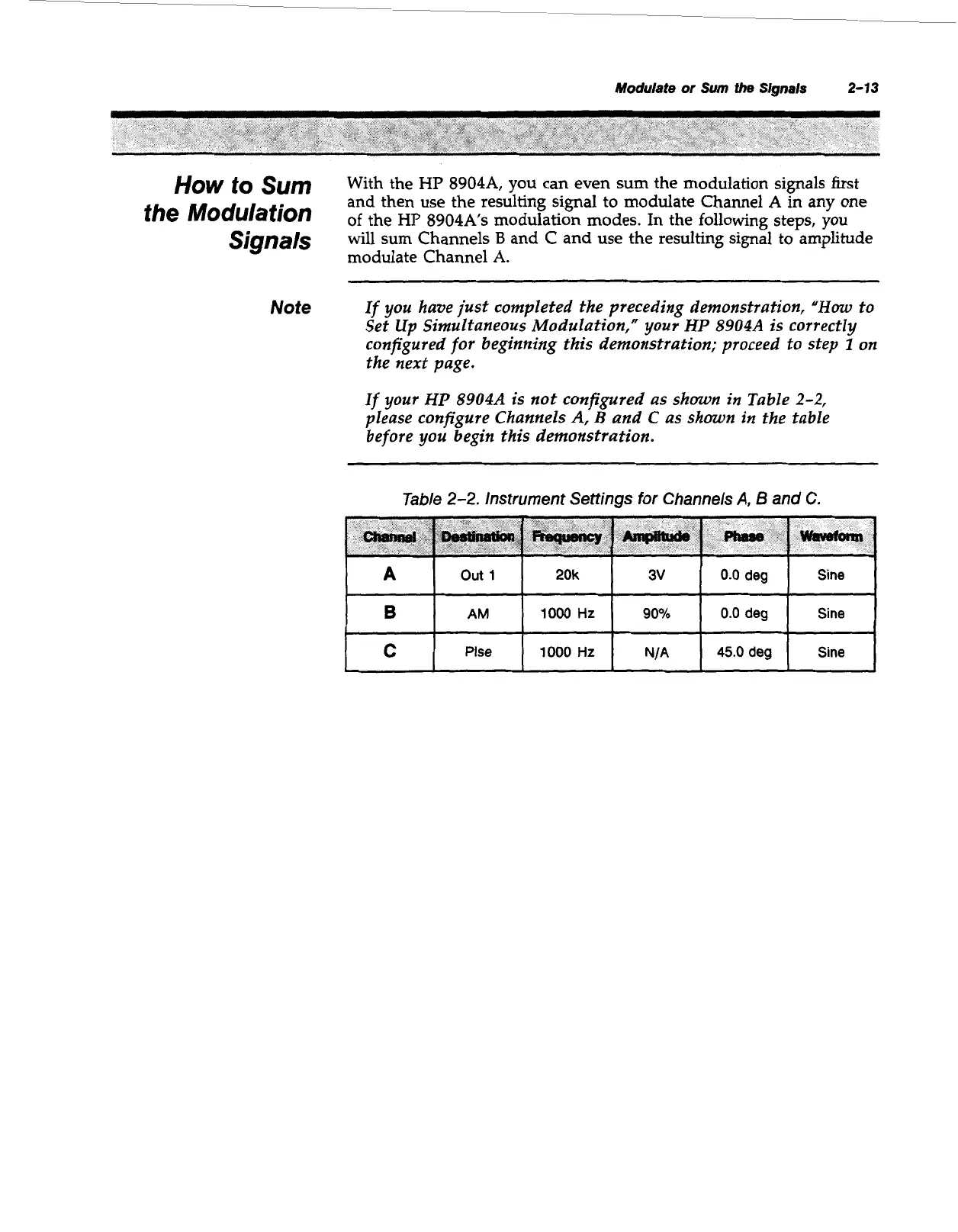
shown in Table
2-2,
please configure Channels
A,
B
and
C
as shown
in
the table
before you begin this demonstration.
Table
2-2.
Instrument Settings for Channels
A,
6
and
C.
Artisan Technology Group - Quality Instrumentation ... Guaranteed | (888) 88-SOURCE | www.artisantg.com



 To Next Page