Modulate
or
Sum
the
Signals
2-15
4.
Press
the
WAVEFORM
key
and
the
NOISE
key.
You
have now
configured Channel C to add
a
10%
noise component to the
Channel
B
modulation signal.
Remember
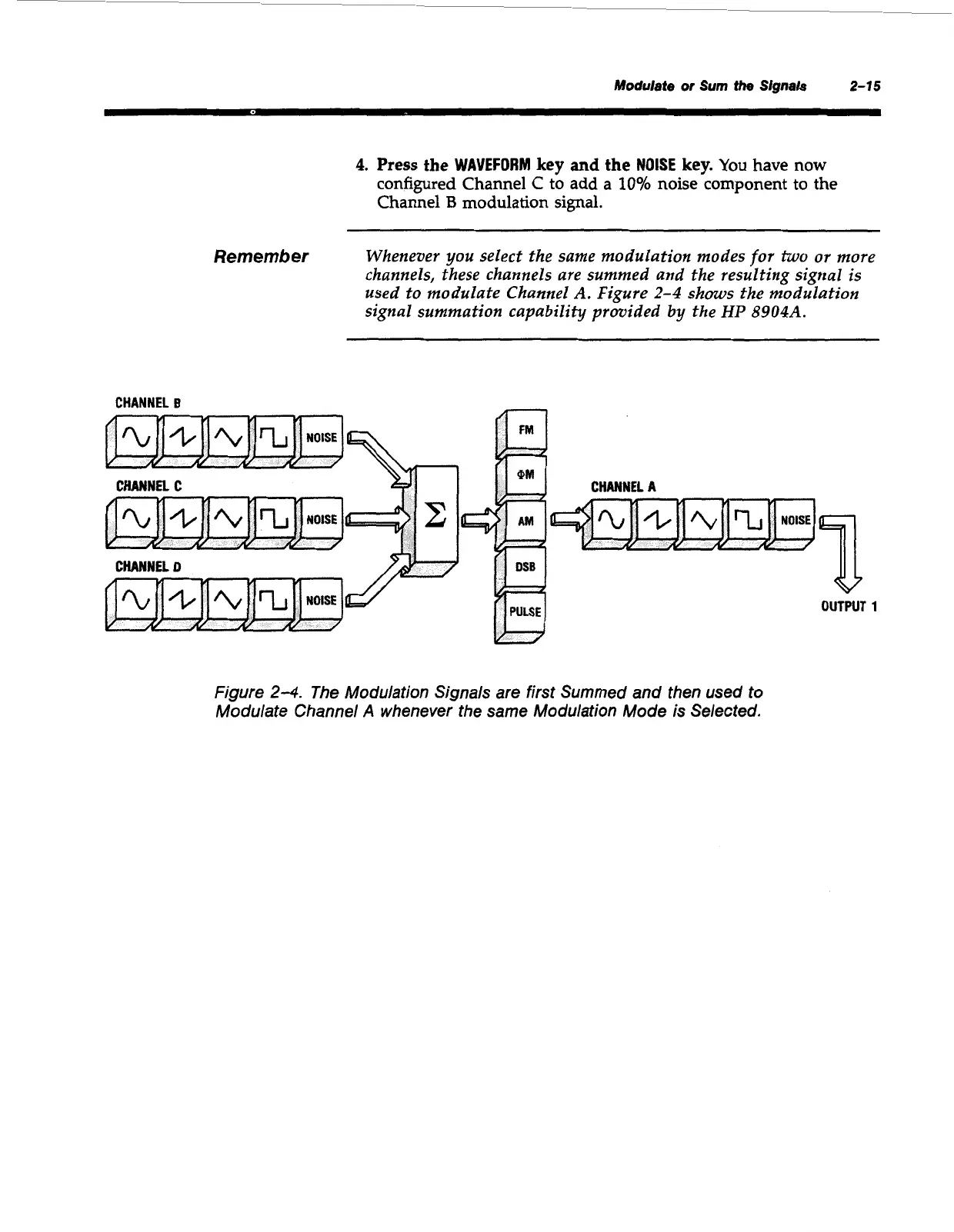
Whenever you select the same modulation modes
for
two
or
more
channels, these channels are summed and the resulting signal is
used to modulate Channel
A.
Figure
2-4
shows the modulation
signal summation capability provided by the
HP
8904A.
CHANNEL
B
-
CHANNEL
C
CHANNEL
D
CHANNEL
A
a
OUTPUT
1
Figure
24.
The Modulation Signals are first Summed and then used to
Modulate Channel
A
whenever the same Modulation Mode is Selected.
Artisan Technology Group - Quality Instrumentation ... Guaranteed | (888) 88-SOURCE | www.artisantg.com



 To Next Page