3-6
Output
a
Sequence
of
Signals
Specify
the
Sequence Order
15.
Press the
NEXT
key to access the Sequence String display. This
display allows you to define the order in which you wish to
output the tones you have setup.
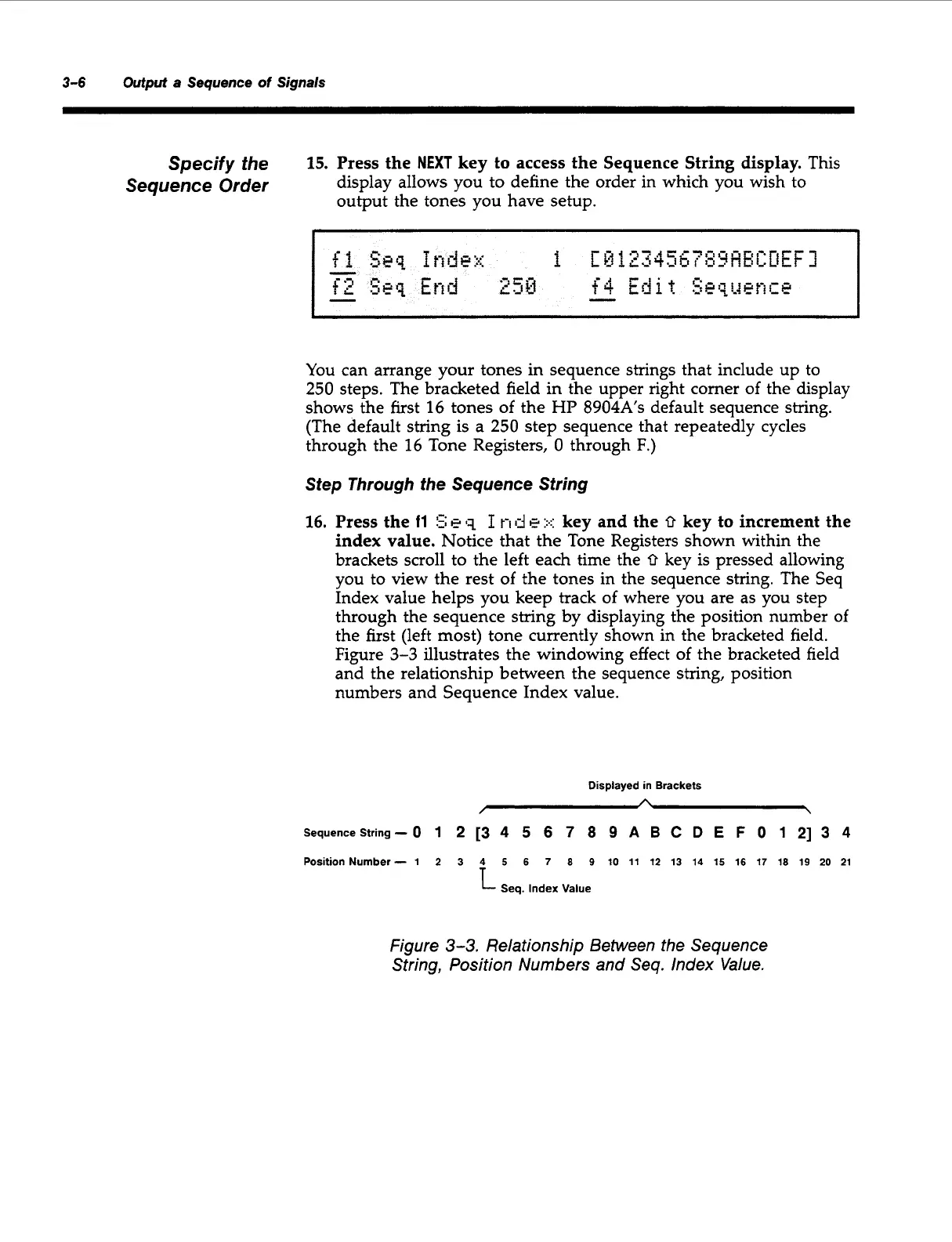
You can arrange your tones in sequence strings that include up to
250
steps. The bracketed field in the upper right corner of the display
shows the first
16
tones of the
HP
8904A’s
default sequence string.
(The default string is a
250
step sequence that repeatedly cycles
through the
16
Tone Registers,
0
through
F.)
Step Through the Sequence String
16.
Press the
11
!2
e
q
I
n
d
e
:.::
key and the
0
key to increment the
index value. Notice that the Tone Registers shown within the
brackets scroll to the left each time the
0
key is pressed allowing
you to view the rest
of
the tones in the sequence string. The Seq
Index value helps you keep track
of
where you are as you step
through the sequence string by displaying the position number
of
the first (left most) tone currently shown in the bracketed field.
Figure
3-3
illustrates the windowing effect of the bracketed field
and the relationship between the sequence string, position
numbers and Sequence Index value.
Displayed in Brackets
A
/
\
Sequencestring
-
0
1
2
[3
4
5
6
7
8
9
A
B
C
D
E
F
0
1
21
3
4
Position Number- 1
2
3
4
5
6
7
8
9 10 11 12
13
14
15
16
17
18 19 20 21
Seq. Index Value
Figure
3-3.
Relationship Between the Sequence
String, Position Numbers and Se9. Index Value.
Artisan Technology Group - Quality Instrumentation ... Guaranteed | (888) 88-SOURCE | www.artisantg.com



 To Next Page