3-14
Output
a Sequence
of
Signals
xx
Dig
1
tal
Sequence Node
Press
NEXT/LHST
keys.
fi
Exit
How
to
Output
a
In
this demonstration, you will output
a
binary Digital Sequence
of
TTL compatible bits.
Digital
Sequence
1.
If
you are not currently
at
the Main Selection Level display,
press
the blue
SHIFT
key and the
MAIN
key.
2.
Press the
NEXT
key twice and then the
11
[I
i
$3
i
t
.a
1
S
e
13
1-4
e
t-i
c
e
softkey to access the Digital
Sequence Mode.
Enfer the
Bif
Parameters
t
HP
89Q4A
Main
Selectitn
Level
f
1
Channel
Cmf
ig
,
P
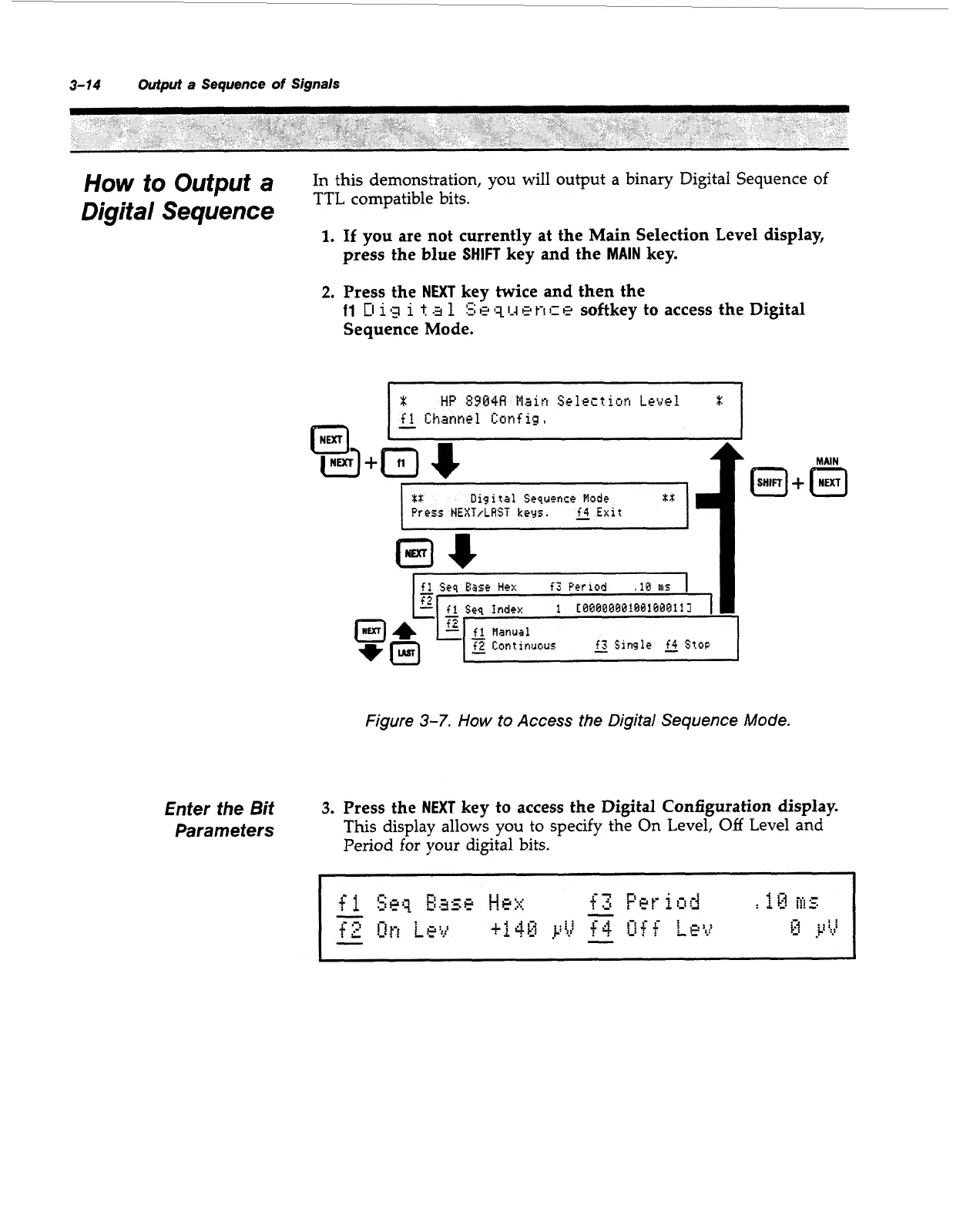
Figure
3-7.
How
to Access the
Digital
Sequence
Mode.
3.
Press the
NEXT
key
to
access the Digital Configuration display.
This display allows you to specify the
On
Level,
Off
Level and
Period for your digital bits.
Artisan Technology Group - Quality Instrumentation ... Guaranteed | (888) 88-SOURCE | www.artisantg.com



 To Next Page