54
Help
Messages
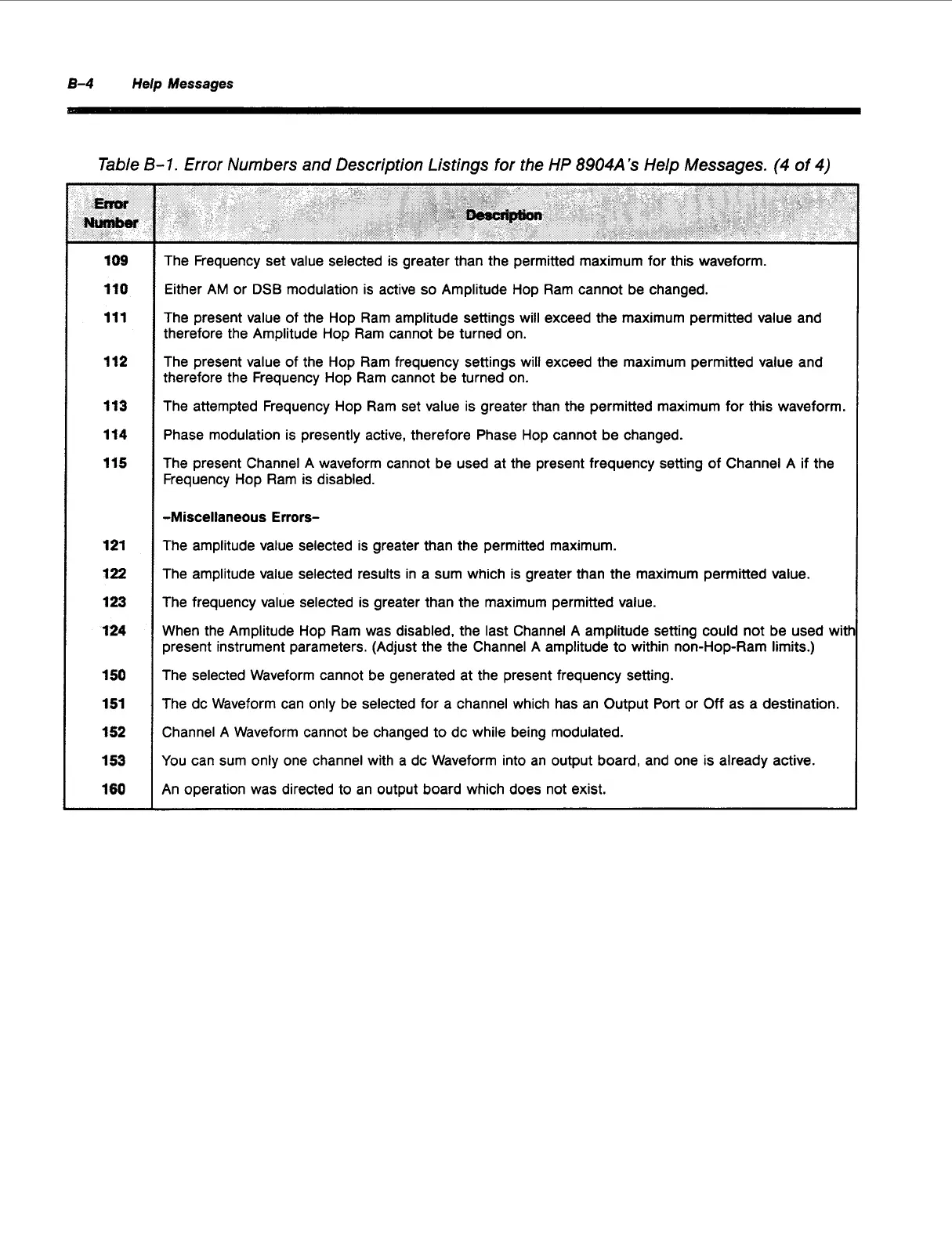
Table
B-
1.
Error Numbers and Description Listings
for
the HP
8904A’s
Help Messages.
(4
of
4)
109
110
111
112
113
114
115
121
122
1
23
124
1
50
151
152
153
1
SO
The Frequency set value selected is greater than the permitted maximum for this waveform.
Either AM or
DSB
modulation is active
so
Amplitude Hop Ram cannot be changed.
The present value of the Hop Ram amplitude settings will exceed the maximum permitted value and
therefore the Amplitude Hop Ram cannot be turned on.
The present value of the Hop Ram frequency settings will exceed the maximum permitted value and
therefore the Frequency Hop Ram cannot be turned on.
The attempted Frequency Hop Ram set value is greater than the permitted maximum for this waveform.
Phase modulation is presently active, therefore Phase Hop cannot be changed.
The present Channel A waveform cannot be used at the present frequency setting of Channel A if the
Frequency Hop Ram
is
disabled.
-Miscellaneous
Errors-
The amplitude value selected is greater than the permitted maximum.
The amplitude value selected results in a sum which
is
greater than the maximum permitted value.
The frequency value selected is greater than the maximum permitted value.
When the Amplitude Hop Ram was disabled, the last Channel
A
amplitude setting could not be used witt
present instrument parameters. (Adjust the the Channel A amplitude to within non-Hop-Ram limits.)
The selected Waveform cannot be generated at the present frequency setting.
The dc Waveform can only be selected for a channel which has an Output Port or
Off
as a destination.
Channel
A
Waveform cannot be changed to dc while being modulated.
You can sum only one channel with a dc Waveform into an output board, and one
is
already active.
An operation was directed to an output board which does not exist.
Artisan Technology Group - Quality Instrumentation ... Guaranteed | (888) 88-SOURCE | www.artisantg.com



 To Next Page