C-2
HP-IB
Codes
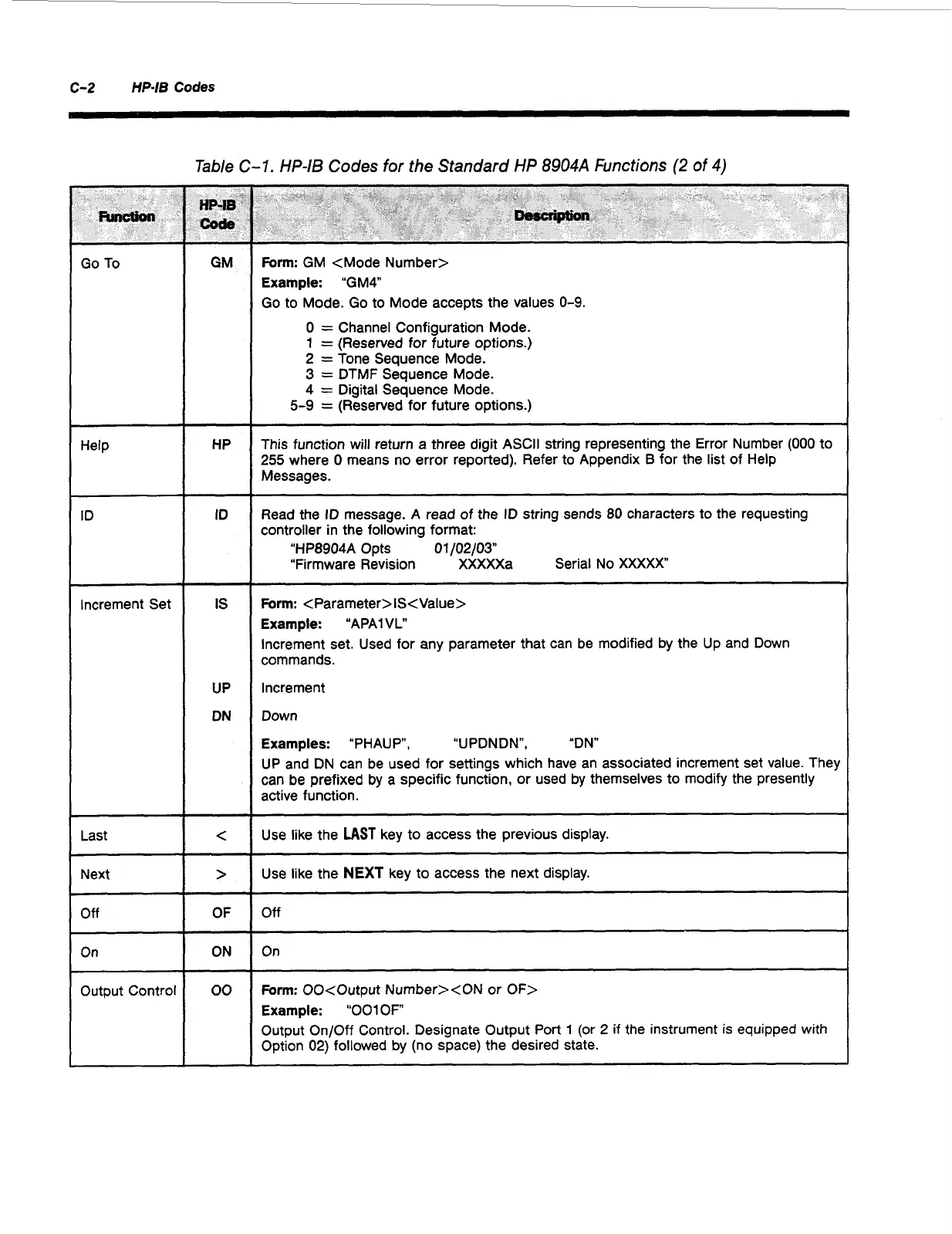
Go
To
Help
ID
Increment Set
Last
Next
Off
On
Output Control
Table C-7.
HP-IS
Codes
for
the Standard
HP
8904A
Functions
(2
of
4)
HP
ID
IS
UP
DN
c
>
OF
ON
00
Form:
GM <Mode Number>
Example:
“GM4
Go
to Mode.
Go
to Mode accepts the values
0-9.
0
=
Channel Configuration Mode.
1
=
(Reserved for future options.)
2
=
Tone Sequence Mode.
3
=
DTMF Sequence Mode.
4
=
Digital Sequence Mode.
5-9
=
(Reserved for future options.)
This function will return a three digit ASCII string representing the Error Number
(000
to
255
where
0
means no error reported). Refer to Appendix
B
for the list of Help
Messages.
Read the ID message. A read of the ID string sends
80
characters to the requesting
controller in the following format:
“HP8904A Opts
01
/02/031
“Firmware Revision XXXXXa Serial No
XXXXX
Form:
<Parameter>lS<Value>
Example:
“APAlVL“
Increment set. Used for any parameter that can be modified by the Up and Down
commands.
Increment
Down
Examples:
“PHAU
P,
“UPDNDN”, “DN“
UP and DN can be used for settings which have an associated increment set value. They
can be prefixed by
a
specific function, or used by themselves to modify the presently
active function.
~
Use like the
LAST
key to access the previous display.
Use like the
NEXT
key to access the next display.
Off
On
Form:
00cOutput Number><ON
or
OF>
Example:
“001
OF
Output On/Off Control. Designate Output Port
1
(or
2
if
the instrument is equipped with
Option
02)
followed by (no space) the desired state.
Artisan Technology Group - Quality Instrumentation ... Guaranteed | (888) 88-SOURCE | www.artisantg.com



 To Next Page