Model
8904A
Performance
Tests
NOTE
Drift
in
the oscilloscope may require periodically checking the de
4V
ref-
erence line
To
do
this
simply set the Multifunction Synthesizer waveform
back
to
dc,
check the
de
voltage on the digital multimeter, and rea&ust the
vertical position
of
the oscilloscope.
If
it
is
difficult
to
locate the position
of
the limits on the display, simply
set the amplitude increment of the Multifunction Synthesizer to 0.08V and
increment the amplitude down once then up once. This increment causes a
0.08
division
(1%)
level shift.
To
improve the display resolution, it
is
possible to use a more sensitive
input range
or
vertical magnification
(if
that feature is available). However,
care
must
be taken
to
assure that the
8
Vpp signal
does
not overdrive the
oscilloscope’s input amplifier.
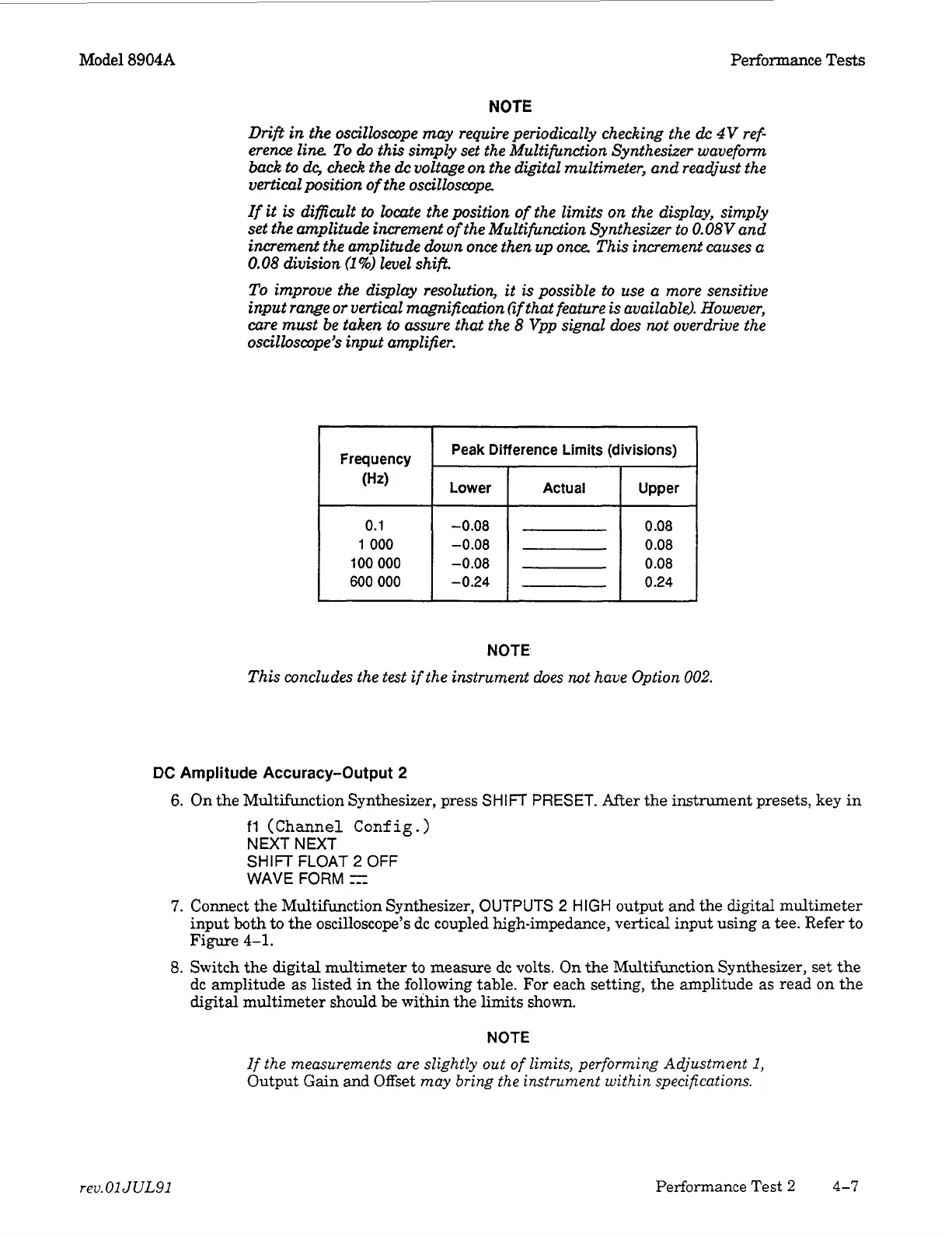
Frequency
(Hz)
0.1
1
000
100
000
600 000
Peak Difference
Limits
(divisions)
Lower
-0.08
-0.08
-0.08
-0.24
Actual
NOTE
This concludes the
test
if the instrument does not have Option
002.
DC
Amplitude Accuracy-Output
2
6.
On the Multifunction Synthesizer, press
SHIFT
PRESET.
After the instrument presets, key
in
fl
(Channel Config.)
NEXT NEXT
SHIFT
FLOAT
2
OFF
WAVE
FORM
r-
7.
Connect the Multifunction Synthesizer, OUTPUTS
2
HIGH
output and the digital multimeter
input both
to
the oscilloscope’s dc coupled high-impedance, vertical input using
a
tee. Refer
to
Figure
4-1.
8.
Switch the digital multimeter
to
measure dc volts.
On
the Multifunction Synthesizer, set the
dc amplitude
as
listed in
the
following table.
For
each setting, the amplitude
as
read
on
the
digital
multimeter should be within the limits shown.
NOTE
If
the
measurements are slightly out
of
limits, performing Adjustment
1,
Output Gain and Offset
may bring
the
instrument within specifications.
rev.
01
JUL91
Performance Test
2
4-7
Artisan Technology Group - Quality Instrumentation ... Guaranteed | (888) 88-SOURCE | www.artisantg.com



 To Next Page