1-8
Meet
the
HP
8904A
Enter
a
Frequency
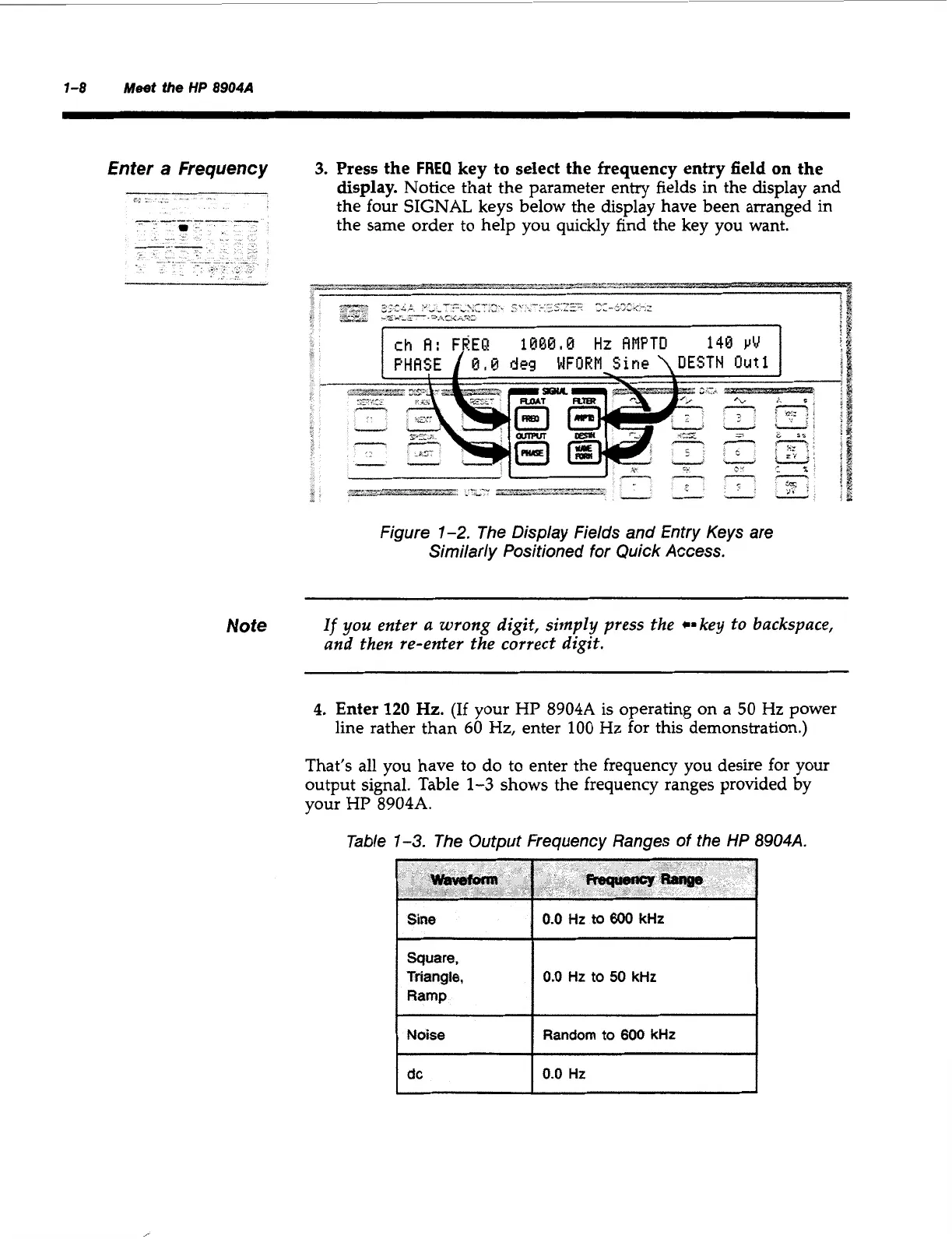
3.
Press the
FREQ
key to select the frequency entry field on the
display.
Notice that the parameter entry fields in the display and
the four SIGNAL keys below the display have been arranged in
the same order to help you quickly find the key you want.
--s--*-----
-~.-..rm-z&zJzc%
Figure
1-2.
The Display Fields and Entry Keys are
Similarly Positioned for Quick Access.
Note
If
you enter
a
wrong
digit, simply press the *=key to backspace,
and then re-enter the correct digit.
4.
Enter
120
Hz.
(If
your
HP
8904A
is
operating on a
50
Hz
power
line rather than
60
Hz,
enter
100
Hz
for this demonstration.)
That’s all you have to do to enter the frequency you desire for your
output signal. Table
1-3
shows the frequency ranges provided by
your
HP
8904A.
Table
1-3.
The Output Frequency Ranges of the
HP
8904A.
Sine
Square,
Triangle,
Ramp
Noise
I
dc
0.0
Hz
to
600
kHt
0.0
Hz
to
50
kHr
Random
to
600
kHr
0.0
Ht
Artisan Technology Group - Quality Instrumentation ... Guaranteed | (888) 88-SOURCE | www.artisantg.com



 To Next Page