Meet
the
HP
8904A
1-7
How
to
Output
You are now ready to learn how quickly and easily the
HI?
8904A
enables you to set up the output signals you desire.
a
Signal
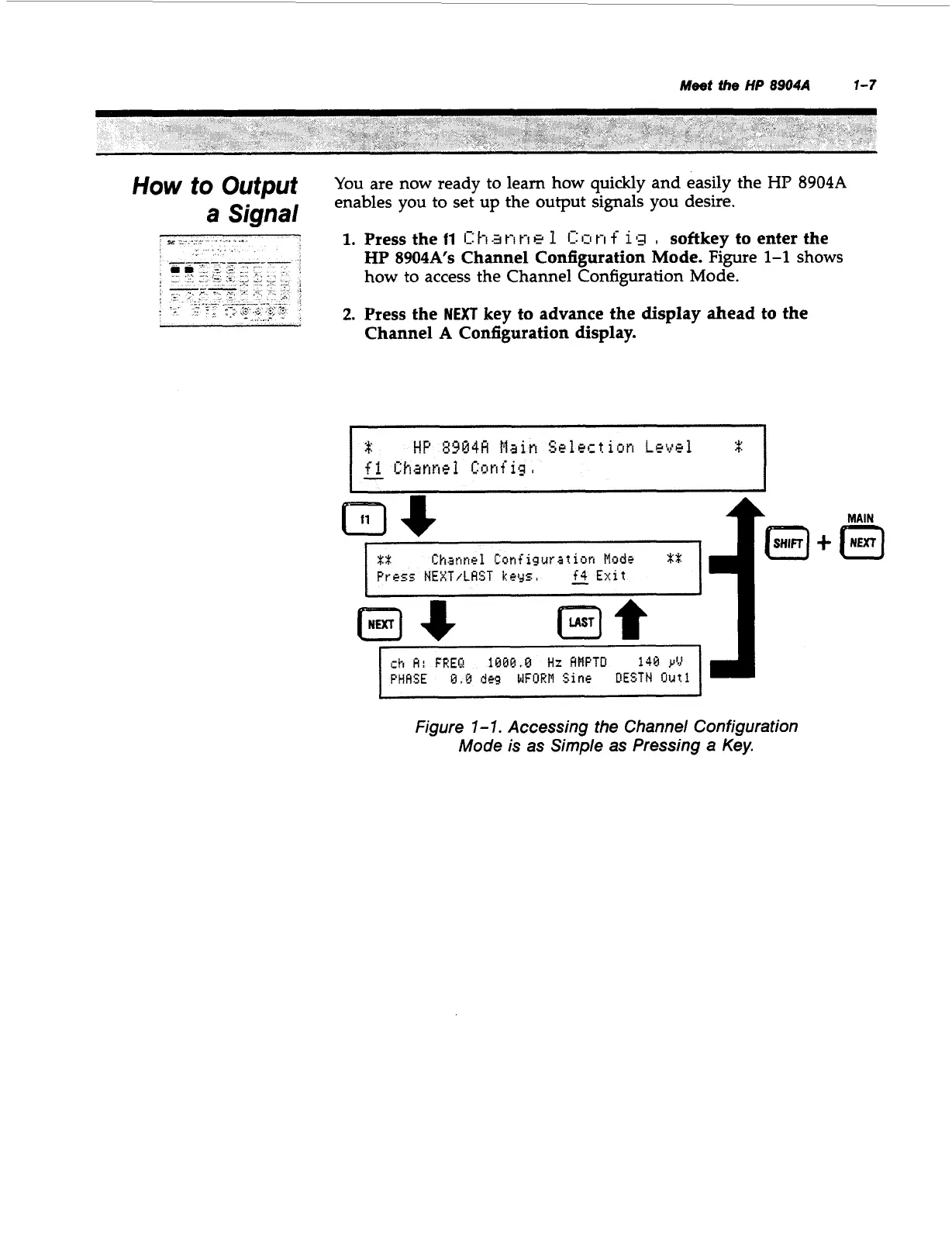
1.
Press the
11
1:
1-1
.a
t-I
t-I
e
1
1:
1~1
ri
f
1
g
,
softkey to enter the
HP
8904A's
Channel Configuration Mode.
Figure
1-1
shows
how to access the Channel Configuration Mode.
Channel
A
Configuration display.
2.
Press the
NEXT
key to advance the display ahead to the
td
Channel
Lunfigurat
ion
tlodr
XX:
Press
NEi(T/tRST
keys,
f4
Exit
-
t
1
B*
m*
ih
H:
FREQ
1BBB.B
HZ
HHPTD
148
y'rl
PHHSE
b3.B
deg
blFORM
Sine
DESTH
Out1
+
Figure
1
-
1.
Accessing the Channel Configuration
Mode
is
as Simple as Pressing a Key.
Artisan Technology Group - Quality Instrumentation ... Guaranteed | (888) 88-SOURCE | www.artisantg.com



 To Next Page