Meet the
HP
8904A
7-73
Turn
Off
the Output
1.
Press the
blue
SHIFT
key
and
then the
OUTPUT
key.
The Output
Control display should now appear on the HP
8904A.
2.
Press the
1
key.
This designates which Output
(1
or
2)
you
wish
to control. (Output
2
can be turned "On" only when the
HP
8904A
is equipped with Dual Output Ports, Option
02.)
3.
Press the
OFF
key.
You have turned
off
Output
1.
Note that the
ON
LED
for
OUTPUT
1
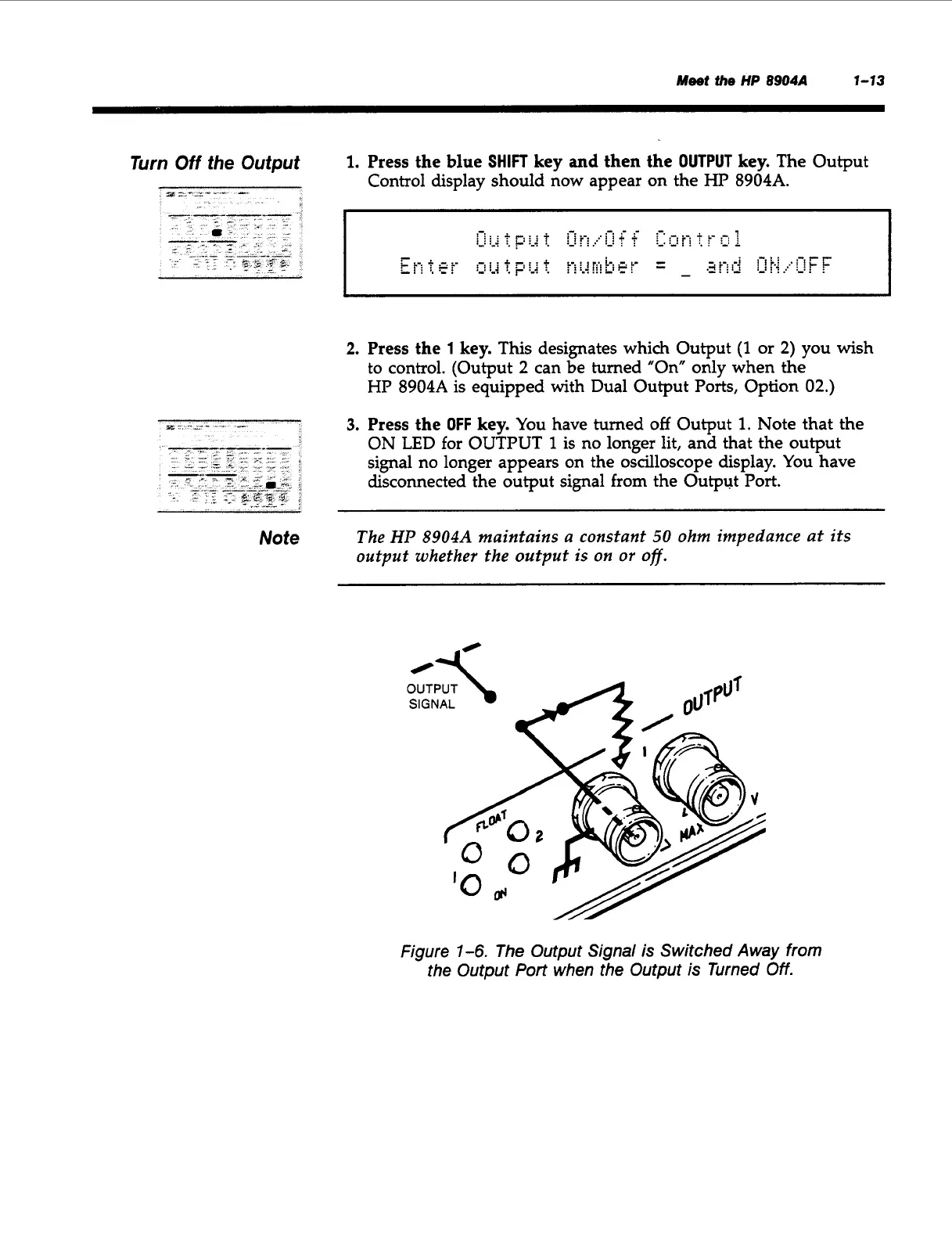
is no longer lit, and that the output
signal no longer appears on the oscilloscope display. You have
disconnected the output signal
from
the Output
Port.
Note
The
HP
8904A
maintains a constant
50
ohm impedance at its
output whether the output is
on
or
off.
OUTPUT
\
SIGNAL
Figure
7-6.
The Output Signal is Switched Away from
the Output
Port when the Output is Turned Off.
Artisan Technology Group - Quality Instrumentation ... Guaranteed | (888) 88-SOURCE | www.artisantg.com



 To Next Page