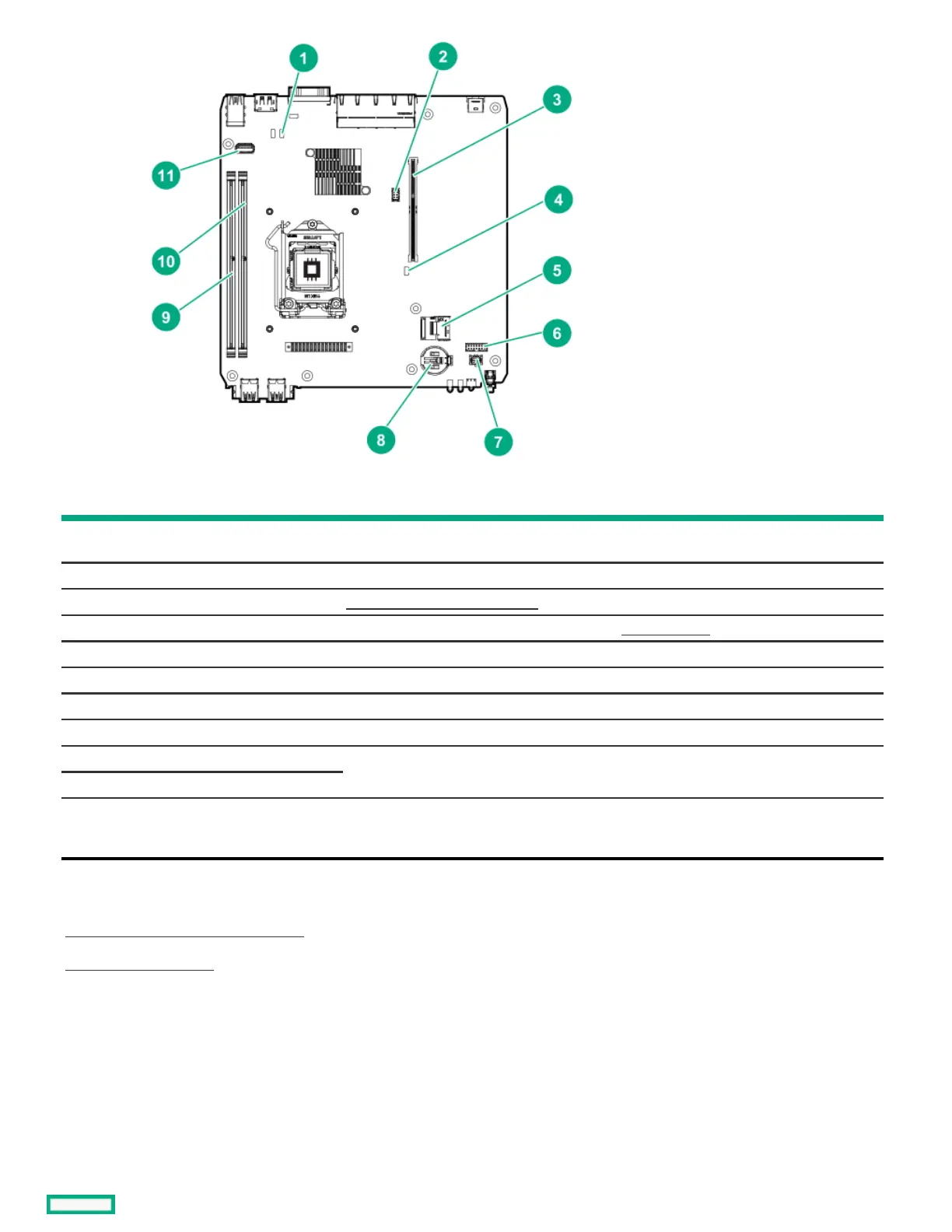
ItemItem ComponentComponent DescriptionDescription
1 CMOS header Use this header to clear the CMOS and reset the BIOS settings to their factory default
values.
2 Fan connector Connects the fan cable.
3 Riser connector Connects the system riser board .
4 System maintenance switch Use this switch to physically configure various server settings.
5 SATA 6GB/s port Connects the drive SATA cable.
6 Drive sideband connector Connects the drive sideband signal cable.
7 Drive power connector Connects the drive power cable.
8 System battery This battery provides power to the server CMOS and real-time clock.
9 DIMM slot 1B These slots support standard UDIMMs with ECC. When installing a single UDIMM only,
install it in the DIMM slot 2A.
10 DIMM slot 2A
11 Internal USB 3.2 Gen 1 port Connect a USB device, such as a USB security key or a USB drive key, intended for
permanent use. The internal connection avoids issues of clearance on the front or rear of
the server and prevents physical access to secure data.
SubtopicsSubtopics
System maintenance switch descriptionsSystem maintenance switch descriptions
DIMM label identificationDIMM label identification
System maintenance switch descriptionsSystem maintenance switch descriptions















 To Next Page