ItemItem ComponentComponent DescriptionDescription
1 Drive bays (4, behind the front bezel) The drive bays support 3.5-inch LFF SATA drives.
To support 2.5-inch SFF drives, install the LFF-to-SFF drive converter option.
2 Front bezel To access the drive bays, remove this bezel.
3 USB 3.2 Gen 2 Type-A ports Connect USB devices. These ports are backwards compatible with earlier USB
Type-A version devices.
These ports are also known as SuperSpeed USB 10 Gb/s ports. The appropriate cable and compatible hardware are required to take
advantage of the 10 Gb/s data transfer speed.
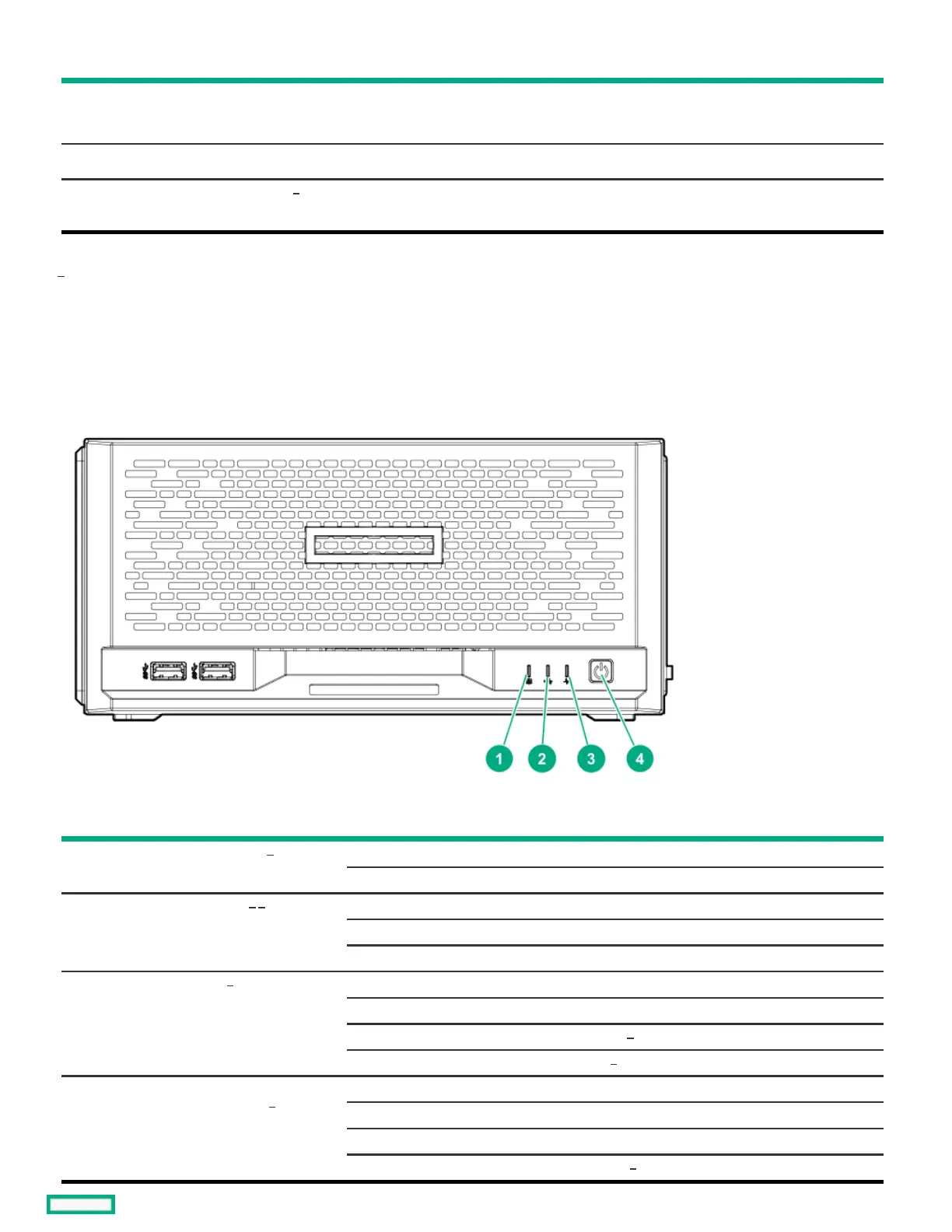
Front panel LEDs and buttonFront panel LEDs and button
ItemItem DescriptionDescription StatusStatus DefinitionDefinition
1 Drive activity LED Flashing green Ongoing drive activity
Off No drive activity
2 NIC status LED Solid green Linked to network
Flashing green Network active
Off No network activity
3 Health LED Solid green Normal
Flashing green iLO is rebooting
Flashing amber System degraded
Flashing red System critical
4 Power on/Standby button and
system power LED
Solid green System on and normal operation
Flashing green Performing power-on sequence
Amber System in standby
Off No power present
1
1
1
2 3
3
4
4
3
5















 To Next Page