Home
HTC
Virtual Reality Headsets
VIVE FOCUS VISION
Page 74
HTC VIVE FOCUS VISION - Page 74
102 pages
Manual
Save Page as PDF
To Next Page
To Next Page
To Previous Page
To Previous Page
Loading...
3.
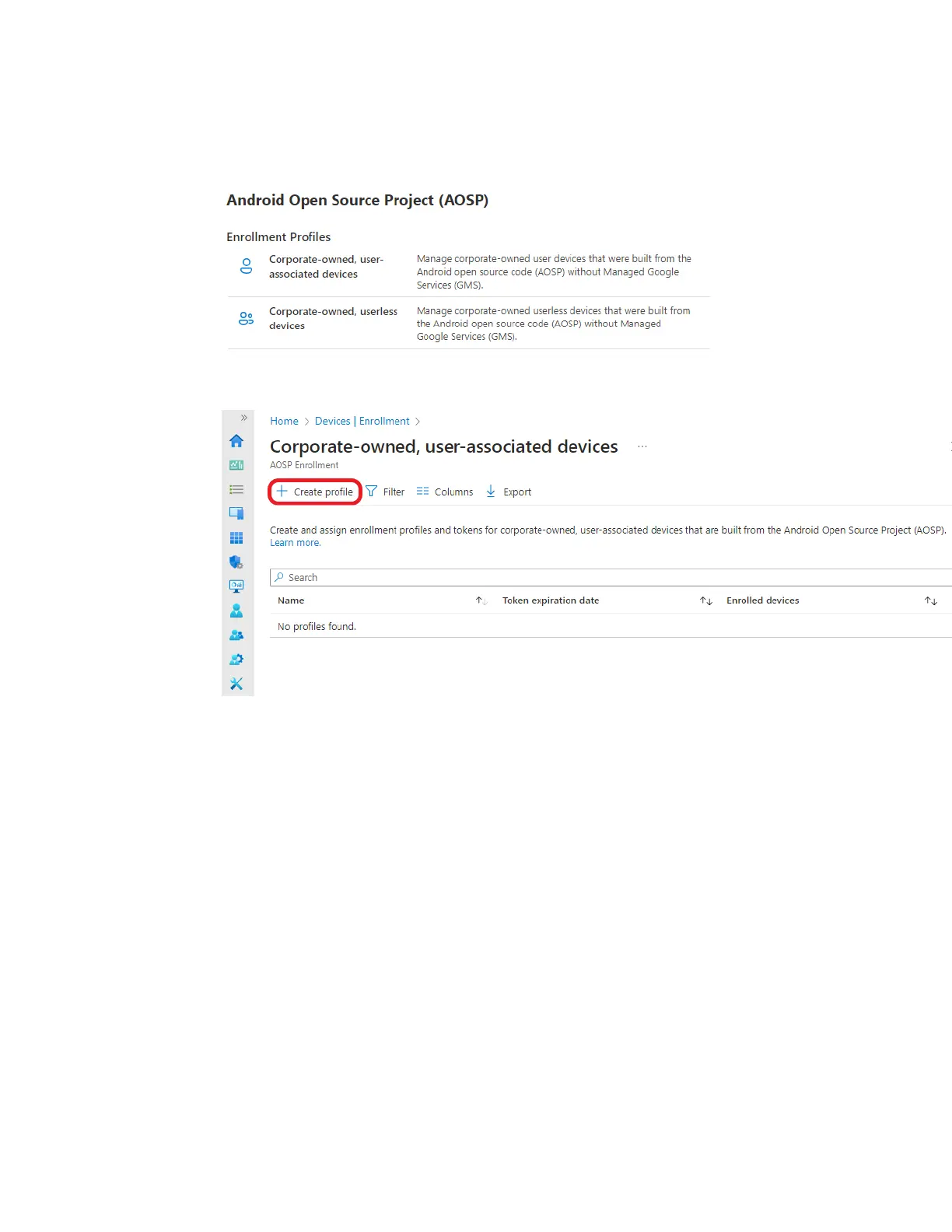
Select the enrollment profile that matches your requirements.
§
Corporate-owned, user-associated devices
§
Corporate-owned, userless devices
4.
On the corresponding enrollment page, click
+ Create profile
.
74
VIVE Focus Vision for Business
73
75
Table of Contents
Main Page
Table of Contents
2
About this Guide
4
Overview
5
What's Inside the Box
5
About the VIVE Focus Vision Headset
6
VIVE Focus Vision Controllers
9
Headset, Battery Cradle, and Controller Leds
11
Getting Started
14
Hardware
14
Setup (Headset and Controllers)
23
Setup (Play Area)
28
Basics
30
Mixed Reality
36
Cleaning
40
Additional Accessories
42
Managing Screenshots, Files, and Apps
44
Connecting the Headset to Your Computer
44
Transferring Screenshots and Screen Recordings to Your Computer
44
Browsing and Viewing Files
45
Viewing 360° Photos
46
Connecting an External Storage Device to the Headset
47
Copying Files between the Headset and External Storage
47
Installing Apps on the Headset
48
Installing APK Files on the Headset
48
Uninstalling Apps
49
Changing App Permissions
50
Using VIVE Manager
51
About VIVE Manager
51
What Phones Does VIVE Manager Support, and How Do I Get the App
51
Installing System Updates through VIVE Manager
52
Pairing VIVE Manager with a New Headset
52
Setting up Parental Controls
53
Granting Permissions for Phone Mirroring
54
Setting up Kiosk Mode through VIVE Manager
54
Sharing and Streaming Content
56
Casting the Headset to a Web Browser
56
Casting the Headset to an External Display
57
Casting the Headset to Your Phone
58
Mirroring Your Phone Screen to VIVE Focus Vision
59
Phones Compatible with VIVE Focus Vision
62
Streaming PC VR Apps to the Headset
65
Setting a Device Passcode
66
Connecting to a Wi-Fi Network
66
Adding a VPN
67
Adjusting the Power Frequency
68
Adjusting Audio Settings
68
Choosing a Display Mode
68
Choosing a Tracking Mode
69
Pairing Bluetooth Devices
69
Setting up and Using Kiosk Mode
70
Installing System and Firmware Updates
70
Resetting the Headset (Factory Reset)
71
VIVE Focus Vision for Business
72
About VIVE Focus Vision for Business
72
Changing the App Marketplace
72
VIVE Business
73
Mobile Device Management (MDM)
73
Microsoft Intune
73
Vmware Airwatch
80
Solutions and Faqs
83
General
83
Headset and Controllers
88
Play Area
91
Eye Tracking and IPD
92
System
94
Apps and Content
96
Trademarks and Copyrights
102
Related product manuals
HTC Vive Focus 3
71 pages
HTC VIVE FLOW
53 pages
HTC VIVE Pro 2
90 pages
HTC Vive Cosmos
64 pages
HTC VIVE Pro Eye
77 pages
HTC VIVE XR ELITE
79 pages
HTC VIVE Cosmos Elite
73 pages
HTC VIVE Wireless Adapter
29 pages



 To Next Page