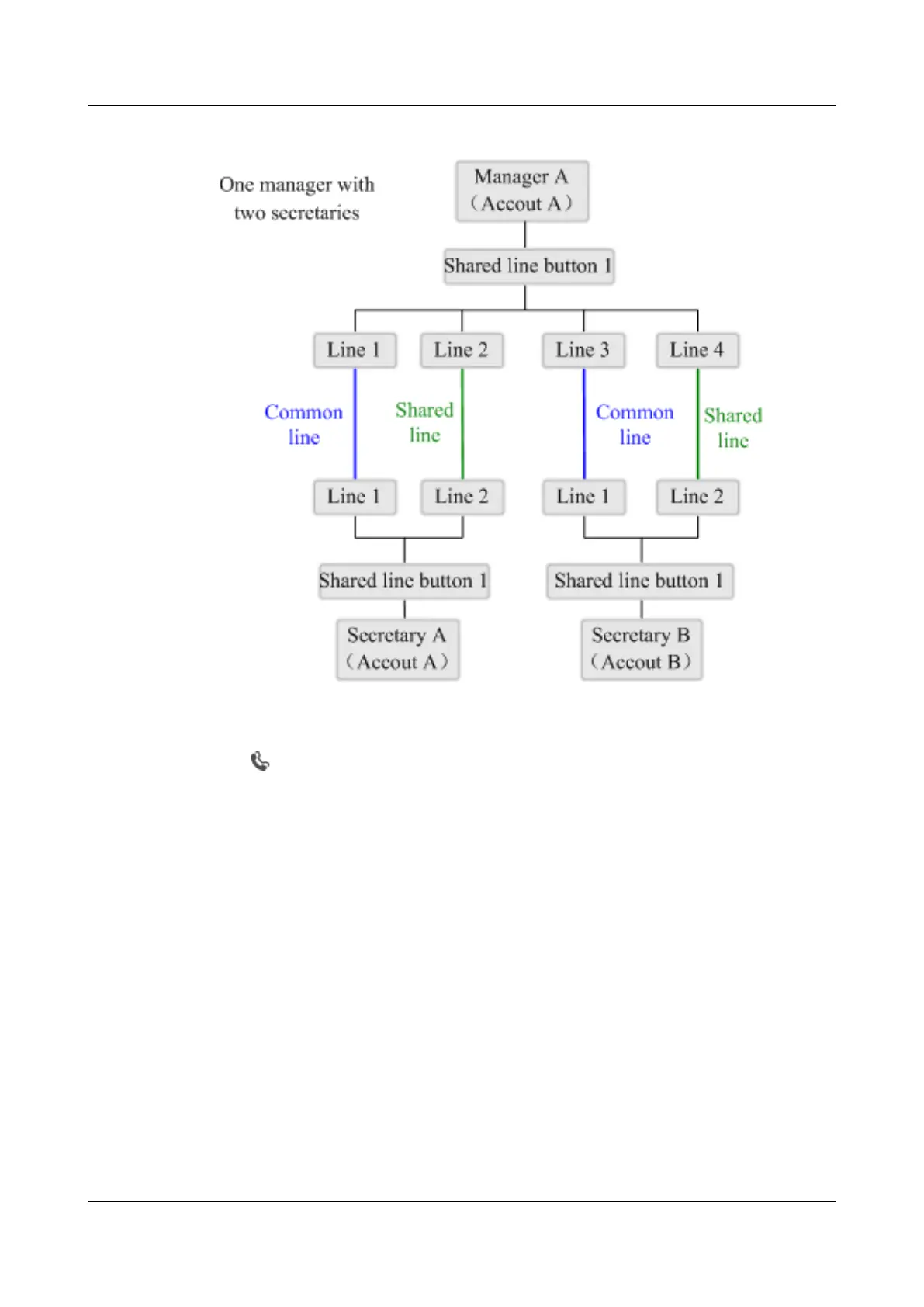
Figure 15-1 Line mappings between A, B, and C
The manager's line and secretaries' lines are shared. When a user calls the shared line, the phones
of both the manager and secretaries ring at the same time. After a shared line is configured, the
icon
is displayed for the line button.
A Third Party Calls a Shared Line and the Manager Directly Answers the Call
A third-party user D calls A who then directly answers the call.
Step 1 D calls A.
The phones of A, B, and C ring simultaneously.
Step 2 A directly answers the call, because this call is from a VIP.
The phones of B and C stop ringing. The shared line is in talking state, which is displayed on
the phones of A, B, and C.
Step 3 A or D hangs up to end the call.
The shared line is in idle state, which is displayed on the phones of A, B, and C.
----End
A Third Party Calls a Shared Line and a Secretary Answers and Transfers the Call
to the Manager
A third-party user D calls A. B answers the call and transfers it to A.
eSpace 8950 IP Phone
User Guide
15 Advanced Secretary
Issue 03 (2014-10-16) Huawei Proprietary and Confidential
Copyright © Huawei Technologies Co., Ltd.
46



 To Next Page