SUN2000L-(2KTL-5KTL)
User Manual
Huawei Proprietary and Confidential
Copyright © Huawei Technologies Co., Ltd.
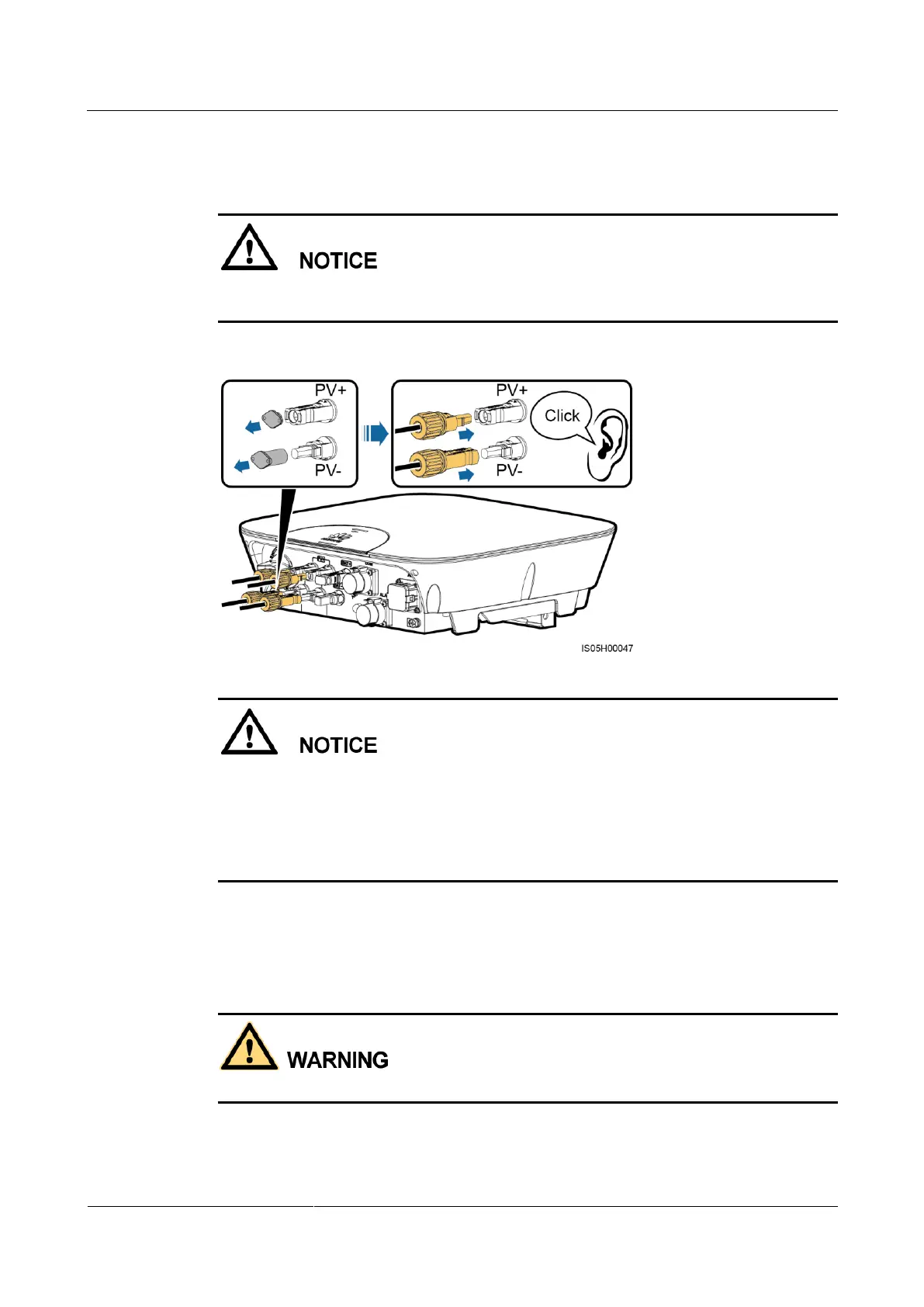
Step 3 Insert the positive and negative connectors into corresponding DC input terminals on the
SUN2000L.
After the positive and negative connectors snap into place, pull the DC input power cables
back to ensure that they are connected securely.
Figure 5-15 Connecting DC input power cables
If polarity of the DC input power cable is reversed and the DC switch is ON, do not turn off
the DC switch immediately or unplug positive and negative connectors. The device may be
damaged if you do not follow the instruction. This damage is not covered under any warranty
or service agreement. Wait until the solar irradiance declines at night and the PV string current
reduces to below 0.5 A, and then turn off the DC switch and remove the positive and negative
connectors. Correct the string polarity before reconnecting the string to the SUN2000L.
----End
Follow-up Procedure
Before removing the positive and negative connectors, ensure that the DC switch is OFF.
To remove the positive and negative connectors from the SUN2000L, insert an open-end
wrench into the notch and press the wrench with an appropriate force.











 To Next Page