16
Relay Function
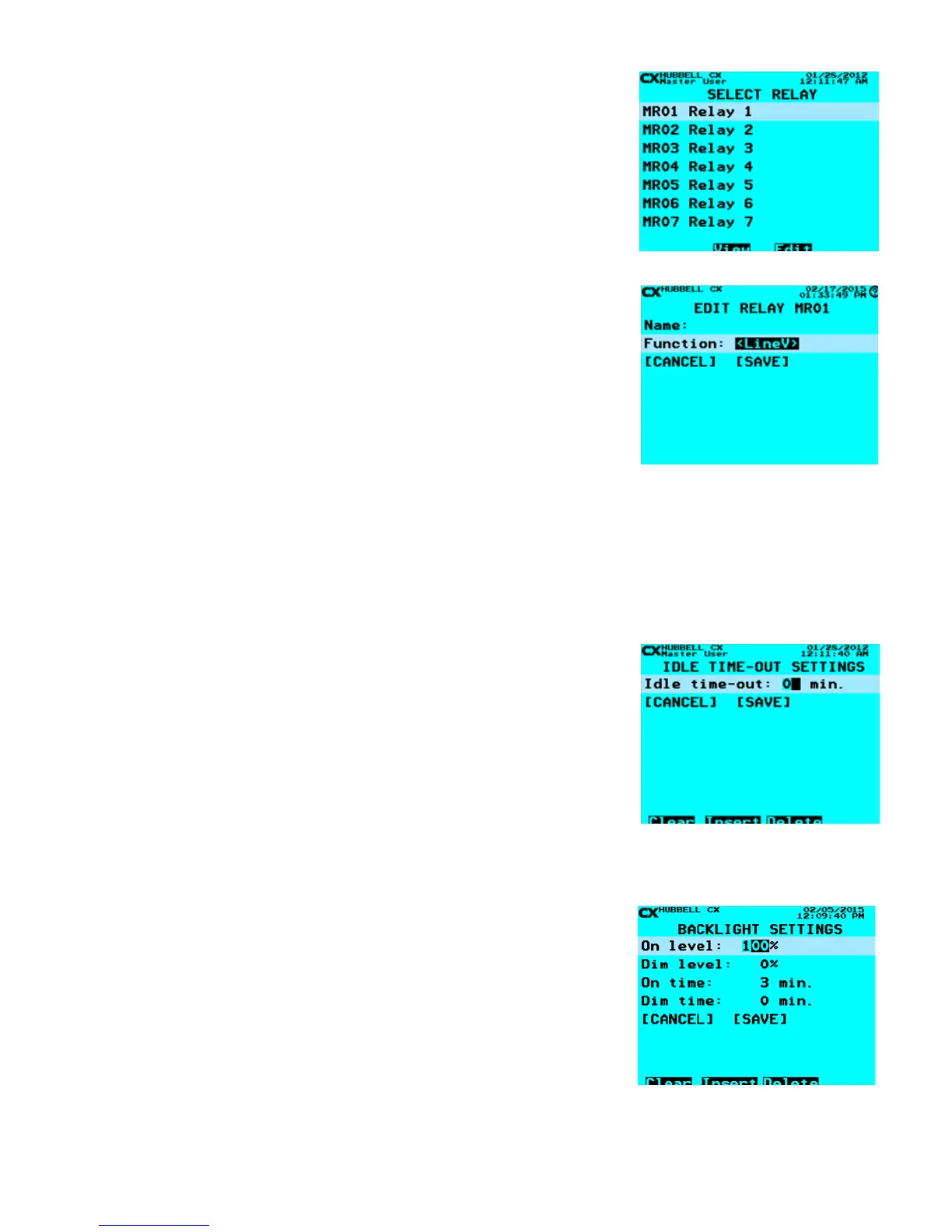
Relay Function denes relay names, and the function of each relay.
• From the Main Menu, select System Settings > Relay Function. Then press
ENTER
• Select Relay – Scroll to Relay to program. Then press ENTER or Function
Keys.
• Name Relay – Use the Function keys and the alphanumeric keypad to edit
the Relay name. Refer to “Function Keys” section at the beginning of the
Programming Section of this manual.
• Function – Select the desired function by scrolling Left/Right using the following
choices
• No Blink: The relay does not participate in Blink Alerts, (The Default
Setting)
• Blink: The relay participates in Blink Alerts
• HID: The relay does not blink, but will be extended by the switch during
the warning period. (Use when including HID sources in Blink Alert
Groups)
• LineV: Circuit has a Line Voltage Control Switch that is operated by 3- or
5-second intervals of power loss to the switch to activate the switch ON or
OFF at a scheduled event.
When nished scroll down to highlight SAVE. Press ENTER to save your changes.
Note: The use of the HID type requires another Blink type relay in the same group to ash the Blink Alert. The default setting for all
relays is the “No Blink” function.
Idle Time-Out Settings
Idle Timeout denes the time after which the CX Controller will log out an inactive user.
The system default is “2”. When set as “0” the Idle Timeout is in the “disabled” state.
Logging Out involves reverting to the CX Lighting Control Home Screen.
• From the Main Menu, select System Settings > Idle Time-Out Settings. Then
press ENTER.
• Idle time-out: The number of minutes (1-99) of idle time before forced log-out, or
0 to “disable”
• When nished scroll down to highlight SAVE. Press ENTER to save your
changes.
Backlight Settings
Backlight Settings dene the backlight parameters of the CX Controller screen.
• From the Main Menu, select System Settings > Backlight Settings. Then
press ENTER.
• On level: The screen brightness when the controller is in use
• Dim level: The screen brightness when the controller is idle
• On time: The number of minutes before screen dimming begins
• Dim time: The number of minutes to dim from On level to Dim level
• When nished scroll down to highlight SAVE. Press ENTER to save your
changes
Name Relay and Select Type
Idle Time-Out Settings


 To Next Page