19
Example How Scenarios Work
For this exercise we will be demonstrating the Scenario steps to achieve manual ON/ automatic
OFF for a room with a motion sensor and a switch.
• From the Main Menu, select Scenarios >Factory Defaults. Then press ENTER.
• Use the Up/Down arrow to choose Indoor Scenarios. Then press ENTER
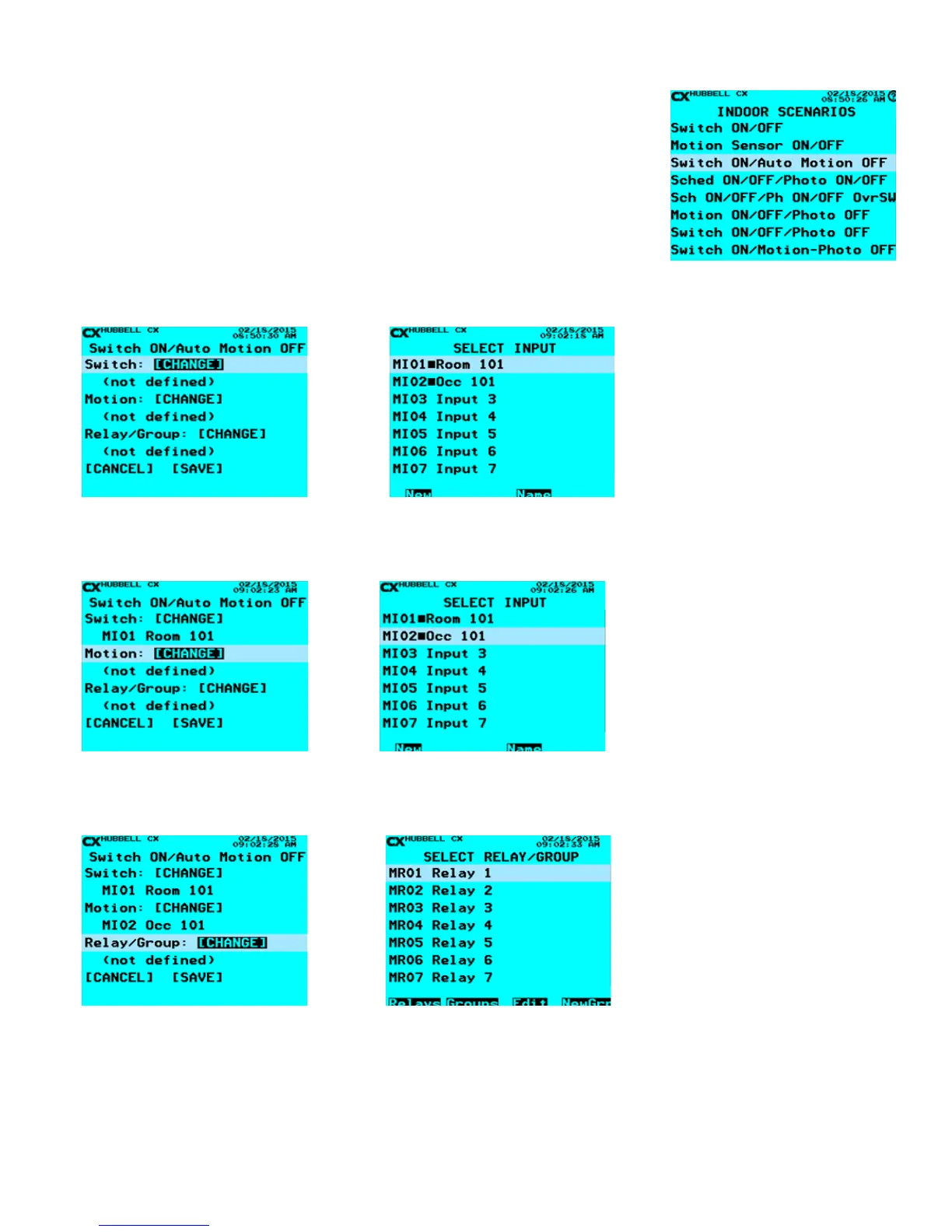
• Use the Up/Down arrow key to select Switch ON/Auto Motion OFF. If the HELP
button is pressed while highligting the selection a pop-up screen with the message,
“Manual switch turns lights ON/OFF; motion sensor automatically turns lights OFF.
Lights turn ON only if switch is turned ON rst.”
7. When all the values have been entered select [SAVE] and press ENTER to return to the Scenario Screen.
The following prompts appear and need to be completed in the order from top to bottom. Once each section is completed the User
will be brought to the Scenarios Screen until SAVE has been selected.
1. Dene the Switch. Highlight [CHANGE]
next to Switch, press ENTER
2. Select the Input the Momentary Switch will be connected, Highlight and
press ENTER. The Name can be changed by highlighting the Input needed and
selecting the Function Key under Name and using the alphanumeric keypad.
3. Dene the Motion Sensor. Highlight
[CHANGE] next to Motion, press ENTER
4. Select the Input the Motion Sensor will be connected, Highlight and press
ENTER. The Name can be changed by highlighting the Input needed and
selecting the Function Key under Name and using the alphanumeric keypad.
5. Dene the Relay/Group. Highlight
[CHANGE] next to Relay/Group, press
ENTER.
6. Select the Relay or Group to be controlled, press ENTER. If a Group needs to
be created, use the F4 function key to create the Group by selecting NewGrp and
selecting your relays. Edit allows the User to change the function of the Relay,
(see Relay Function). F1 and F2 when pressed allow the User to quickly go to the
top of the list of Relays or Groups without scrolling.



 To Next Page