131
Radar Overview
RADAR TRANSMISSION SETTINGS
T
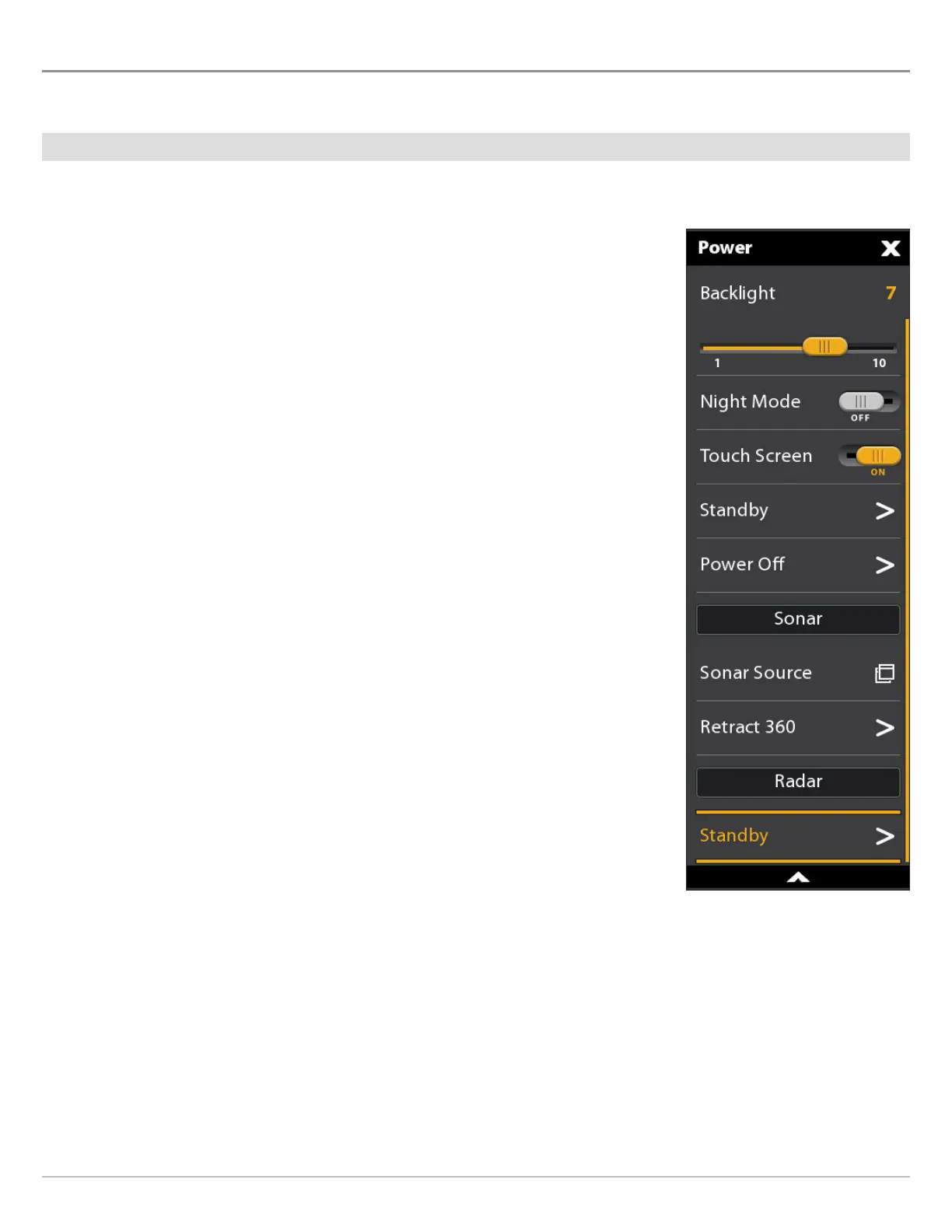
he Radar Transmit menu can be accessed from the Power X-Press Menu, the Radar X-Press Menu, and the Radar tab in Settings.
Start/Stop Radar Transmission
Start Transmission: Humminbird CHIRP Radar
1. Power On: Turn on the radar power source (breaker or switch).
2. Open the Power X-Press Menu: Tap the top, right corner of the status bar.
OR
Press the POWER key.
3. Under Radar, select Standby.
4. Reopen the Power X-Press Menu: Repeat step 2. Under Radar, select Transmit.
Start Transmission: Humminbird Radar
1. Power On: Turn on the radar power source (breaker or switch).
2. Tap the top, right corner of the status bar.
OR
Press the POWER key.
3. Select Radar Transmit > On.
Stop Transmission
1. Tap the top, right corner of the status bar.
OR
Press the POWER key.
2. Humminbird CHIRP Radar: Under Radar, select Off.
Humminbird Radar: Select Radar Transmit > Off.
3. Power Off: Turn off the power source from the breaker or switch.
Starting Humminbird
CHIRP Radar Transmission



 To Next Page