183
Side Imaging
Turn on/off Contour Mode
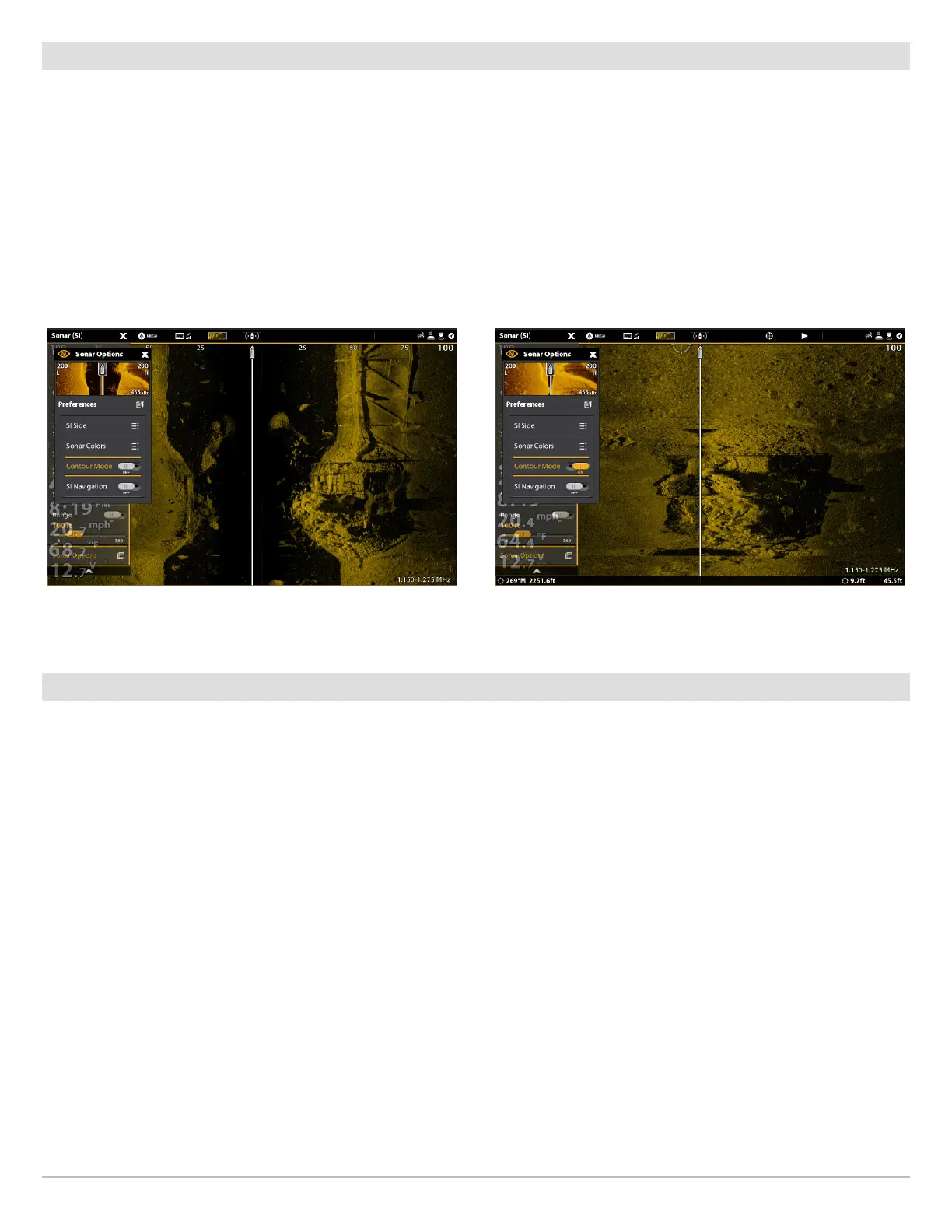
Contour Mode controls how the water column is displayed in the Side Imaging Views. When Contour Mode turned off, the water
column is displayed on the view. The location of a target on the display is based on the slant range to the target.
When Contour Mode is turned on, the bottom is graphed at a constant point on the display, regardless of changes in depth. The Side
Imaging beams are divided by a vertical line. The water column is removed from the view, which allows the display to show targets
at their linear horizontal distance. The location of a target may be easier to interpret when the water column is removed.
1. From the Preferences menu, select Contour Mode.
2. Tap the on/off button, or press the ENTER key, to turn it on/off.
Turn on/off SI Navigation
SI Navigation controls how the boat icon is displayed in Side Imaging Views. See Navigation in Sonar Views for more information.
If SI Navigation is turned on, the boat icon indicates the direction the boat needs to turn to reach the next waypoint during navigation.
If SI Navigation is turned Off, the boat icon will not change during navigation although you can still mark waypoints and start
navigation from a Side Imaging View.
1. From the Preferences menu, select SI Navigation.
2. Tap the on/off button, or press the ENTER key, to turn it on/off.
Contour Mode Off Contour Mode On
The water column is displayed on the Side Imaging View. The water column is removed from the Side Imaging View.



 To Next Page