WeatherTRAK 2-Wire Controller Installation Guide
15
©2020 HydroPoint Data Systems Inc. All rights reserved. 800.362.8774 • hydropoint.com
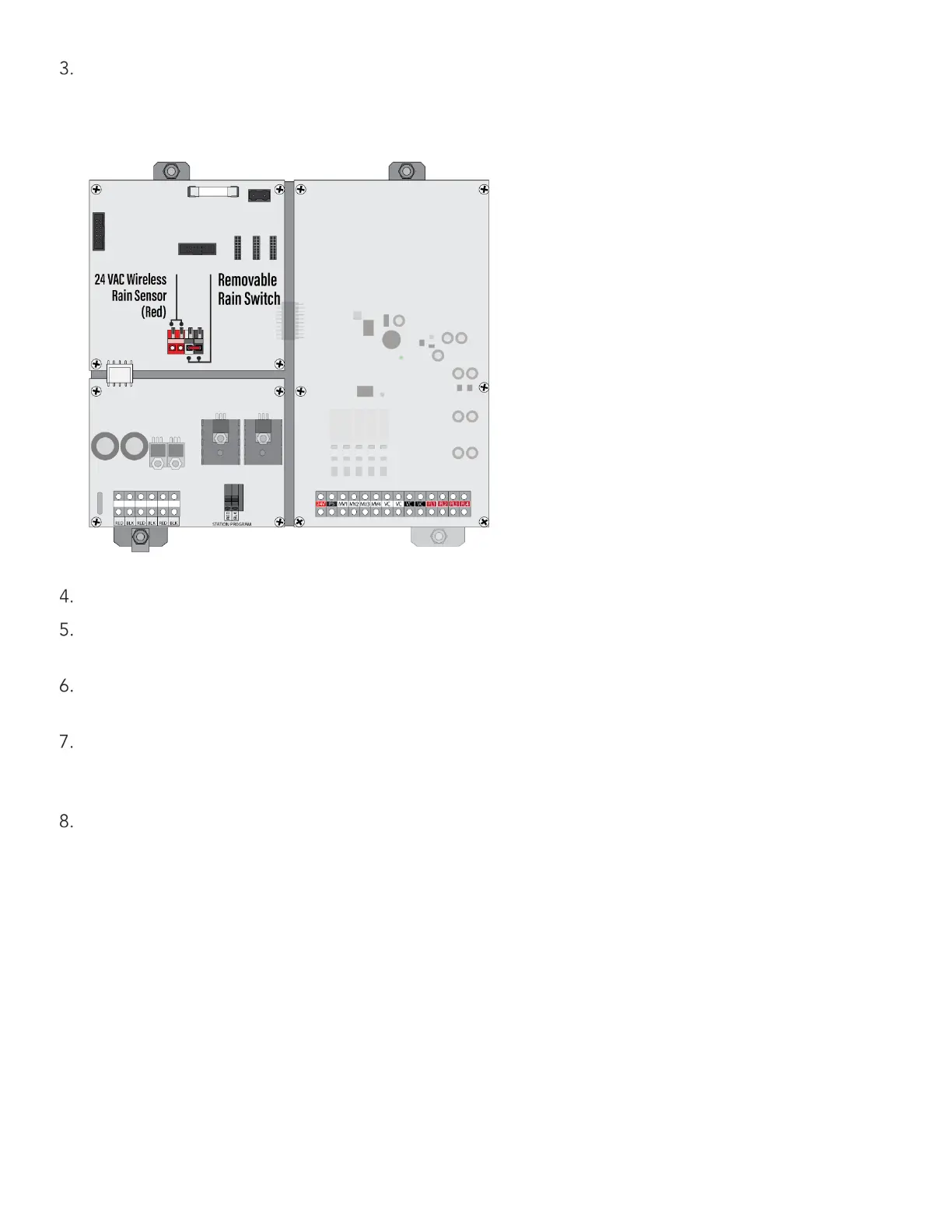
Locate the rain sensor input terminal block in the upper-left corner of the 24-station input/output board.
This terminal block is designed to be removable to facilitate faster connection of rain sensor wiring. To
remove, simply wiggle the terminal block side to side. Remove the rain switch wire jumper (See figure
below).
Remove approximately 3/8” of wire insulation to expose the solid or stranded conductor.
Confirm the lever of the screwless terminal is in the up or unlocked position. Insert the exposed wire and
press the lever downward to lock. Confirm contact by gently pulling down on the inserted wire.
Connect the red wires to the 24 VAC terminals to red colored terminals. These terminals are not polarized;
either wire can be inserted into either of the two far left terminal positions.
Insert the white wire into the white colored terminal and the brown wire into the black colored terminal as
shown in Figure 10. Confirm the lever has not clamped down on the wire insulation which can result in
electrical continuity and operation of the rain switch.
Locate the rain switch transmitter within the manufacturer’s recommended range. Locate the transmitter
where it will receive rainfall without obstruction. Confirm communication to the receiver before mounting
permanently.


 To Next Page