WeatherTRAK 2-Wire Controller Installation Guide
16
©2020 HydroPoint Data Systems Inc. All rights reserved. 800.362.8774 • hydropoint.com
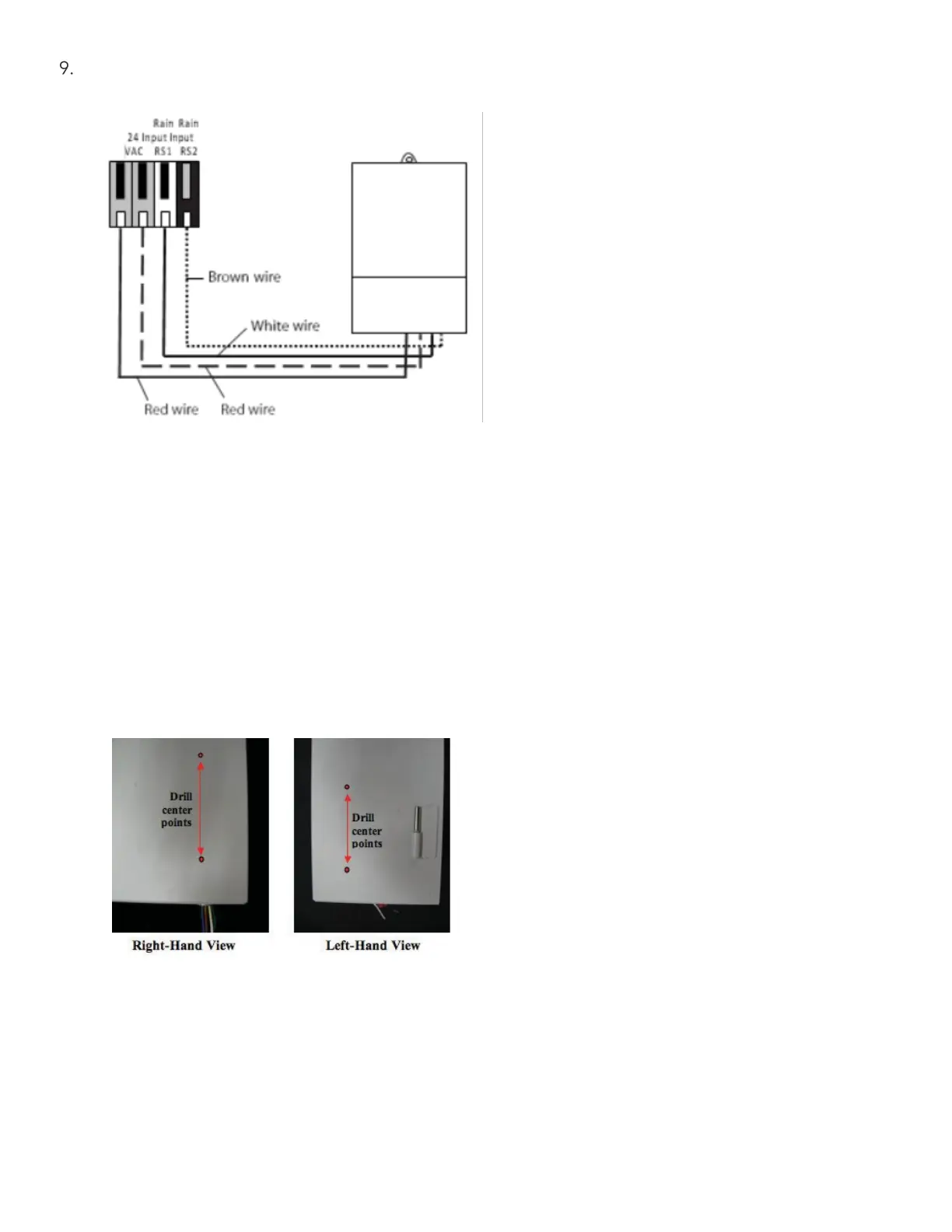
Test the rain sensor function by pressing the test switch on top of the transmitter for a brief period of time.
Confirm the controller displays “RainSwitch” in the RUN menu when the test switch is depressed.
Note: For other compatible rain switch wiring diagrams, please read the manufacturer’s instructions for
normally closed rain switches.
Center Drill Points for Rain Sensor Mounting
The bottom left and right outer sides of the enclosure have two sets of drilling center points as shown below.
These drilling points are for enclosure mounting for specific Irritrol or Toro wireless or wired rain or rain/freeze
sensors. Two self- tapping stainless steel screws are taped to the inside of the enclosure to mount a rain
sensor receiver when needed.
Note: Mount the rain sensor receiver on the opposite side of the transformer location to avoid reception
issues for wireless models.
Irritrol Wireless Rain Switch Series


 To Next Page