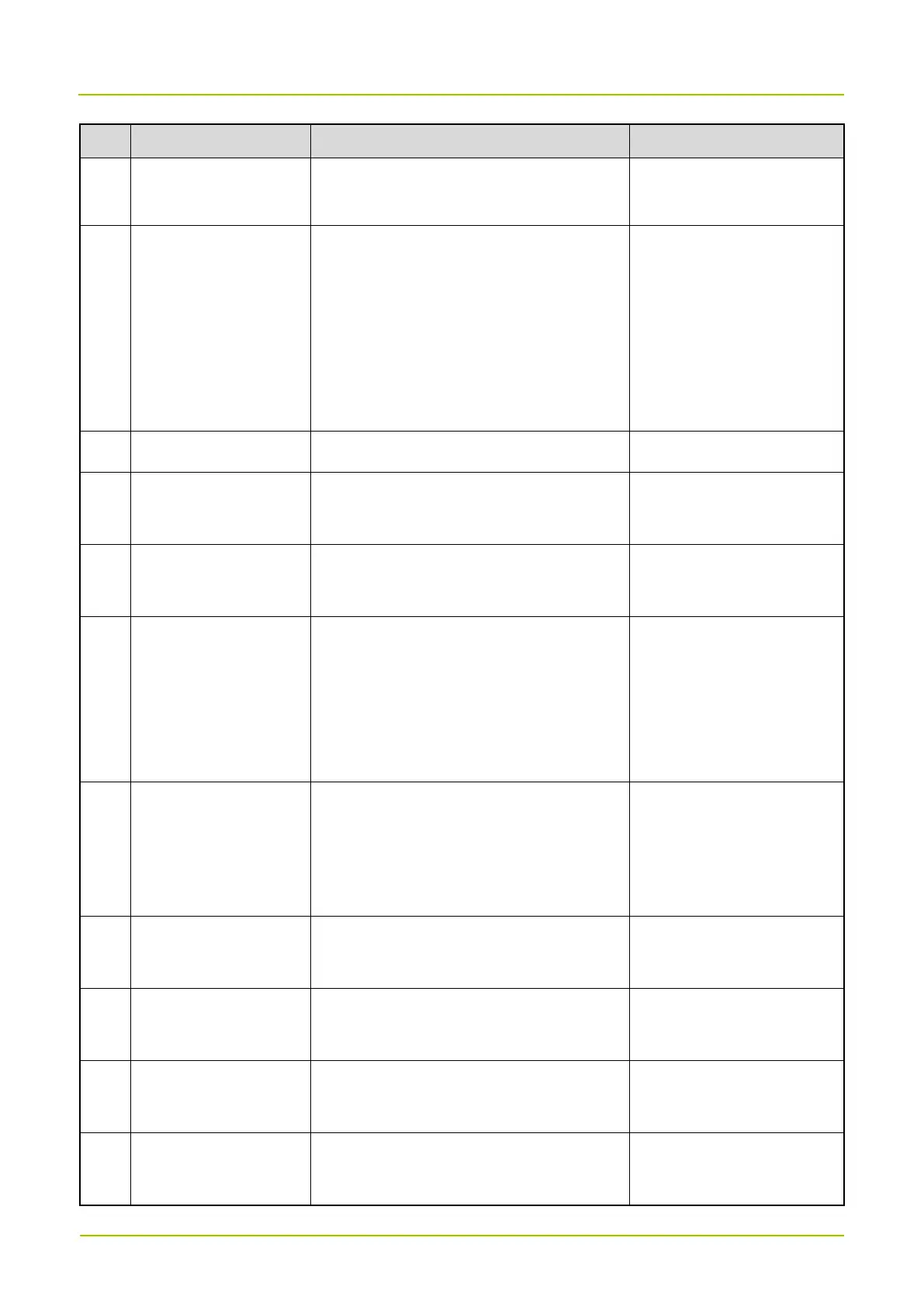
No. Test Item
Standard for Judgement
Note
the radio automatically completes and
exits the test.
11 EarPhone Test
Insert the earpiece: The LCD displays a
prompt that the earpiece is connected.
Speak to the earpiece Mic: You can hear
the voice in the earpiece speaker.
Press the
PTT
key on the earpiece: If
succeeded, select
PASS
.
12 Front Camera Test The camera takes photos clearly.
13 Rear Camera Test
Tap the screen to focus, and then take a
photo. The photo is clear.
14 Flashlight Test
The flashlight lights up when it is turned
on.
15 Mic Test
When you align with the bottom
microphone and speak, the test value
exceeds 88 dB. Then the radio
automatically completes and exits the
test.
16 Deputy Mic Test
When you align with the top microphone
and speak, the test value exceeds 88 dB.
Then the radio automatically completes
and exits the test.
17 Speaker Test
The speaker plays two numbers. Check
whether the sound is clear without noise.
The two numbers are 0 and
a random number.
18 Keyboard Test
The radio responds when you press the
five keys on it.
19 LCD Brightness Test
Check whether the LDC turns bright and
dark normally.
20 LCD RGB Test
Check whether any defect pixel exists in
different colors.



 To Next Page