14
4
MEMORY OPERATION
Memory names
■
Programming memory names ï
The memory channel can display a 6-character name in-
stead of the programmed frequency.
q In the frequency mode, rotate [DIAL] to select the desired
frequency in the frequency mode.
w Push
,
then push [MR•MW] to program the contents
into the selected memory channel.
e Rotate [DIAL] to select the desired memory channel to be
programmed.
• Push , then push [0•BANK], and rotate [DIAL] to select the
BANK number, if desired. Push [CLR•DEL] to exit the BANK se-
lection mode.
r Push [MR•MW] to enter the memory name programming
mode.
• “-- -- -- -- -- -- ” appears on the display.
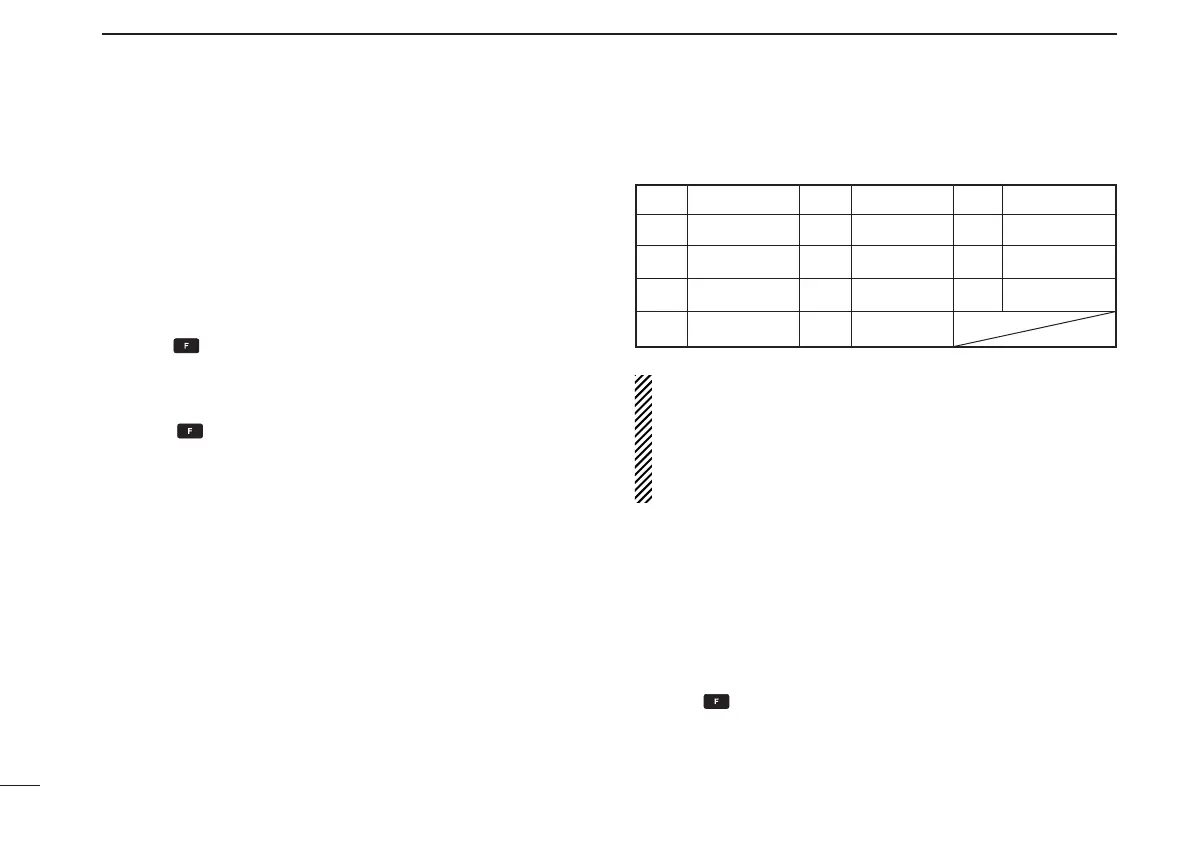
t Push the appropriate digit key several times to select the
desired character, as listed to the right.
• To erase a character, overwrite with a space (displayed as _).
• To move the cursor forwards or backwards, use [DIAL].
y Push [ENT•WX] to program the name.
• The memory name stops ashing.
• When no name is programmed, the display shows the operat-
ing frequency.
• To clear the entered memory names, push [CLR•DEL] before
pushing [ENT•WX].
NOTE: When programming the memory name to the pro-
grammed memory channel do the following.
q Follow the same steps as in “Transferring memory con-
tents” (see p. 12).
w Follow steps w–y in “Programming memory names”
(see left column).
Clearing the memory contents
■
Unwanted memory channels can be cleared.
q Select the memory channel to be cleared.
w Push
,
then hold down [CLR•DEL] for 1 second.
• “-- -- -- -- -- --” appears momentarily, then the next selectable
channel appears.
Key Character Key Character Key Character
1 1, Q, Z 2 2, A, B, C 3 3, D, E, F
4 4, G, H, I 5 5, J, K, L 6 6, M, N, O
7 7, P, R, S 8 8, T, U, V 9 9, W, X, Y
ENT Program 0 0, space, -



 To Next Page