17
5
SCAN OPERATION
Weather channel scan
■
(U.S.A. version only)
q Push , then push [ENT•WX] to select a weather chan-
nel.
w Set the squelch to the point where noise is just muted.
e Push , then push [ANL•SCAN] to start the scan.
• When a signal is received, the scan pauses until it disappears.
• To change the scanning direction, rotate [DIAL].
r To stop the scan, push [CLR•DEL].
“TAG” channel setting
■
Memory and weather channels* can be specified to be
skipped for the memory and weather channel* scans re-
spectively. The “TAG” channel function is only available dur-
ing the scan operation.
q Push [MR•MW] to select the memory mode; or, push ,
then push [ENT•WX] to select a weather channel.*
w Select the desired memory channel to be a “TAG” chan-
nel.
• Push , then push [0•BANK], and rotate [DIAL] to select the
BANK number, if desired. Push [CLR•DEL] to exit the BANK se-
lection mode.
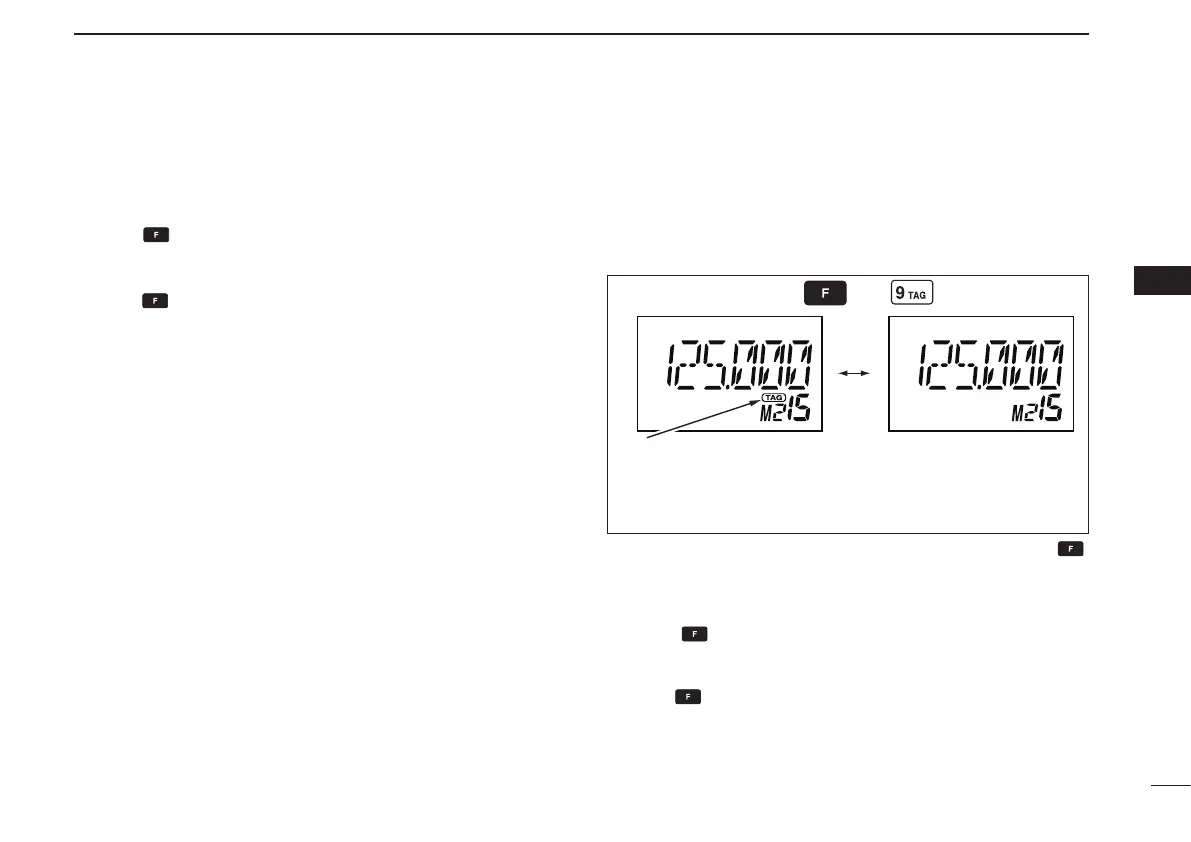
e Push
,
then push [9•TAG] to set a “TAG.”
• “TAG” appears.
• Non-“TAG” channels are skipped during scan.
r To cancel the “TAG” setting, repeat the above steps.
*Weather channel: U.S.A. version only.
Memory channel 15 is
scanned during memory
scan.
Memory channel 15 is
skipped during scan.
Appears the “TAG” indicator.
2
3
1
4
5
6
7
9
10
8
12
13
11
14



 To Next Page