24
6
VOR NAVIGATION (IC-A24 ONLY)
Duplex operation
■
(U.S.A. version only)
The duplex function allows you to call a flight service station
while receiving a VOR station. The duplex function requires
frequency programming for the flight service station in ad-
vance.
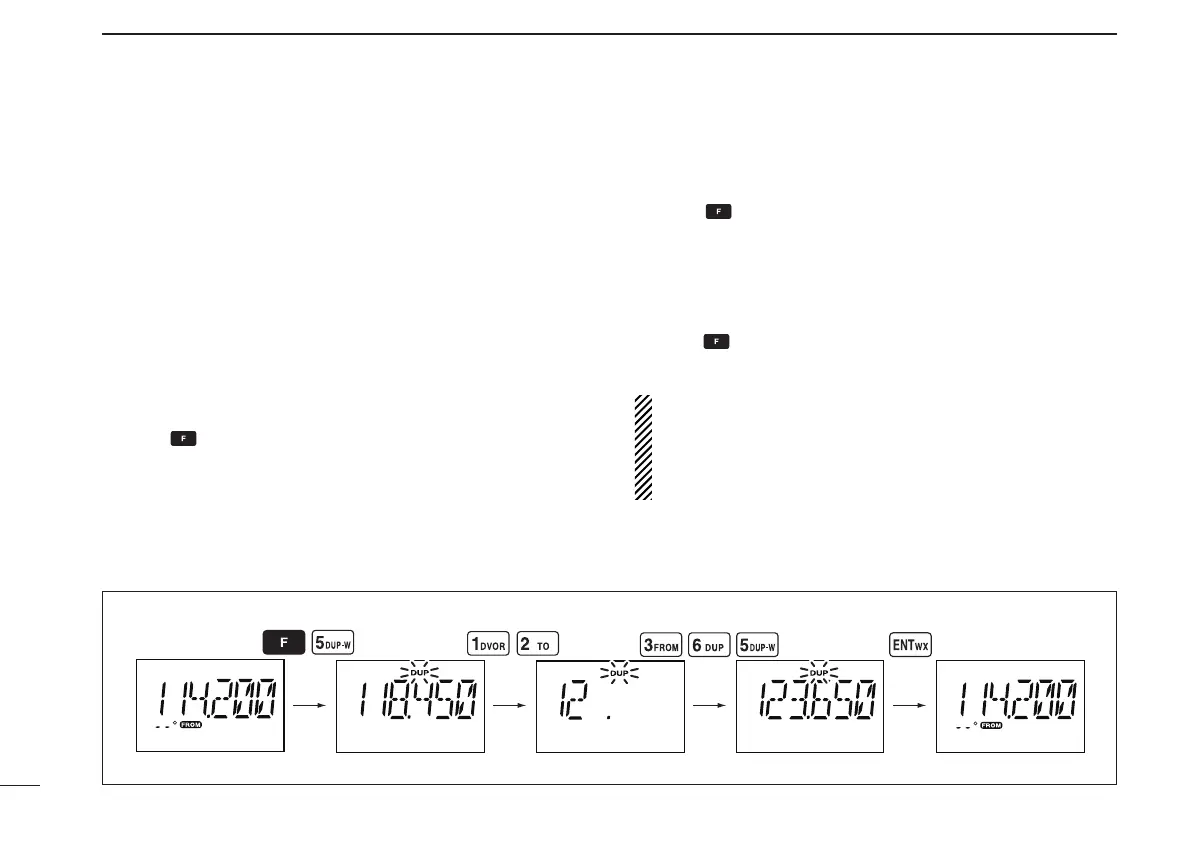
Programming a duplex frequency ï
q Push [CLR•DEL] to select the frequency mode.
w Set a NAV band frequency using the tuning dial or keypad.
• NAV band frequency range: 108.000–117.975 MHz
e Push , then push [5•DUP-W].
• “DUP” ashes and transmit frequency appears.
r Set the frequency of the flight service station using the
tuning dial or keypad. When using the tuning dial, push
[ENT•WX] after setting a frequency.
• The displayed frequency returns to the NAV band frequency.
Operating the duplex function ï
q Set the desired frequency in the NAV band.
• NAV band frequency range: 108.000–117.975 MHz
w Push , then push [6•DUP] to turn the duplex function
ON.
• “DUP” appears on the function display.
e Hold down [PTT] to transmit at the pre-programmed
transmit frequency.
r Release [PTT] to return to receive.
t Push , then push [6•DUP] to cancel the function.
• “DUP” disappears on the function display.
NOTE: A duplex frequency can be programmed into each
memory channel independently. Set a duplex frequency
before programming the memory channel, if desired. The
duplex ON/OFF setting can also be programmed into a
memory channel.
EXAMPLE: Programming 123.65 MHz as the transmit frequency in the duplex function.



 To Next Page