25
7
CLONING
Cloning allows you to quickly and easily transfer the
programmed data from one transceiver to another
transceiver, or, data from a PC to a transceiver, using the
optional CS-A24 (#02) c l o n i n g s o f t w a r e .
Transceiver to transceiver cloning ï
q Connect the OPC-474 CLONING CABLE with adapter
plugs to the [SP/MIC] jack of the master and sub trans-
ceivers.
• The master transceiver is used to send data to the sub trans-
ceiver.
w While holding down [MR•MW], push
[PWR] to enter the cloning mode (to
operate the master transceiver
only).
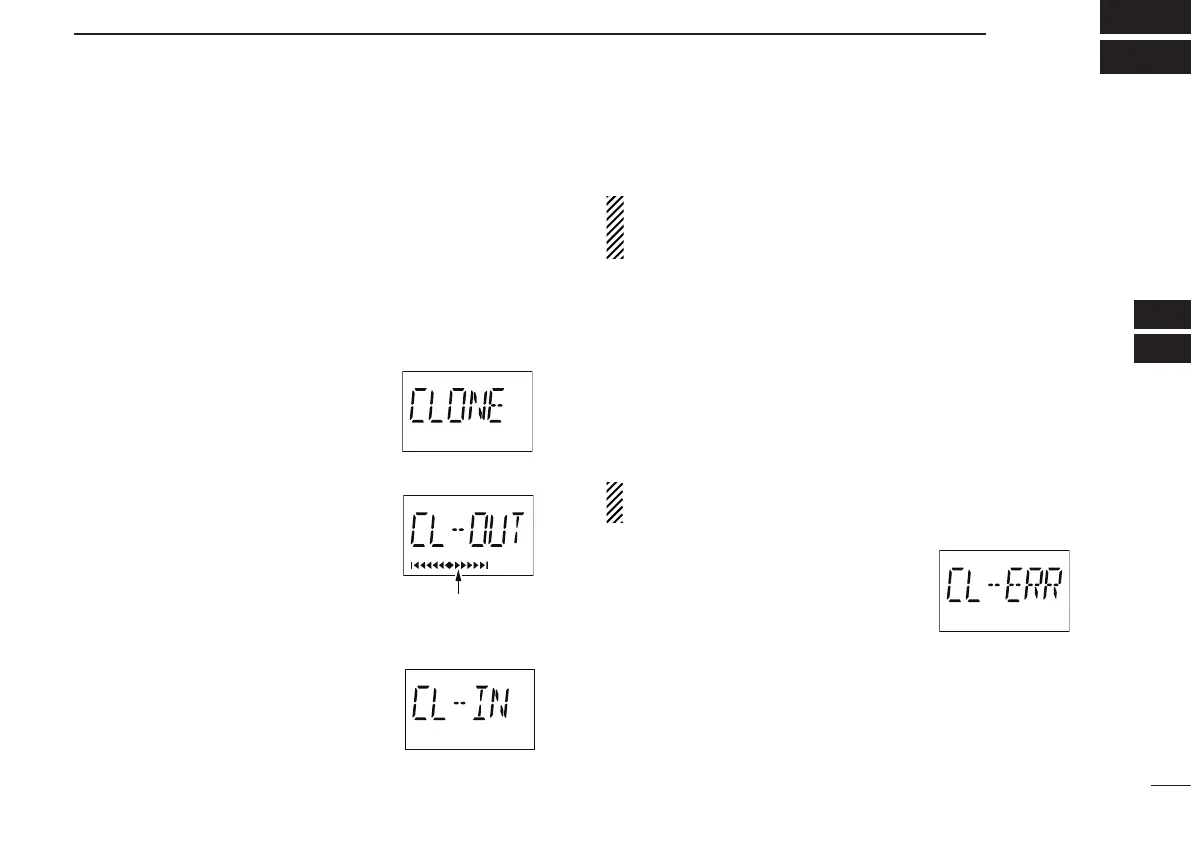
• “CLONE” appears and the transceivers
enter the clone standby condition.
e Push [MR•MW] on the master trans-
ceiver.
• “CL-OUT” appears in the master trans-
ceiver’s display.
• “COURSE DEVIATION NEEDLES”
shows that cloning is taking place
• “CL-IN” appears automatically in the
sub transceiver’s display.
r When cloning is finished, turn power OFF, then ON again
to exit the cloning mode.
NOTE: DO NOT transfer the data from a IC-A24 to a IC-
A6, when the data contains the NAV band data. In such
case, a cloning error may occur.
Cloning using PC ï
Data can be cloned to and from a PC (Microsoft
®
Windows
®
XP) using the optional CS-A24 (#02) c l o n i n g s o f t w a r e and
the optional OPC-478 (RS-232C type), OPC-478U or OPC-
478UC (USB type) c l o n i n g c a b l e . Consult the CS-A24
(#02) c l o n i n g s o f t w a r e HELP file for details.
Cloning error ï
NOTE: DO NOT push [ENT•WX] on the sub transceiver
during cloning. This will cause a cloning error.
When the display at right appears, a
cloning error has occurred.
In this case, both transceivers automatically return to the
clone standby condition and cloning must be repeated.
Microsoft and Windows are registered trademarks of Micro-
soft Corporation in the U.S.A. and other countries.
“COURSE DEVIATION
NEEDLES” shows that
cloning is taking place.
2
3
1
4
5
6
7
9
10
8
12
13
11
14



 To Next Page