27
8
BATTERY PACKS
Regular charging ï
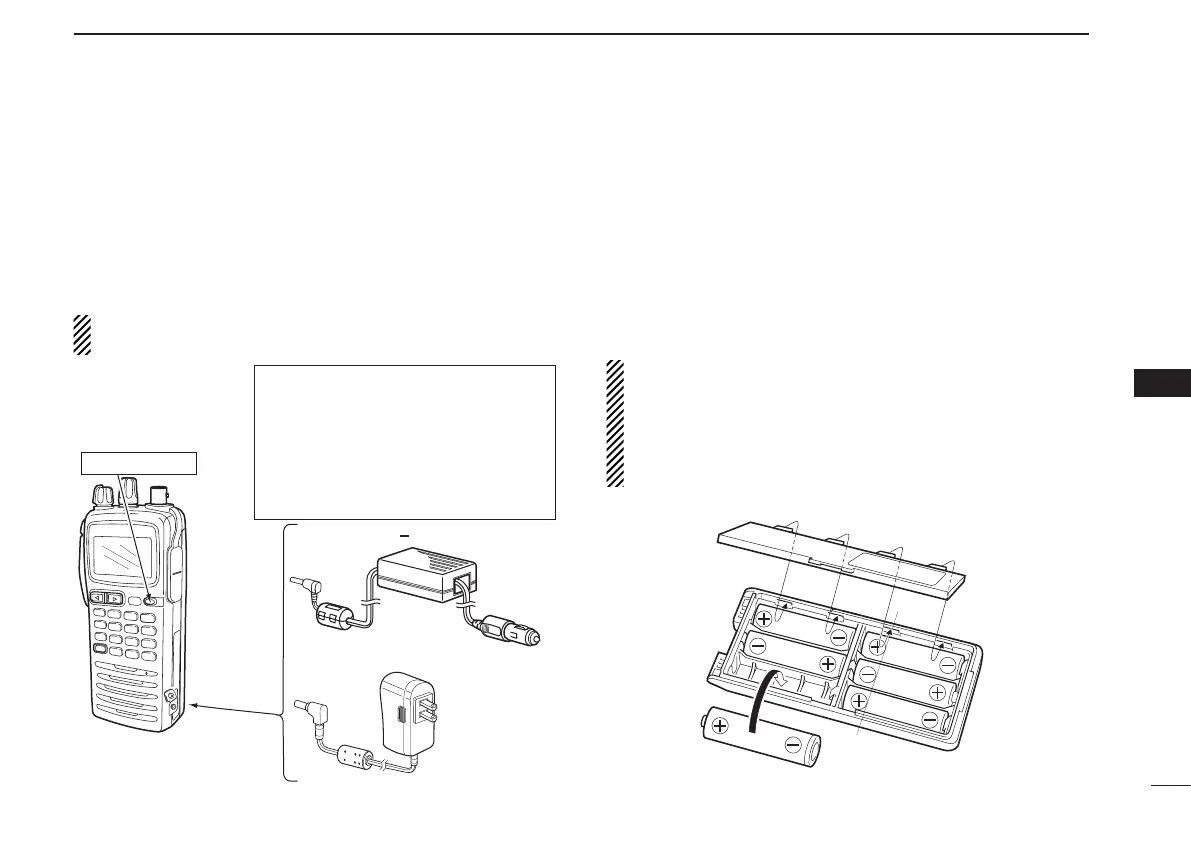
q Attach the battery pack to the transceiver.
w Be sure to turn the transceiver power OFF.
e Connect the wall charger or optional cable (CP-20) as
shown below.
r Charge the battery pack approximately 8 hours, depend-
ing on the remaining power condition.
DO NOT charge the BP-210N more than 12 hours. Other-
wise, the BP-210N will be damaged.
Optional battery case
■
When using a battery case attached to the transceiver, in-
stall 6 × AA (LR6) size Alkaline batteries, as illustrated
below.
q Remove the battery case from the transceiver.
w Install 6 × AA (LR6) size Alkaline batteries.
• Be sure to observe the correct polarity.
CAUTION:
• When installing batteries, make sure they are all the
same brand, type and capacity. Also, do not mix new
and old batteries together.
• Keep battery contacts clean. It’s a good idea to clean
battery terminals once a week.
To [DC 11V]
IC-A24/A6 with the
attached battery pack
CP-20 (for 11 24 V)
(optional)
To the cigarette
lighter socket
To AC outlet
The shape may
differ depending
on the version.
Wall charger
Tu rn power OFF
R WARNING!
• NEVER modify the CP-20. A modifica-
tion could cause a fire or electrocution.
• NEVER cut or fray the CP-20’s power
cable when disconnecting/connecting
the CP-20 from/to the cigarette lighter
socket.
2
3
1
4
5
6
7
9
10
8
12
13
11
14



 To Next Page