19
6
VOR NAVIGATION (IC-A24 ONLY)
VOR functions
■
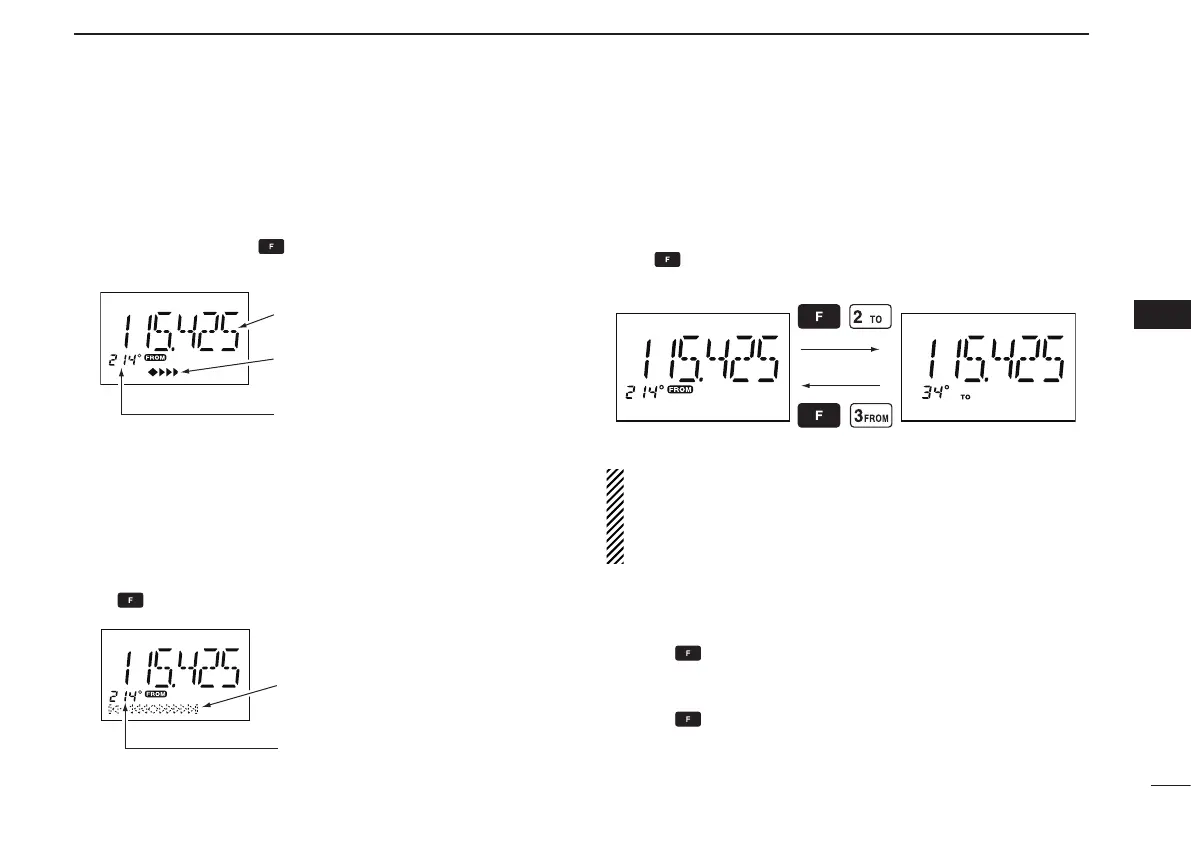
To select the CDI mode ï
To show the deviation between your flying course and the
desired course, push , then push [4•CDI] to select the
CDI mode.
To select the DVOR mode ï
When entering the NAV band, 108.000–117.975 MHz, the
IC-A24 selects the DVOR mode automatically.
To show your aircraft’s direction to (or from) the VOR station,
push , then push [1•DVOR] to select the DVOR mode.
‘TO’ or ‘FROM’ flag selection ï
The to-from flag indicators indicate whether the VOR naviga-
tion information is based on a course leading to the VOR
station or leading away from the VOR station.
Push , then push [3•FROM] or [2•TO] to change the flag
from ‘TO’ to ‘FROM’ or vice versa, respectively.
NOTE:
• When using the ‘TO’ ag and passing through the VOR station,
the ‘TO’ ag changes to the ‘FROM’ ag automatically.
• When turning power ON, the ‘FROM’ ag is selected automati-
cally.
Selecting the next VOR station when using ï
CDI mode
(when using the course deviation needle)
q Push , then push [1•DVOR] to select the DVOR mode.
w Push the keypad or rotate [DIAL] to set the next VOR sta-
tion’s frequency.
e Push , then push [4•CDI] to select the CDI mode.
• Select ‘TO’ or ‘FROM’ ag, if desired.
Operating frequency can not be
changed.
Each course deviation arrow
indicates a two-degree deviation.
Course indicator is fixed, but it
can be changed with the tuning
[DIAL] or keypad.
Course deviation needle does not
appear.
Course indicator shows your
direction to (or from) the VOR
station.
2
3
1
4
5
6
7
9
10
8
12
13
11
14



 To Next Page