35
9
DSC OPERATION
■ Receiving DSC calls (Distress)
The transceiver receives Distress calls, Distress Acknowledgements, and Distress Cancel
calls. When you receive a call, an emergency alarm sounds.
NOTE: The screens that are displayed when a Distress call or an Acknowledgement
is received slightly dier from one another. The following steps are described using an
example of receiving a Distress call.
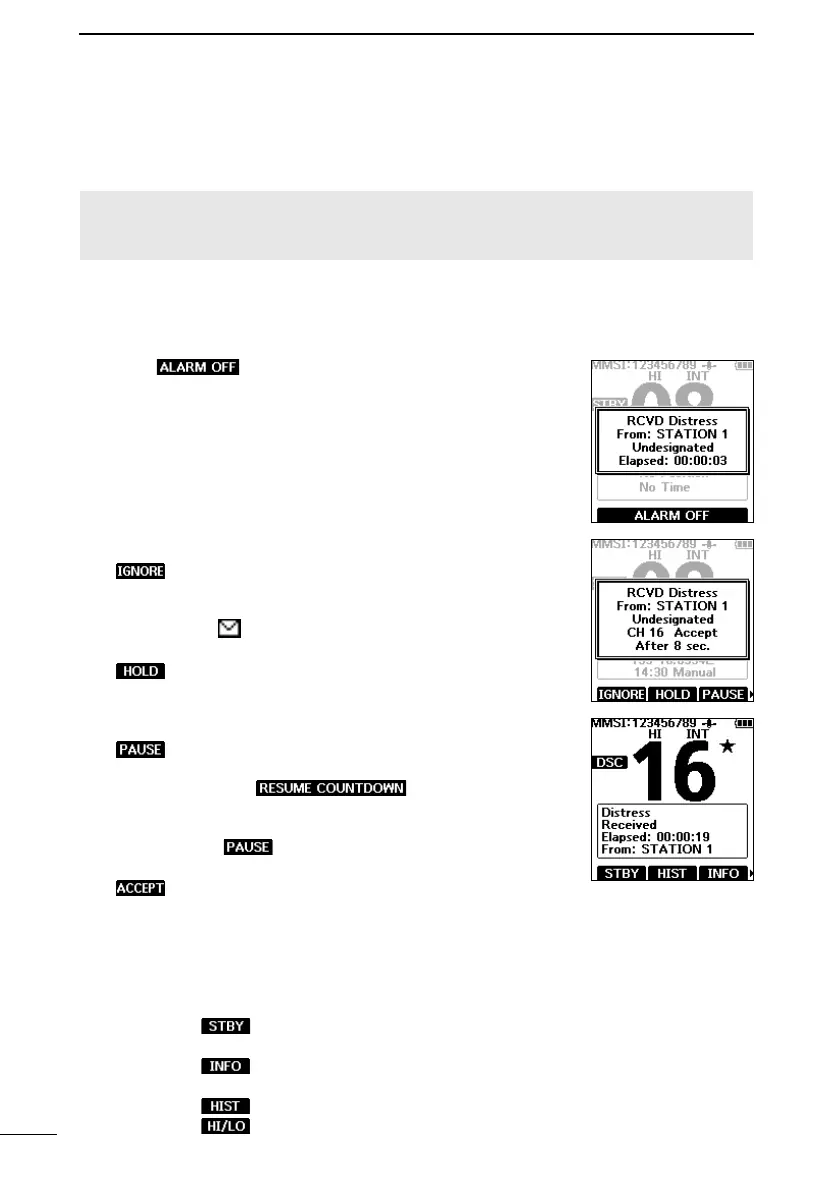
When a Distress call is received:
• The emergency alarm sounds until you turn it OFF.
• “RCVD Distress” is displayed.
1. Push
to turn OFF the alarm.
2. Push the Software Key below for the intended operation.
:
(Ignore)
Ignores the call and returns to the operating
screen.
• The call is saved in the DSC Log.
• “
” blinks continuously until you display the
call message.
:
(Hold)
Puts the received call on hold, and returns to
the operating screen.
L You can check the DSC calls that are on hold
in the Unread List. (p. 41)
:
(Pause)
Pauses the countdown until the assigned
channel is automatically selected.
• Push
to resume the
countdown.
• The call is saved in the DSC Log.
L is not displayed if the “CH Auto Switch”
item is set to “Manual (TEMP).” (p. 42)
:
(Accept)
Accepts the call.
• Channel 16 is automatically selected.
• Monitor Channel 16 as a coast station may
require assistance.
• After Channel 16 is selected, select your next
operation by pushing the Software Key below
the following options.
: Closes the Distress operation, and
returns to the operating screen.
: Displays the information of the received
Distress Acknowledgement.
: Displays the “Distress History.”
: Changes the output power.



 To Next Page