40
9
DSC OPERATION
9
10
15
18
13
11
16
14
12
17
1
7
4
2
8
5
3
6
■ DSC Log
D Received DSC Log
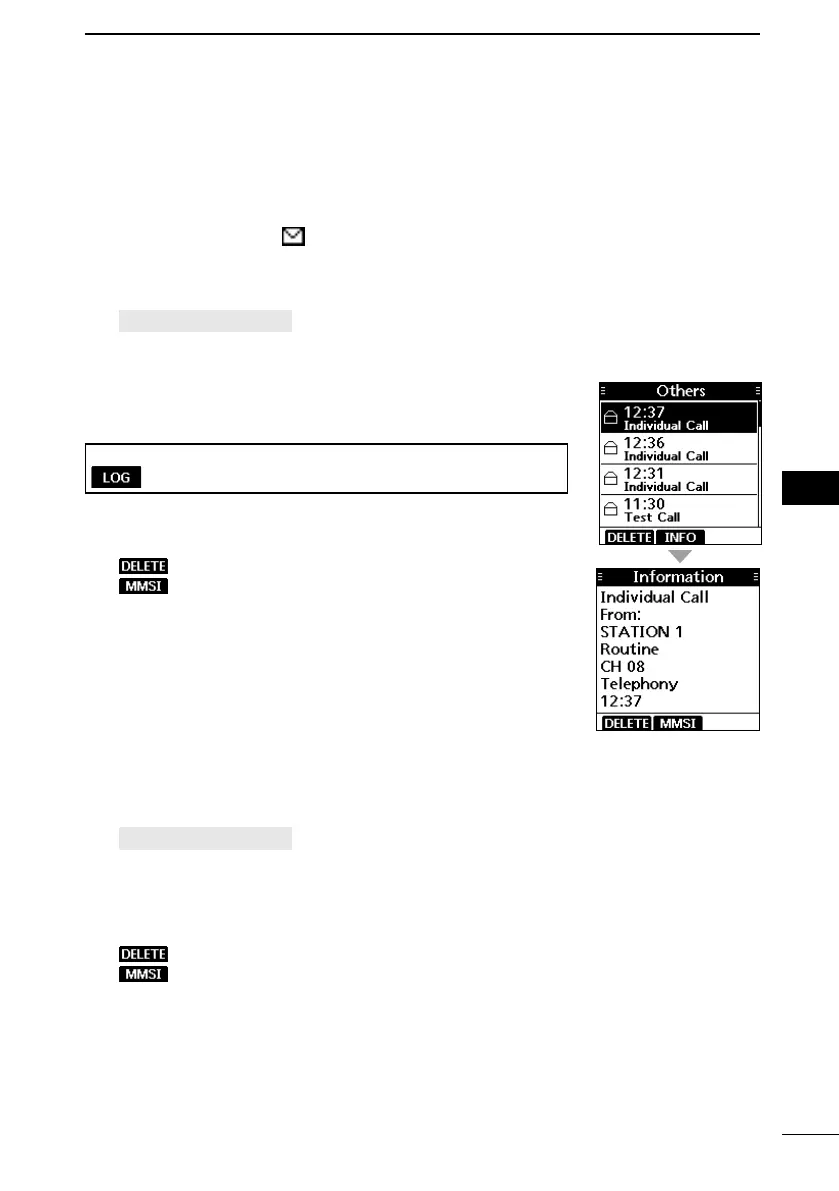
The transceiver saves up to 50 received Distress call messages and 50 received “Others”
call messages in your DSC Log.
On the operating screen, “
” is displayed when there is an unread call message.
The icon blinks when there is a new received call message.
1. Open the “DSC Log” screen.
[MENU] > DSC Log
2. Select “Received,” and then push [ENT].
• The “Received” screen is displayed.
3. Select “Distress” or “Others,” and then push [ENT].
L “Distress” displays the received Distress call log, and
“Others” displays the received DSC call log.
TIP: You can also display the “Received” screen by pushing
on the operating screen.
4. Select a log, and then push [ENT] to display the detailed
information.
: Deletes the selected call log.
: Saves the MMSI as an Individual ID.
D Transmitted DSC Log
The transceiver saves up to 50 DSC transmitted calls in your
DSC Log.
1. Open the “DSC Log” screen.
[MENU] > DSC Log
2. Select “Transmitted,” and then push [ENT].
• The “Transmitted” screen is displayed.
3. Select a log, and then push [ENT] to display the detailed
information.
: Deletes the selected call log.
: Saves the MMSI as an Individual ID or a Group ID.



 To Next Page