New2001
2
1
ACCESSORY ATTACHMENT
New2001
1
2
3
4
5
6
7
8
9
10
11
12
13
14
15
16
17
18
19
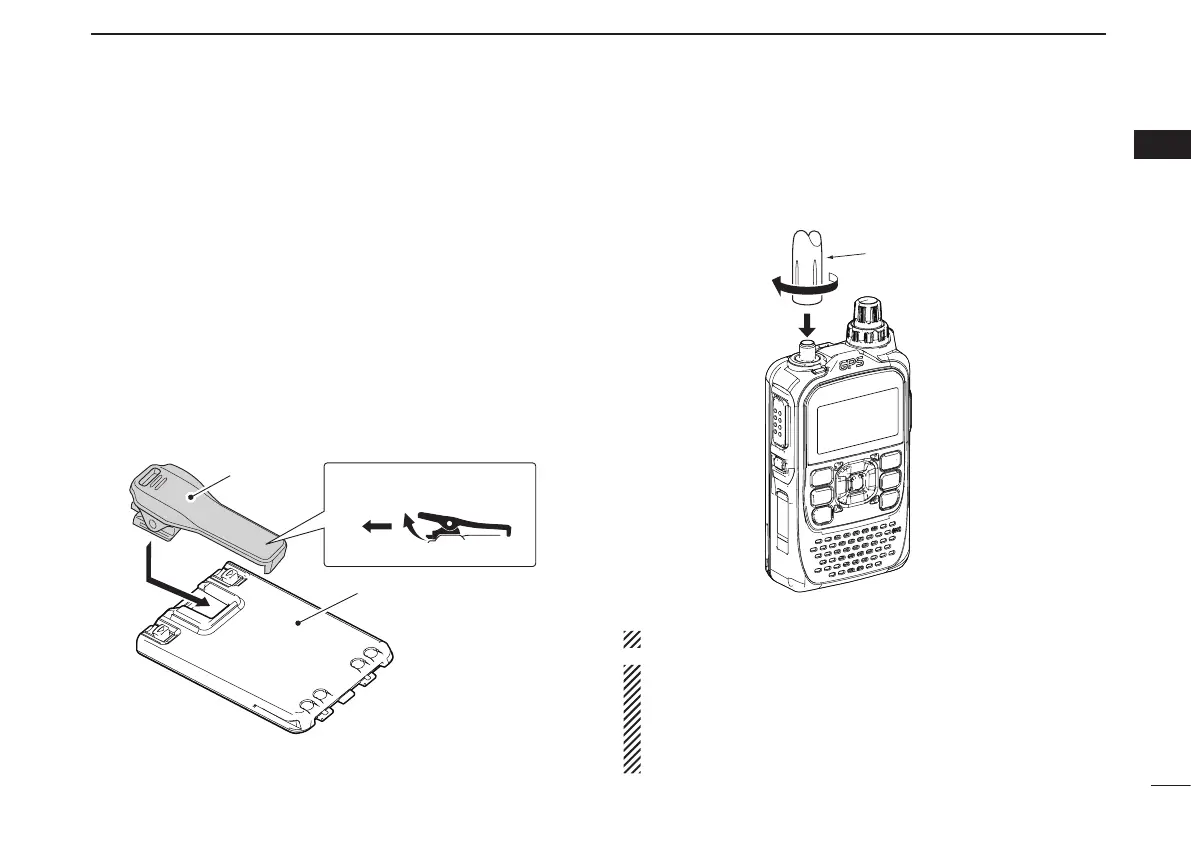
■ Belt clip
To attach the belt clip:
Remove the battery pack from the transceiver, if it is at- q
tached. (p. 1)
w Slide the belt clip in the direction of the arrow until the belt
clip locks in place, and makes a ‘click’ sound.
To detach the belt clip:
Remove the battery pack from the transceiver, if it is at- q
tached. (p. 1)
Lift the tab up ( w q), and slide the belt clip in the direction
of the arrow (w).
■ Antenna
Insert the antenna connector into the antenna base and tight-
en the antenna base.
NEVER carry the transceiver by holding only the antenna.
✔ For your information
Third-party antennas may increase transceiver perfor-
mance. An optional AD-92SMA
a n t e n n a c o n n e c t o r
a d a p t e r is available to connect an antenna that has a BNC
connector.
Antenna
Belt clip
To attach To detach
Battery pack (BP-271)



 To Next Page