New2001
28
5
BASIC OPERATION
1
2
3
4
5
6
7
8
9
10
11
12
13
14
15
16
17
18
19
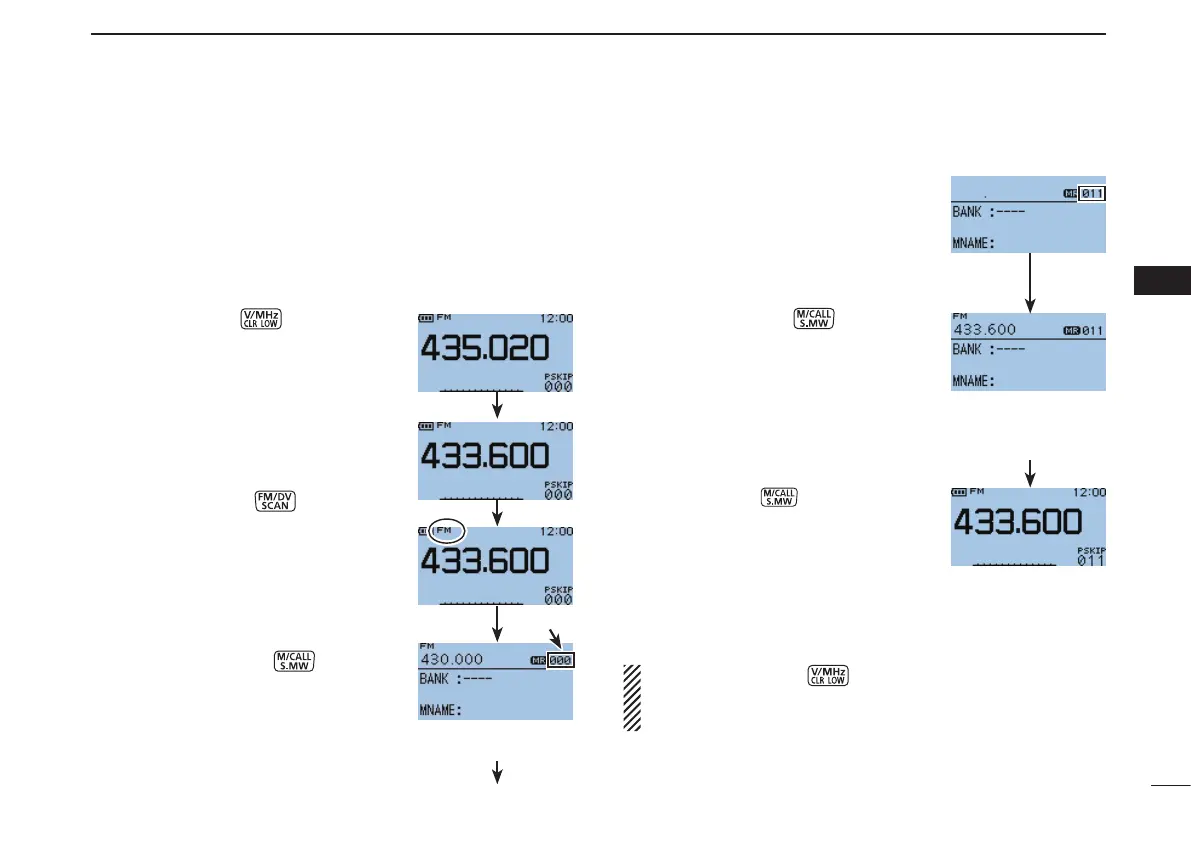
The Memory mode is very useful to quickly select often-used
operating settings.
[Example]:Programming 433.600 MHz/FM mode into
memory channel 11 (a blank channel).
q Push [V/MHz]
to select the
VFO mode.
w Set a desired frequency and operat-
ing mode:
➥ Rotate [DIAL] to set a desired fre-
quency.
➥ Push [FM/DV]
one or more
times to select a desired operat-
ing mode.
➥Set other data (e.g. duplex di-
rection, frequency offset, tone
squelch, etc.), if desired.
e Hold down [S.MW]
for 1 sec-
ond to enter the Select Memory write
mode.
•1shortand1longbeepsound.
•Thememory channel number blinks.
r Rotate [DIAL] to select a desired
channel.
•Callchannels(C0,C1),VFOandscan
edge channels (00A/00B to 24A/24B),
as well as regular memory channels,
can be programmed in this way.
t Hold down [S.MW] for 1 second
to program.
•3beepssound.
•BeforereturningtotheVFOmode,the
programmed memory contents are dis-
played for a moment.
•Memory channel number automati-
cally increases when continuing to hold
down [S.MW] for 1 second after
programming.
NOTE: Push [CLR] tocanceltheprogramandexit
the Select Memory write mode before memory program-
ming is finished.
■
Memory channel programming
Blinks
Memory contents
is displayed for
a moment
After programming
is finished, return
to the VFO mode
Select Memory
write mode



 To Next Page