New2001
24
5
BASIC OPERATION
1
2
3
4
5
6
7
8
9
10
11
12
13
14
15
16
17
18
19
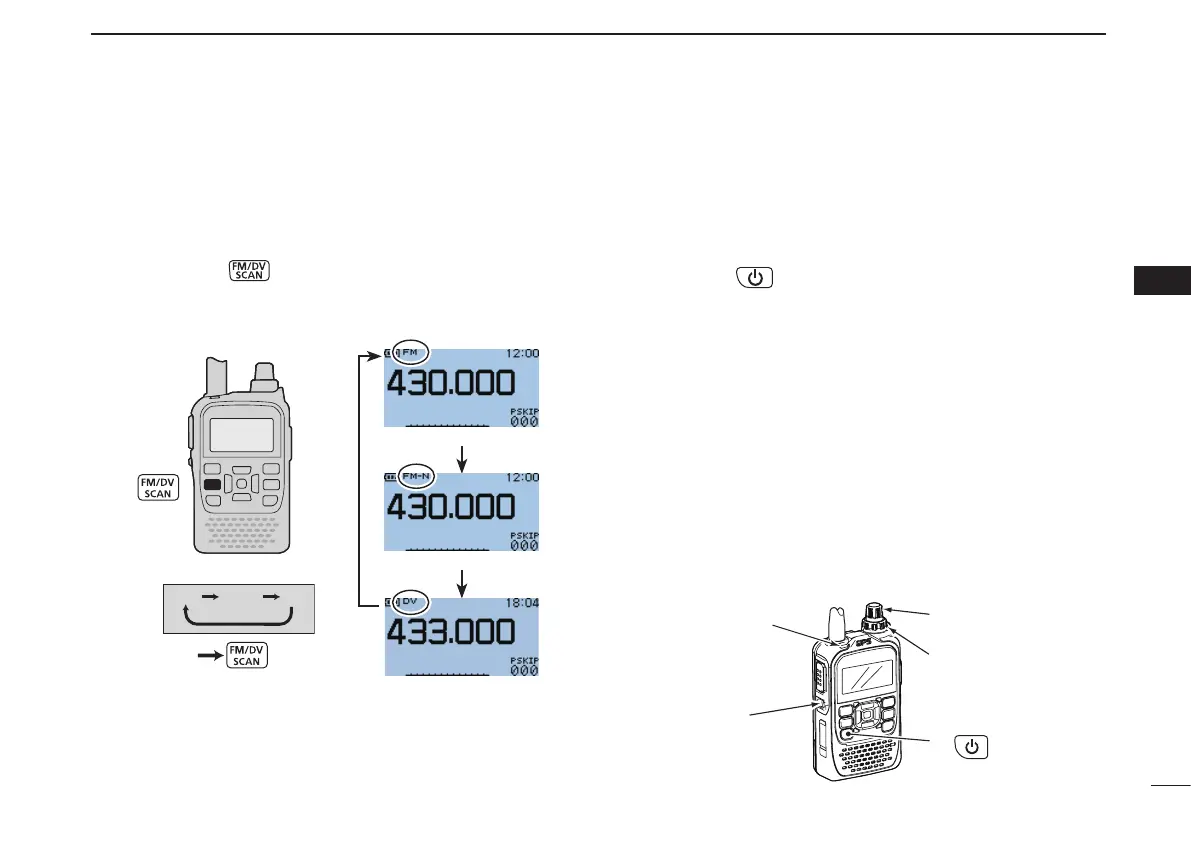
■ Operating mode selection
Operating modes are determined by the modulation of the
radio signals. The transceiver has a total of three operating
modes; FM, FM-N and DV.
➥ Push [FM/DV]
one or more times to select a desired
operating mode.
FM mode selected
FM-N mode selected
DV mode selected
■ Receiving
Make sure a charged BP-271 or BP-272 battery pack, or a
BP-273 battery case with brand new alkaline batteries is at-
tached (pp. 1, 14).
Hold down q for 1 second to turn ON the power.
Rotate [VOL] to adjust to a desired audio level. (p. 19) w
•Thefrequencydisplayshowsthevolumelevelwhileadjusting.
Set the receiving frequency. (p. 23) e
r Set the squelch level. (p. 20)
•Whileholdingdown[SQL],rotate[DIAL]oneclicktodisplaythe
squelch level.
•“LEVEL1”isloosesquelch(forweaksignals)and“LEVEL9”is
tight squelch (for strong signals).
•“AUTO” indicates automatic level adjustment by anoise pulse
counting system.
•Holddown[SQL]tomanuallyopenthesquelch.
t When a signal is received:
•Squelchopensandaudioisoutput.
•TX/RXindicatorlightsgreen.
•TheS/RF-metershowstherelativesignalstrengthlevel.
q
r Set squelch level
e Set frequency
w Adjust audio level
r Push when setting
the squelch
(Push to monitor)
TX/RX
indicator



 To Next Page