New2001
30
5
BASIC OPERATION
1
2
3
4
5
6
7
8
9
10
11
12
13
14
15
16
17
18
19
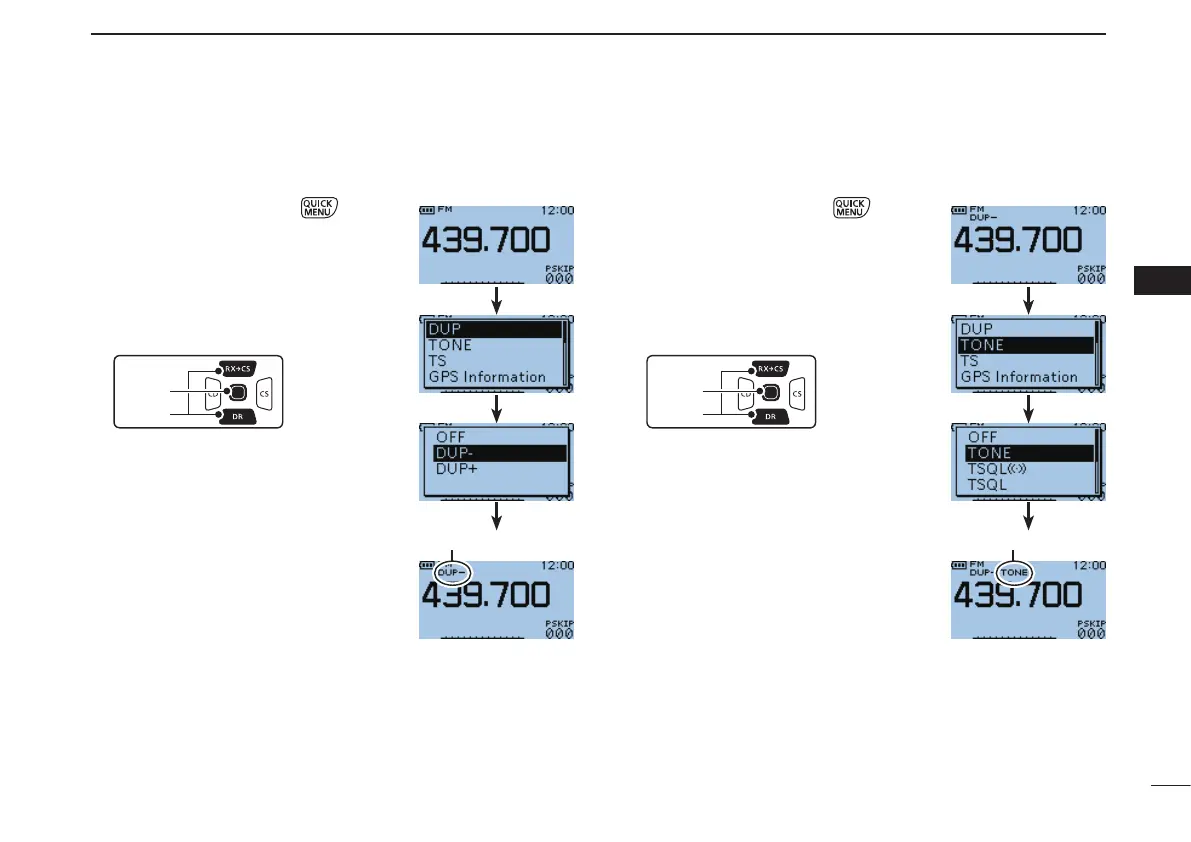
D Setting the duplex direction
In the VFO mode, push q to open
the Quick Menu screen.
Push D-pad( w #) to select the “DUP”
item, then push D-pad(Ent).
Push D-pad( e $) to select the “DUP–”
or “DUP+” option.
r Push D-pad(Ent) to return to the fre-
quency display.
•Selectthedesiredfrequencyoffset.(p.
33)
D Setting the subaudible tone
q In the VFO mode, push to open
the Quick Menu screen.
Push D-pad( w E) to select the “TONE”
item, then push D-pad(Ent).
Push D-pad( e $) to select the “TONE”
option.
r Push D-pad(Ent) to return to the fre-
quency display.
•Select thedesired subaudible tone
frequency. (p. 33)
“DUP–” or “DUP+” appears “TONE” appears



 To Next Page