23
5
BASIC OPERATION
New2001 New2001
■ Setting a tuning step
The following tuning steps are selectable.
•5.0kHz •6.25kHz •10.0kHz •12.5kHz
•15.0kHz •20.0kHz •25.0kHz •30.0kHz
•50.0kHz •100.0kHz •125.0kHz •200.0kHz
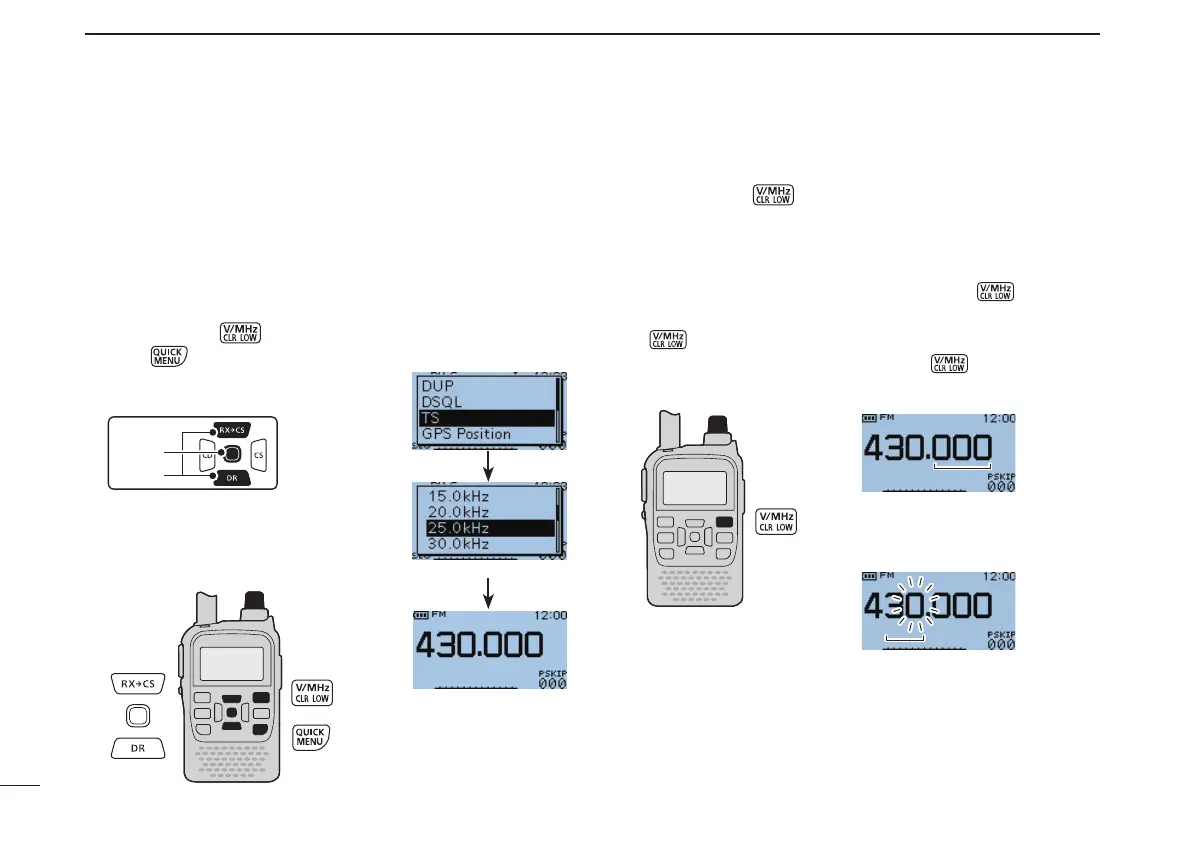
D Tuning step selection
q Push [V/MHz] to select VFO mode, if necessary.
w Push
to open the Quick Menu screen.
e Push
D-pad(E) to select “TS,” and
then push
D-pad(Ent).
r Rotate [DIAL] to select the desired
tuning step.
t Push
D-pad(Ent) to save the setting
andexittheQuickMenuscreen.
■ Setting a frequency
q Push [V/MHz] to select VFO mode, if necessary.
w Rotate [DIAL] to select the desired frequency.
•Thefrequencychangesaccordingtotheselectedtuningsteps.
See the previous content to set the tuning step.
•WhenVFO modeis selected,push [V/MHz] then rotate
[DIAL] to change the frequency in 1 MHz steps. Or push [V/MHz]
again for 10 MHz* steps. (
* Depending on versions, 10 MHz
tuning step is selectable.
) Push [V/MHz] again to cancel it.
25 kHz tuning step
The frequency changes accord-
ing to the selected tuning step.
After pushing [V/MHz] in the
VFO mode, [DIAL] changes the
frequency in 1 MHz or 10 MHz
steps.



 To Next Page