50
7
RESETTING
1
2
3
4
5
6
7
8
9
10
11
12
13
14
15
16
17
18
19
■ Resetting
The display may occasionally display
erroneous information (e.g. when first
applying power). This may be caused
externallybystaticelectricityorbyoth-
er factors.
If this problem occurs, turn OFF power.
After waiting a few seconds, turn ON
power again. If the problem persists,
perform either or both procedures be-
low.
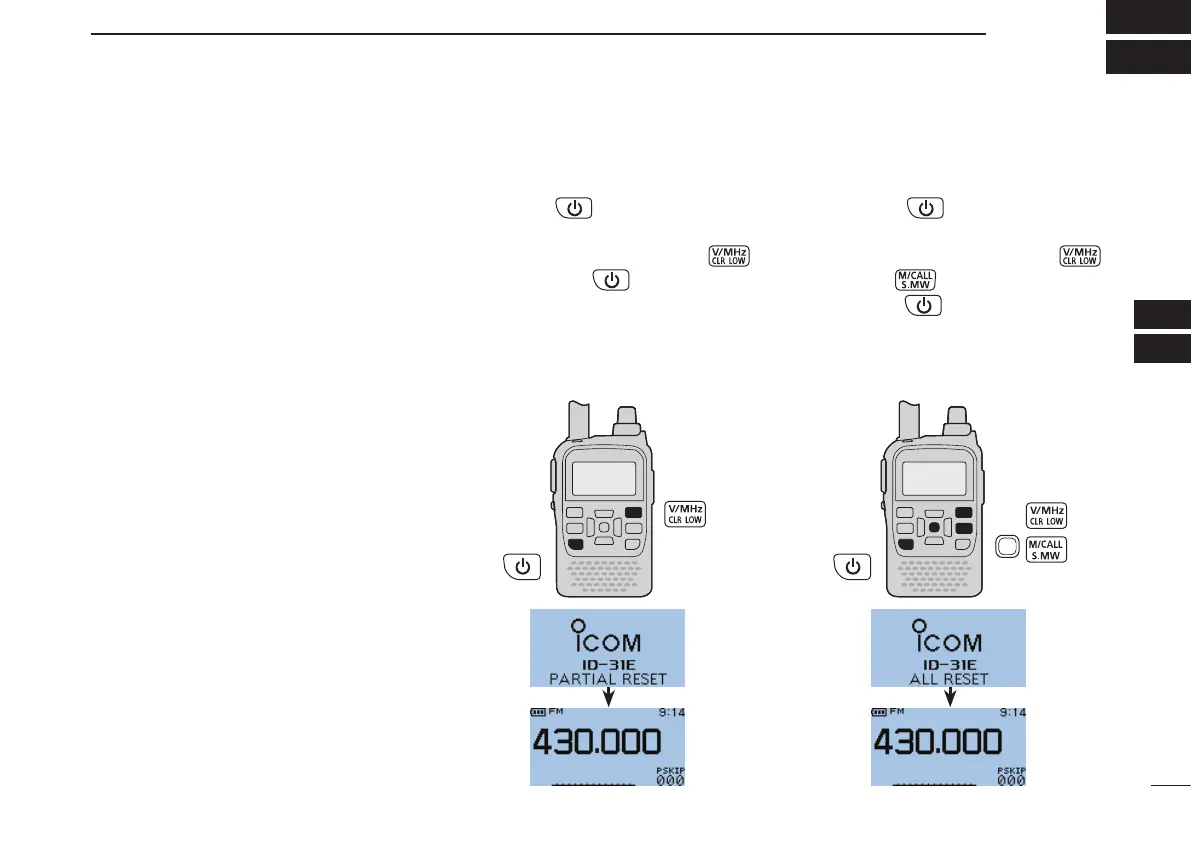
• Partial reset
Use Partial reset if you want to initial-
ize the operating conditions (VFO fre-
quency, VFO settings, menu contents)
without clearing the memory contents,
call sign memories or repeater lists.
• All reset
Reset the CPU, if the internal CPU mal-
functions due to static electricity, etc. All
reset clears all programming and re-
turns all settings to their defaults.
D Partial reset
q Hold down for 1 second to turn
OFF power.
w While holding down [V/MHz]
,
then hold down
for 1 second to
turn ON power to partially reset the
transceiver.
•“PARTIALRESET”appearswhenpar-
tially
resetting the CPU.
D All reset
q Hold down for 1 second to turn
OFF power.
w While holding down [V/MHz]
,
[M/CALL]
and D-pad(Ent), then
hold down
for 1 second to turn
ON power to reset the CPU.
•“ALLRESET”appearswhenresetting
the CPU.



 To Next Page