27
5
BASIC OPERATION
New2001 New2001
■ Scan function
Scanning is a versatile function that can automatically search
for signals, and makes it easier to locate stations to contact
or listen to, or to skip unwanted frequencies.
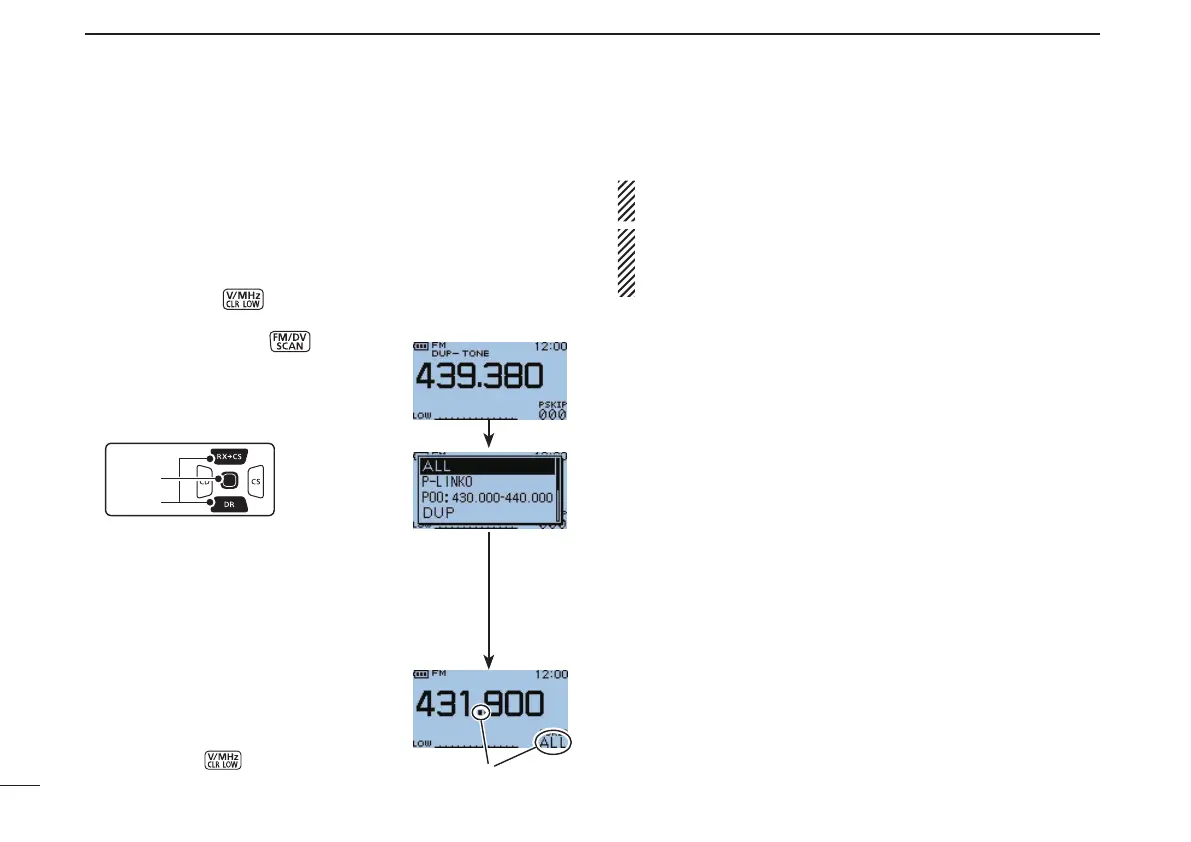
[Example]:FullscanoperationintheVFOmode
Push [V/MHz] q
to select the VFO mode.
Set the squelch level. w
Hold down [SCAN] e
for 1 sec-
ond to enter the scanning type se-
lection mode.
r Push D-pad(E) to select the desired
scanning type.
•Select“ALL”forfullscan,“P-LINKx”for
programmedlinkscan(x=0to9),“Pxx”
forprogrammedscan(xx=0to24;only
programmed scan edge numbers are
displayed), “DUP” for duplex scan or
“TONE” for tone scan.
t Push D-pad(Ent) to start the scan.
•Scanpauseswhenasignalisreceived.
•Rotate [DIAL] to change the scanning
direction. This also causes the trans-
ceiver to resume scanning.
•Push[CLR] to cancel the scan.
About the scanning steps: The selected tuning step in
the VFO mode is used during scan.
•The scan link name or scan name can be displayed when
scan link name or scan name is programmed.
•Scannameisnotdisplayedduringscan.
Blink



 To Next Page