29
4
D-STAR OPERATION
New2001 New2001
■ Making a Simplex call
You can make a transceiver to transceiver call (through no
repeater) in the DR screen.
NOTE: Depending on the transceiver's version, the fre-
quencies may be different. Check for acceptable frequen-
cies for your operating area.
What is a Simplex Call?? ✓
A simplex call is a direct call to another station, not using a
repeater.
Example: Making a simplex call on 433.450 MHz.
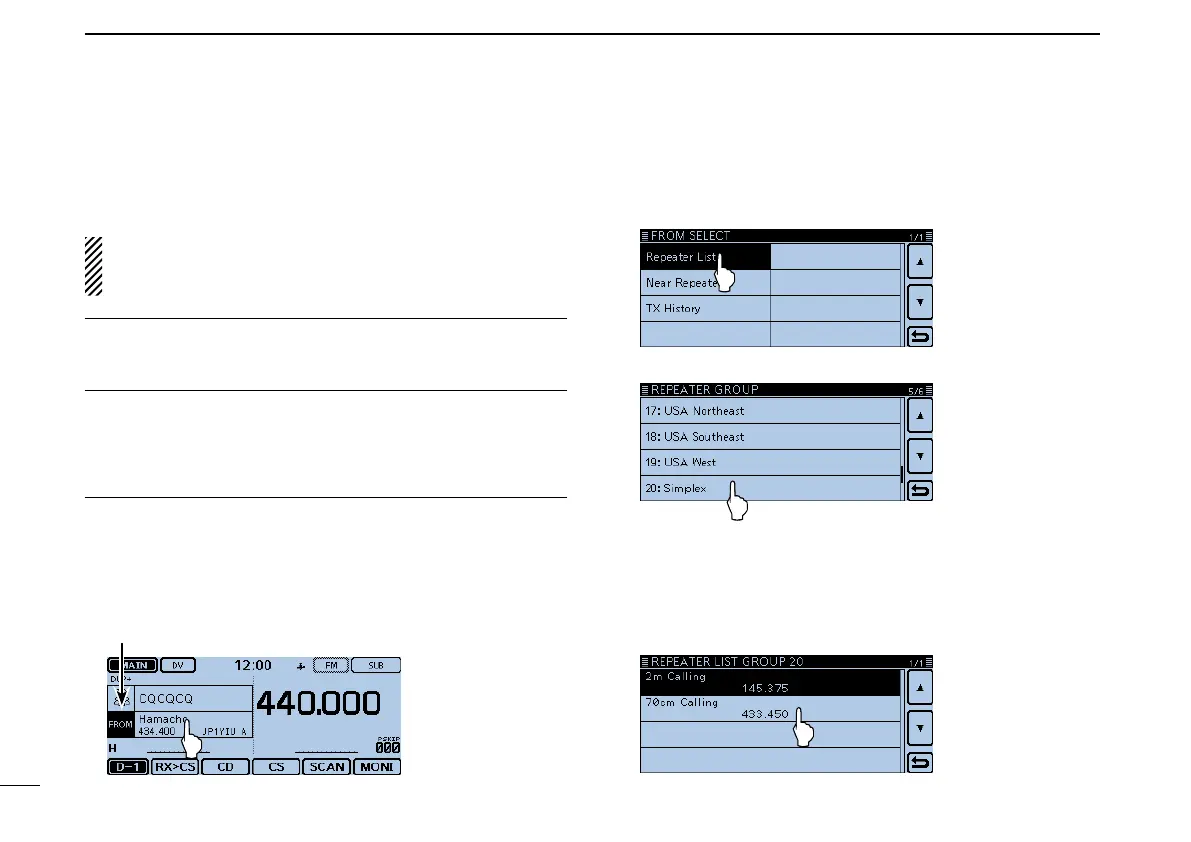
“FROM” (Simplex channel) setting1.
Touch [DR]. q
Check whether or not “FROM” is selected. w
• If “FROM” is not selected, touch the “FROM” eld.
Touch the “FROM” field. e
• Opens the “FROM SELECT” screen.
“FROM” is selected.
Touch “Repeater List.” r
• Opens the “REPEATER GROUP” screen.
Touch “Simplex.” t
Touch a desired frequency. (Example: 433.450) y
• Returns to the DR screen, and the selected frequency is dis-
played in “FROM.”
• “CQCQCQ” is displayed in “TO.”
- If a station call sign is set in “TO,” select “Local CQ” in the “TO
SELECT” screen to set “CQCQCQ” in “TO.”



 To Next Page