MVS6000
3-10
MVS6000 System Level Manual/1.0/Dec-2001
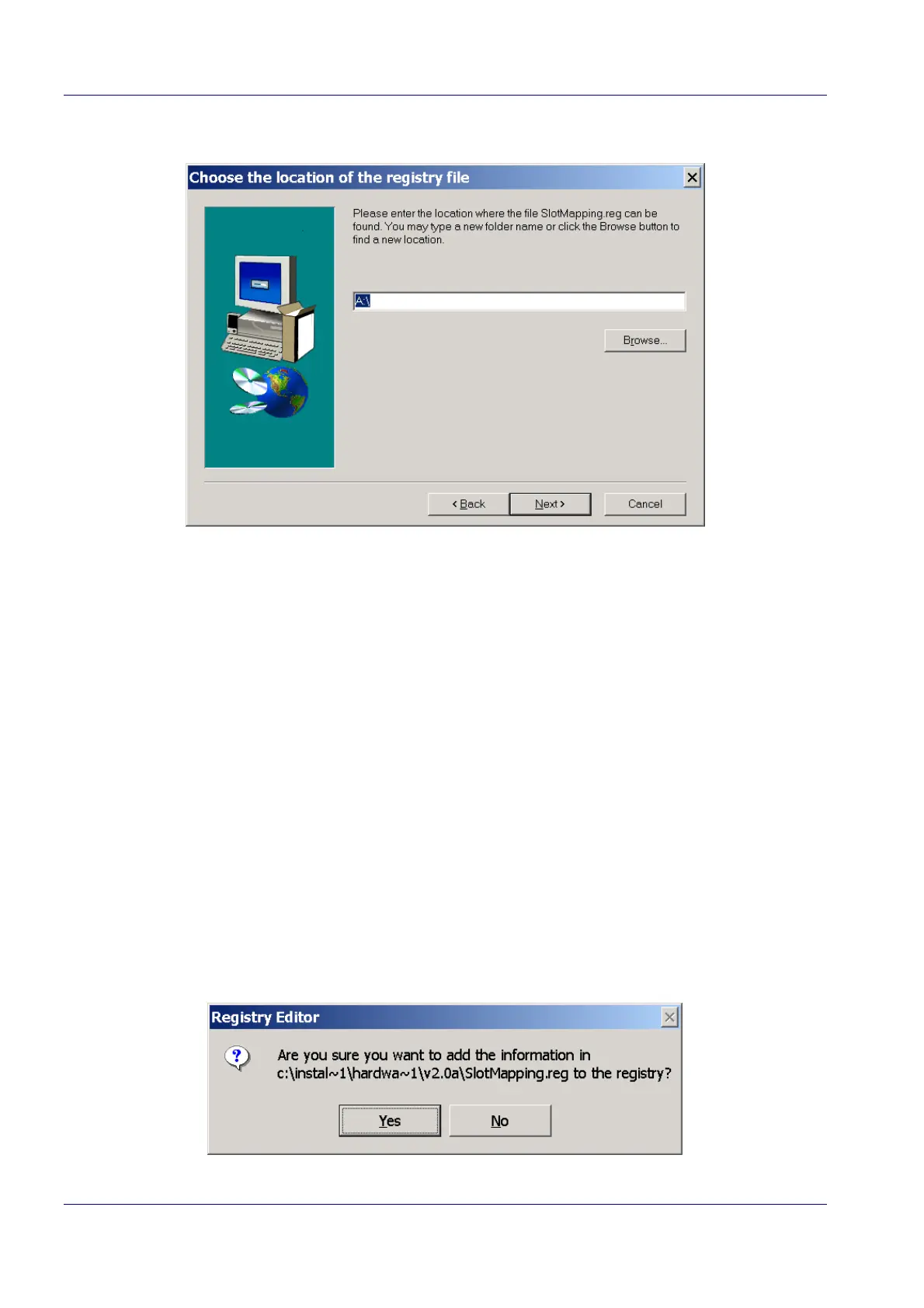
2. Click Next to continue the wizard.
3. Use the Browse button to select the folder with the slotmapping.reg file in the Choose Folder
dialog box.
Notes:
1. The slotmapping.reg file is stored in the \Software\MVS6000 Hardware Setup
folder on the ICOS Installation CD
2. When the warning “There is no disk in the drive. Please insert a disk into drive A”
appears, click Cancel to open the Choose Folder dialog box.
3
The slotMapping.reg file contains the bus number and the PCI slot ID. These
numbers are reserved by the motherboard and can change from the one
manufacturer to the other. You can find this information in the manual of the
motherboard or on the screen when starting up the system. Once you plugged
in an MVS board the PC will show (depending on the BIOS settings) on one of
the first screens (after showing the PC hardware settings) the bus number and
the PCI ID of every used slot. The file slotMapping.reg for the Microbus MAT915
PC is described in the Appendix (see page A-2).
If necessary, copy this file to a floppy disk and edit the fields: PCIBusNumber
and PCISlotNumber.
4. Click Next to continue the wizard.
Windows opens the Registry Editor message box, an example is shown here.


 To Next Page