IDS X-Series Training v2.7
Wired Expander Trouble LED
LED: If the LED is ON continuously then there are no errors, however if there are errors it will start pulsing
the error number. These error pulses will be separated by a 1sec pause with the LED OFF.
Pulse error number:
1. Low Battery
2. No activity on the X-Series serial bus
3. No X-Series messages detected
4. No messages for this peripheral detected from X-Series
5. Awaiting tamper change
6. Expander not yet registered on the X-Series
7. Expander tamper violated
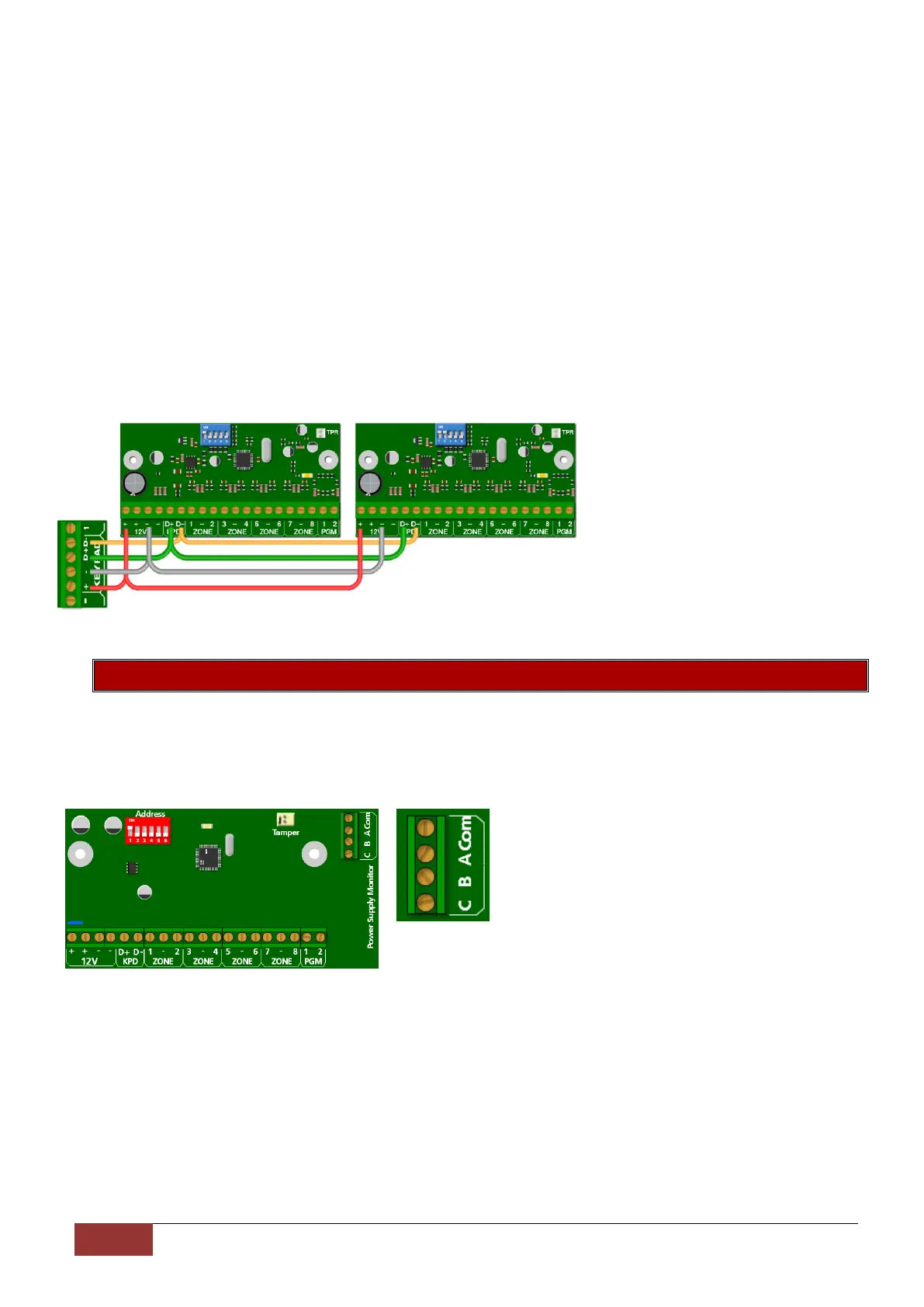
Wired 8 Zone Expander Module Example
An example of two wired zone
expanders connected to the X64
with their ID’s set.
Note that they are wired in a daisy
(series) format.
8.2. IDS X64 – 8 Zone Smart Expander Module
The IDS X64 – 8 Zone Smart Expander Module comes with 4 new connectors which connect to the IDS
Smart Power Supply Module, allowing it to report back to the X-Series alarm panel, in the case of mains
failure, low battery and fuse failure.
The connector labelled A, B, C and Com connect to
the corresponding connectors with the same label
on the Monitored Power Supply.
A – Mains Failure monitoring
B – Low Battery monitoring
C – Fuse Failure monitoring
Com – Common


 To Next Page
 Loading...