IDS X-Series Training v2.7 | X-SMS Module
Introduction
IDS X-SMS offers powerful, versatile and highly configurable SMS reporting and control capabilities, which
will keep you informed and in control of your X-Series alarm system when away from your premises. The
X-SMS module works with IDS X-Series panels from version 2.3x and above.
In this training guide we will cover step by step how to install the IDS X-SMS Module, we will explain the
concept of programming the unit and go through same of the main commands.
1. Installation
1.1. X-SMS Connection to an X-Series Panel
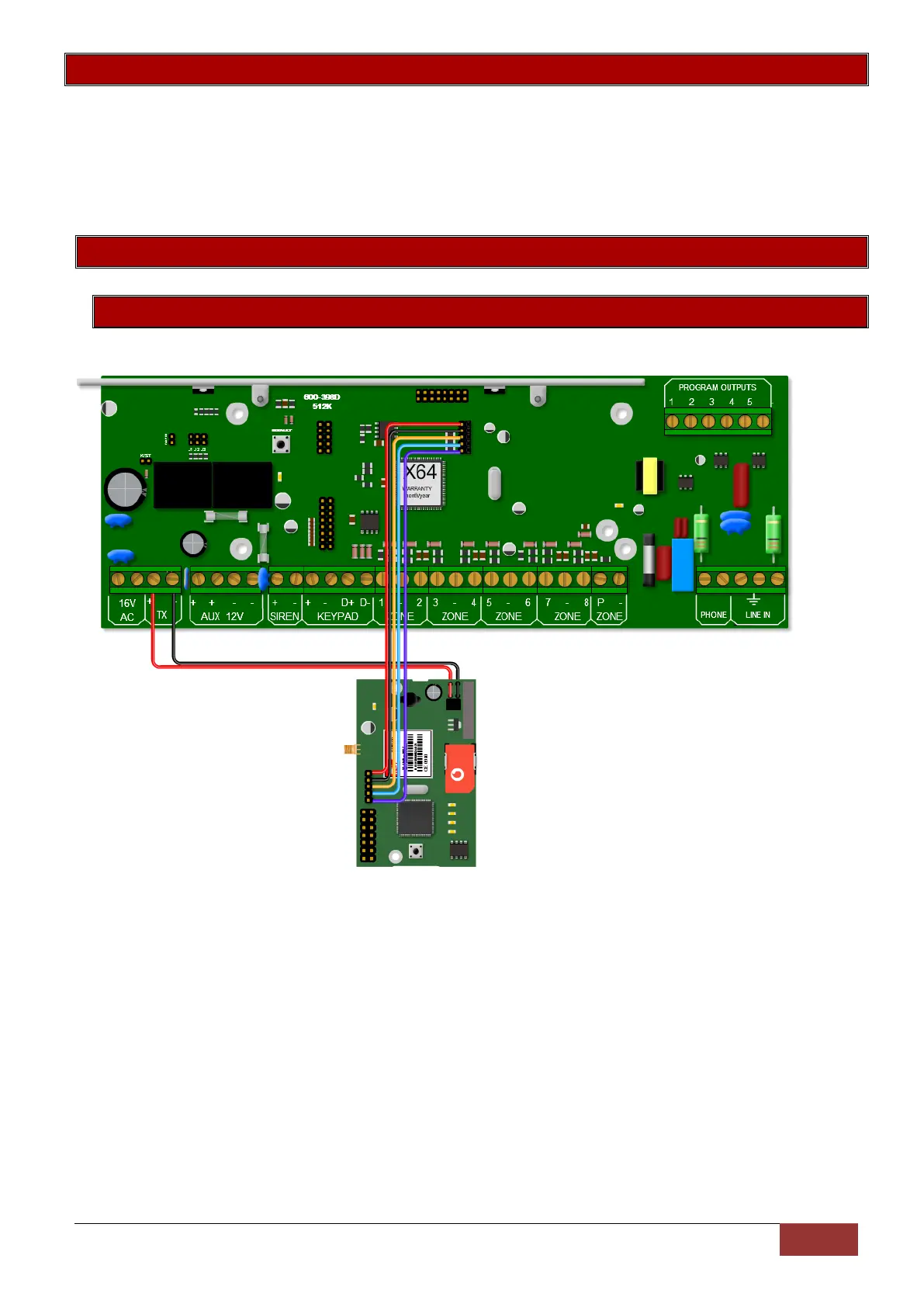
The IDS X-SMS Module connects to the X-Series panel using a serial connection.
The serial connection between the X-SMS module and the X-Series Alarm Panel is shown in the image
above. Remember that the serial pin that is closest to the X-SMS Antenna connector is connected to the
pin closest to the X-Series heat sink.
The colours of the serial cable are correct at time of writing.
The X-SMS Module can be powered by an X-Series panel’s TX or Aux output. The power connection
between the X-SMS module and the X-Series Alarm Panel using the TX output is shown in the image
above.


 To Next Page
 Loading...