49
ifm Programming Manual ecomatmobile BasicController (CR0403) Runtime System V03.02 2015-04-01
Configurations Function configuration of the inputs and outputs
>
Configure the software filters of the inputs
15418
Via the input FILTER in the FB INPUT (→ page 173) a software filter can be configured which filters the
measured input voltage at the analogue inputs.
The filter behaves like a low-pass filter; the filter frequency is set with the value entered in FILTER. For
FILTER, values from 0...8 are permitted.
Table: limit frequency software low-pass filter at the analogue input
FILTER Filter frequency [Hz]
Step response [ms] for ...
Remarks
0…70 % 0…90 % 0…99 %
0 Filter deactivated
1 120 2 4 7
2 47 5 9 17
3 22 10 18 35
4 10 19 36 72 recommended
5 5 38 73 146
6 2.5 77 147 293
7 1.2 154 294 588
8 0.7 308 589 1177
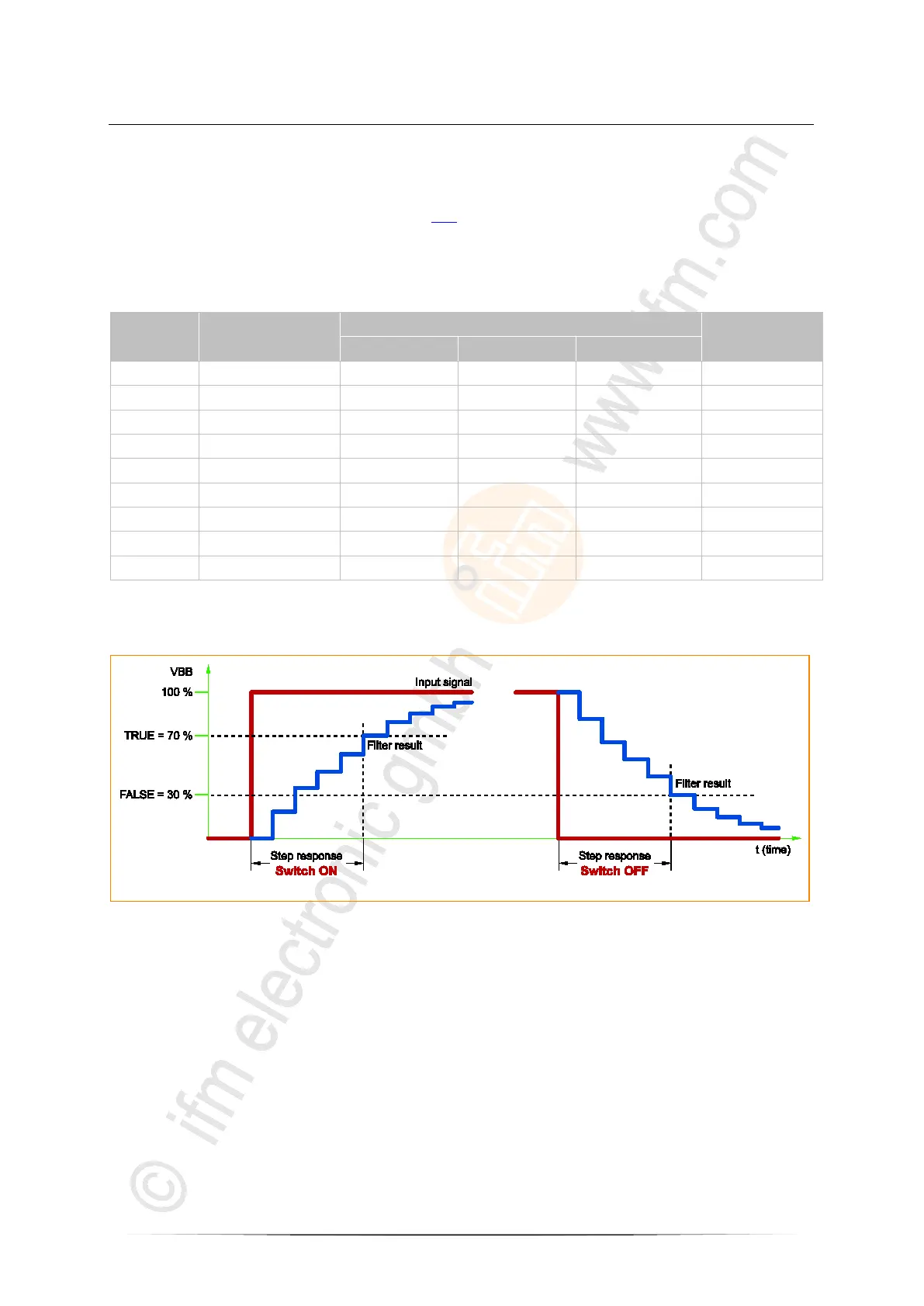
The following statements of the step response are relevant:
• Input analogue: 0...90 % and 0...99 %
• Input binary: 0...70 %
Figure: course of time binary signal at the input upon switch-on / switch-off



 To Next Page