Table of Contents Draco U-Switch
40
6.2 Activating/Deactivating the Routing of USB-2.0-Ports
To activate or deactivate the routing of the USB 2.0 ports to the four USB-B ports, a parameter can be
entered in the configuration file (Config.txt).
Configuration File
The U-Switch contains a configuration file (Config.txt) to set specific parameters. The configured
display mode of the MSC is also saved in the Config.txt.
The Config.txt is located on the flash drive of the U-Switch. The flash drive can be opened by a
Mini-USB connection to a computer. The configuration file can be edited with all common text editors.
NOTICE
To ensure the functionality of the parameterization:
The start command #CFG has to be written into the first line of the Config.txt file.
The U-Switch needs to be restarted.
Firmware Requirements
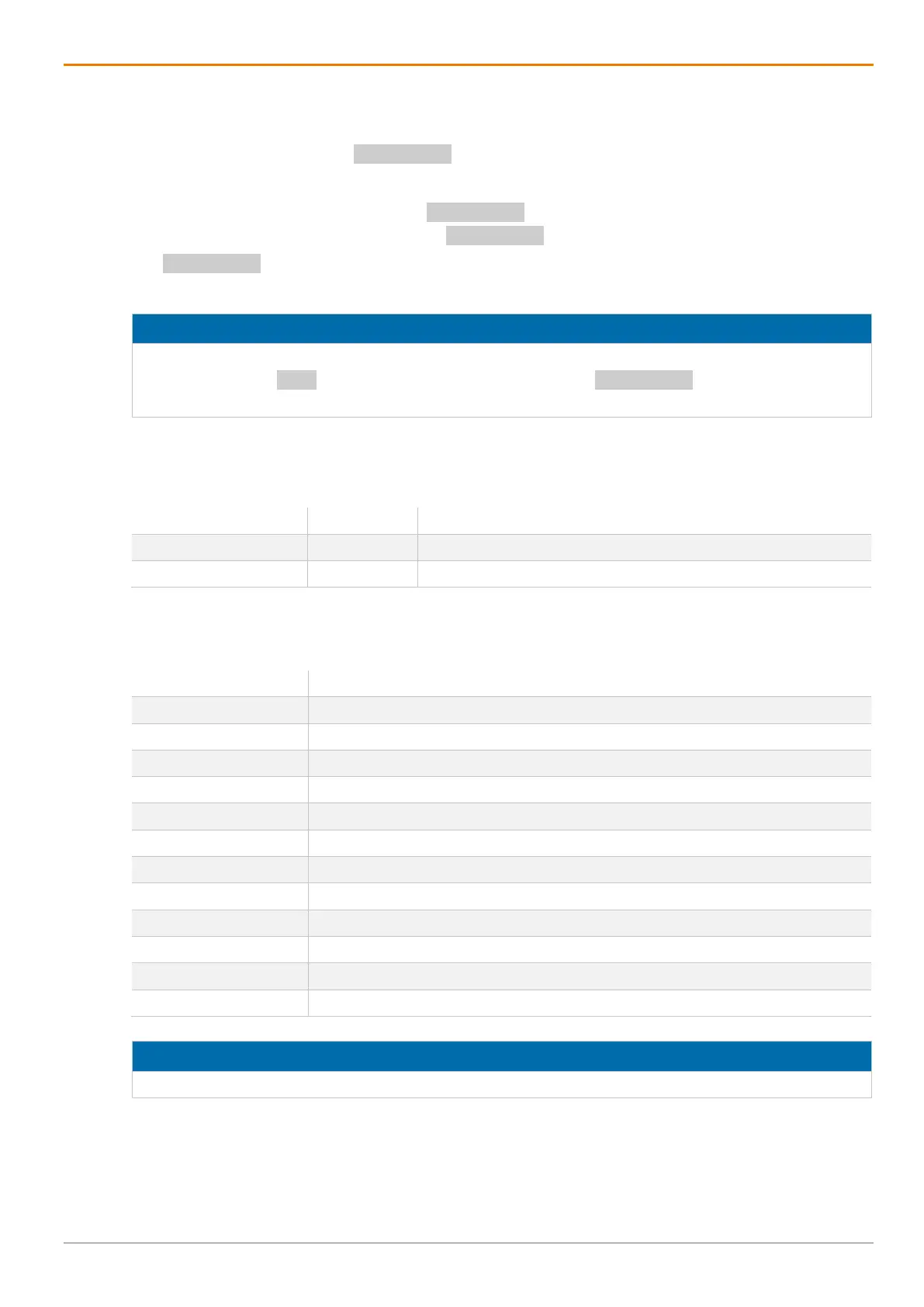
The following firmware is required as a minimum:
Firmware Version Release date
HUSWMSD B01.07 2020-11-27
HUSWITCH F01.05 2020-12-16
Parameters
The following parameter settings are available:
ENAUSB20=1111 Activate all ports (default)
ENAUSB20=1000 Activate the routing of port 1
ENAUSB20=1100 Activate the routing of port 1 and port 2
ENAUSB20=1010 Activate the routing of port 1 and port 3
ENAUSB20=1001 Activate the routing of port 1 and port 4
ENAUSB20=0100 Activate the routing of port 2
ENAUSB20=0110 Activate the routing of port 2 and port 3
ENAUSB20=0101 Activate the routing of port 2 and port 4
ENAUSB20=0010 Activate the routing of port 3
ENAUSB20=0011 Activate the routing of port 3 and port 4
ENAUSB20=0001 Activate the routing of port 4
ENAUSB20=0000 Deactivate the routing of all ports
NOTICE
For a successful setting of the USB 2.0 ports, the following sequence must be strictly observed.



 To Next Page