UNO Synth PRO X
4 – Global Controls
28
4 – Global Controls
The global settings are a group of buttons dedicated to the presets and the internal MIDI and system settings.
4.1 Preset
The instrument is capable of storing 256 presets. The presets can be recalled by Program Change with 2 banks
of 128 presets each.
All presets can be renamed on the machine itself using a maximum of 14 characters each.
A preset stores all the parameters on the panel, the parameters found on the PRESET
MENU, the sequence, the arpeggiator settings and the effects settings.
4.1.1 – Edit Preset menu
The EDIT PRESET menu is accessible by pressing DATA or when pressing the PRESET button while the preset
name is shown on the display.
In this menu, you can view and adjust all the parameters related to the synth engine (OSC, FILTERS, etc.)
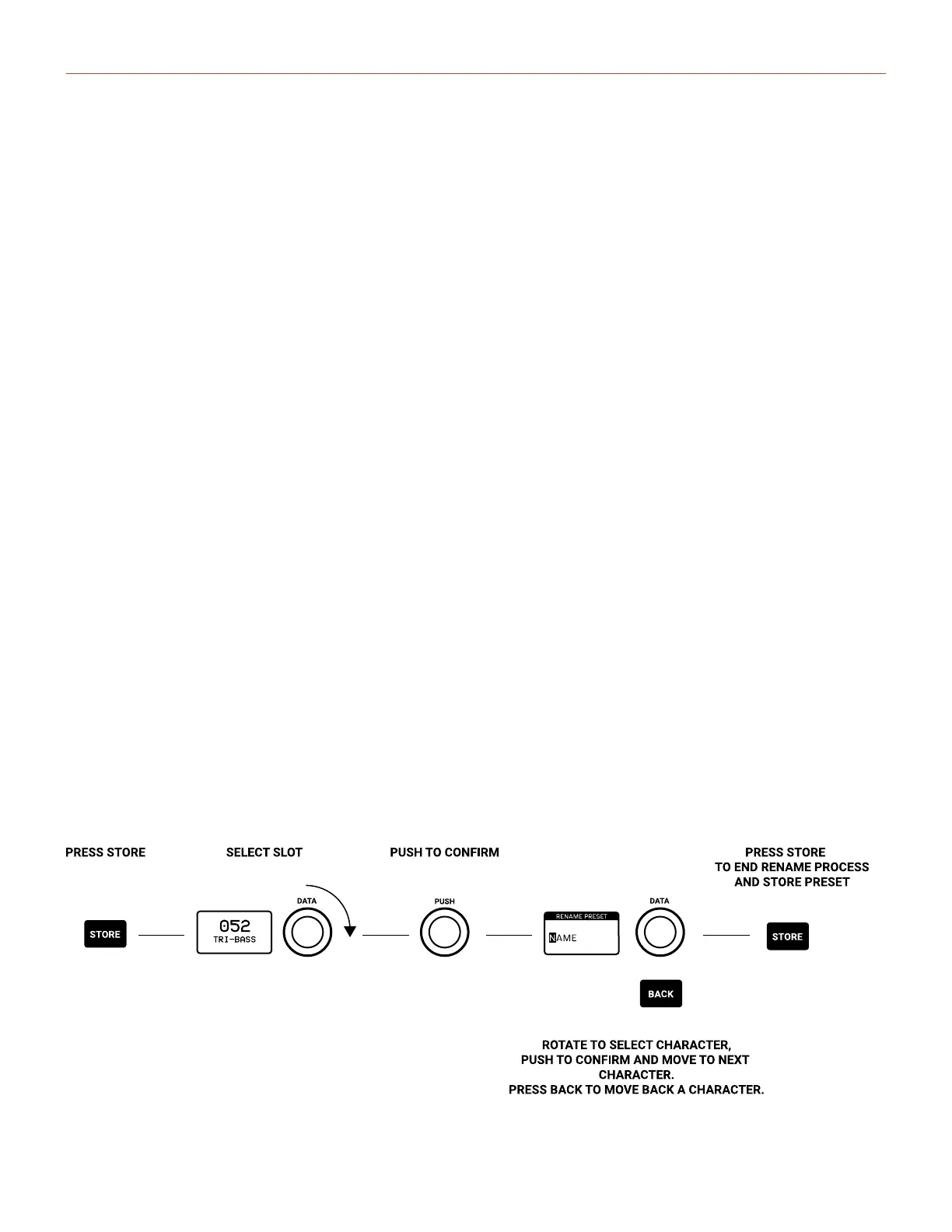
4.1.2 – Store a preset
To store a preset, press the STORE button at any time. Once pressed, the display will show the name of the
loaded preset and the slot number blinking. Use the DATA to select the slot number and PUSH to confirm, or
press BACK to discard.
Once the desired slot is selected, Press STORE to rename the preset. Use the DATA to select the letter, press
DATA to select the next character and BACK to selected the previous.
Once the name is complete, press STORE again to finish the storing procedure.



 To Next Page