
 Need help?
Do you have a question about the iLine microsystems microINR link and is the answer not in the manual?
The microlNR System is intended to monitor oral anticoagulation therapy (OAT) with vitamin K antagonist drugs.
Guide to handling and use of the microlNR Link Meter, including reading Chip instructions.
Provides safety warnings and information on correct use of the microlNR System.
Guidelines for healthcare professionals on preventing infection transmission during testing.
Information on the microlNR Link Meter's Bluetooth communication capabilities and RF energy.
Details compliance with EMC and electrical safety standards for the microlNR Link Meter.
Explains oral anticoagulant therapy, monitoring, and the role of PT and INR.
Explains prothrombin time (PT) measurement and conversion to INR values.
Explains the microfluidics technology of the microlNR Chip and how INR is determined.
Details the calibration process of microlNR Chips using WHO standards.
Lists the components included in the microlNR Link kit, excluding microINR Chips.
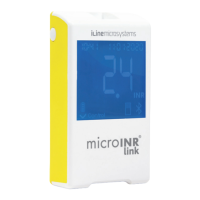
Identifies the physical components of the microlNR Link Meter device.
Provides instructions for recharging the Meter's lithium battery via USB.
Instructions on how to set and adjust the Meter's time and date for accurate chip expiration.
Explains how to optionally record a Patient Identification (PID) with test results.
Details the internal and on-board quality control checks performed by the Meter and Chip.
Lists the essential materials required for conducting an INR test with the system.
Guide on how to turn on the Meter, insert the Chip, and start the measurement process.
Step-by-step guide on how to conduct the test, obtain sample, and interpret results.
Detailed steps for correctly obtaining and applying a capillary blood sample for testing.
Explains how to read and understand the INR results displayed by the Meter.
Outlines the restrictions and conditions that may affect the performance or accuracy of the microlNR System.
Information on how the Meter stores test results and how to access them.
Overview of the Meter's wireless Bluetooth communication capabilities.
Details the configurable settings for the Meter's wireless Bluetooth communication.
Instructions on how to access and navigate the Meter's Bluetooth menu.
Step-by-step guide on how to pair the microlNR Link Meter with a compatible device.
Instructions on how to remove the pairing between the microlNR Link Meter and a connected device.
Explains how test results are automatically sent to a paired device.
Instructions on how to manually send all stored test results from the Meter.
Essential procedures for cleaning and disinfecting the Meter to ensure safety and proper operation.
A comprehensive guide listing error codes, their probable causes, and suggested solutions.
Technical specifications of the microlNR Link Meter, including dimensions, power, and operating conditions.
Details the warranty coverage and limitations for the microlNR system.
Information on obtaining technical support and authorized repairs for the system.
Explanation of the various symbols used on the Meter's screen and in the manual.
Definitions of key terms and technical vocabulary used throughout the manual.
 General
| Sample Type | Capillary whole blood |
|---|---|
| Connectivity | Bluetooth |
| Operating Temperature | 15°C to 35°C |
| Intended Use | Monitoring of oral anticoagulation therapy |
| Measurement | Prothrombin Time (PT) / International Normalized Ratio (INR) |
| Sample Volume | 10 μL |
| Measuring Range | 0.8 – 8.0 INR |
| Power Source | Rechargeable battery |
| Measurement Time | 1 minute |
| Battery Life | Approximately 100 tests |
| Dimensions | 150 mm x 75 mm x 30 mm |

 To Next Page
